Garmin G950 Pilot’s Guide for the Pilatus PC-6
190-00870-02 Rev. A256
FLIGHT MANAGEMENT
SYSTEM
OVERVIEW
FLIGHT
INSTRUMENTS
EIS
AUDIO PANEL
& CNS
FLIGHT
MANAGEMENT
HAZARD
AVOIDANCE
AFCS
ADDITIONAL
FEATURES
APPENDICESINDEX
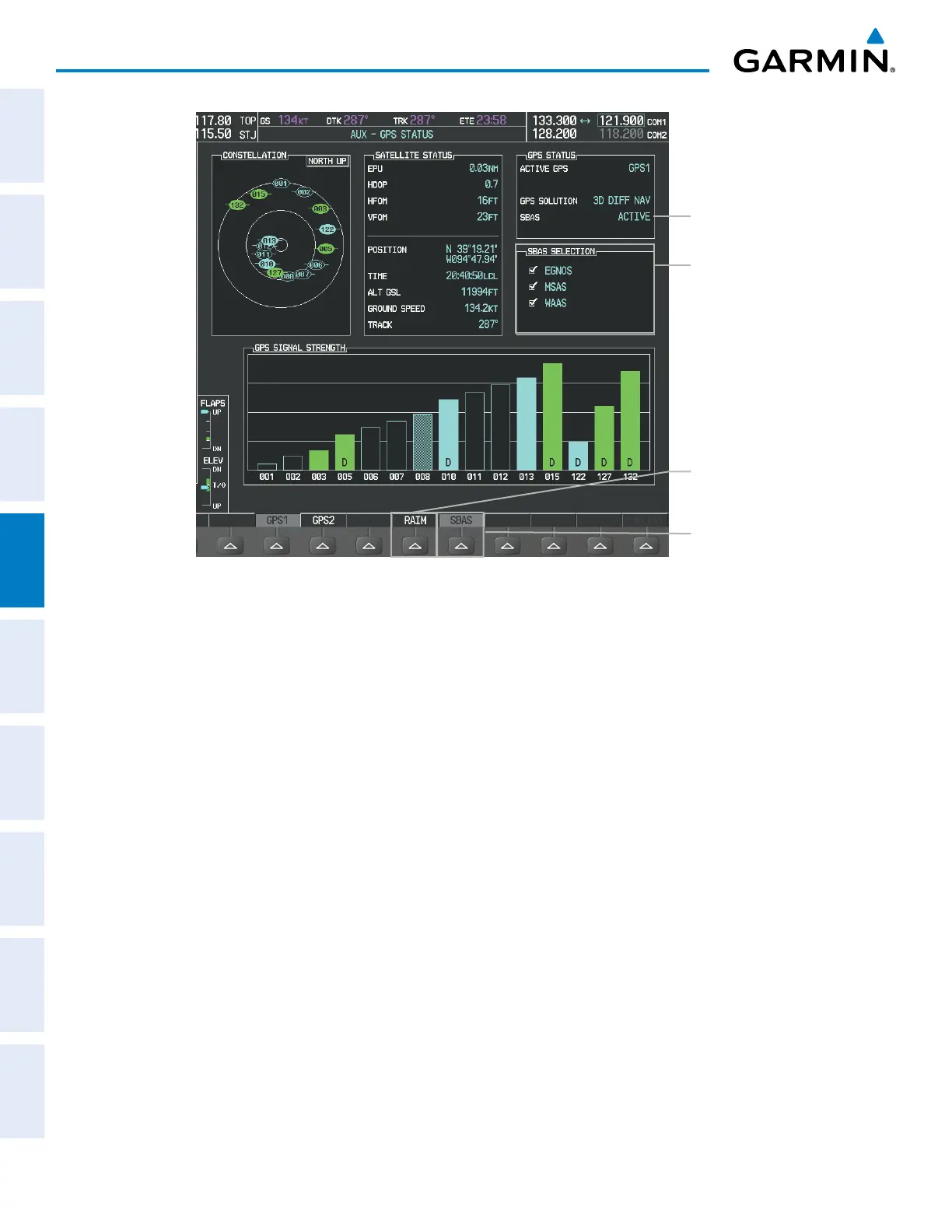
Figure 5-110 SBAS Display - Active
SBAS Softkey
(displays SBAS Selection)
SBAS SELECTION Box
-
EGNOS Enable/Disable
-
MSAS Enable/Disable
-
WAAS Enable/Disable
RAIM Softkey
(displays RAIM
PREDICTION)
SBAS Status
Enabling/Disabling SBAS:
1) Select the AUX-GPS Status Page.
2) Press the SBAS Softkey.
3) Press the
FMS
Knob
, and turn the large FMS Knob to highlight ‘EGNOS’, ‘MSAS’ or ‘WAAS’.
4) Press the ENT Key to disable SBAS. Press the ENT Key again to enable SBAS.



 To Next Page