190-00870-02 Rev. A
Garmin G950 Pilot’s Guide for the Pilatus PC-6
331
HAZARD AVOIDANCE
SYSTEM
OVERVIEW
FLIGHT
INSTRUMENTS
EIS
AUDIO PANEL
& CNS
FLIGHT
MANAGEMENT
HAZARD
AVOIDANCE
AFCS
ADDITIONAL
FEATURES
APPENDICES INDEX
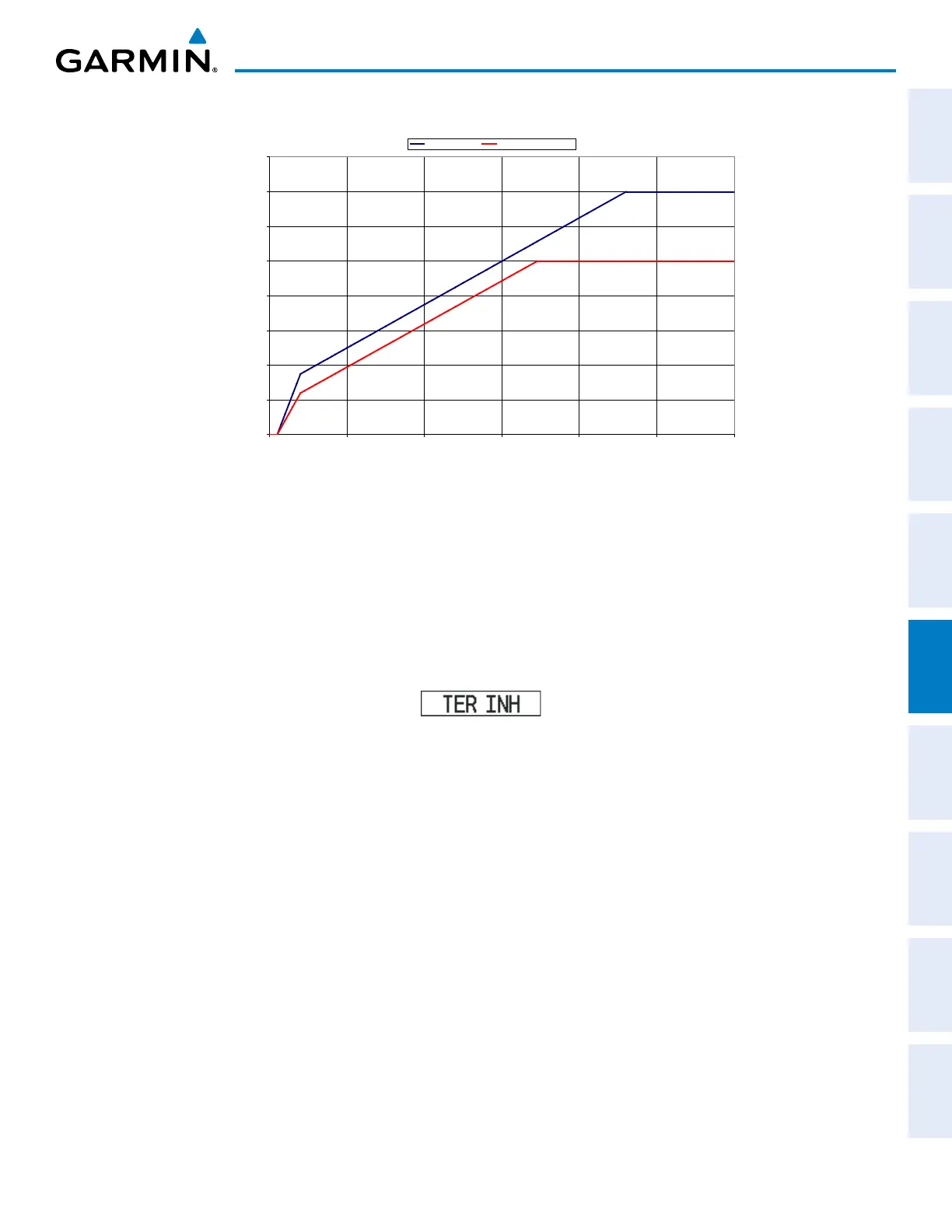
Required Terrain Clearance
0
100
200
300
400
500
600
700
800
0 5 10 15 20 25 30
Distance From Runway (NM)
Required Terrain Clearance (FT)
RTC Level (FT) RTC Descending (FT)
Figure 6-46 FLTA Alert Minimum Terrain and Obstacle Clearance Values
Distance From Runway (NM)
Required Terrain Clearance (FT)
FLTA alerts are automatically inhibited when the aircraft is less than 200 feet above the destination runway
elevation while within 0.5 nm of the approach runway or the aircraft is between runway ends. When Terrain-
SVS alerts are inhibited, the annunciation ‘TER INH’ is shown on the PFD and in the MFD terrain annunciation
window.
FLTA alerts may also be manually inhibited. Use discretion when inhibiting FLTA alerts, as they should be
enabled where appropriate.
Figure 6-47 Terrain-SVS Alerting Disabled
(Terrain-SVS Inhibited) Annunciation
Inhibiting/enabling Terrain-SVS alerting:
1) Select the Terrain-SVS Page.
2) Press the INHIBIT Softkey to inhibit or enable Terrain-SVS (choice dependent on current state).
Or:
1) Select the Terrain-SVS Page.
2) Press the MENU Key.
3) Select ‘Inhibit Terrain-SVS’ or ‘Enable Terrain-SVS’ (choice dependent on current state) and press the ENT Key.
If Terrain-SVS alerts are inhibited when the Final Approach Fix is the active waypoint in a GPS SBAS
approach, a ‘LOW ALT’ annunciation may appear on the PFD next to the Altimeter if the current aircraft
altitude is at least 164 feet below the prescribed altitude at the Final Approach Fix. See the Flight Instruments
Section for details.



 To Next Page