190-00870-02 Rev A
Garmin G950 Pilot’s Guide for the Pilatus PC-6
381
ADDITIONAL FEATURES
SYSTEM
OVERVIEW
FLIGHT
INSTRUMENTS
EIS
AUDIO PANEL
& CNS
FLIGHT
MANAGEMENT
HAZARD
AVOIDANCE
AFCS
ADDITIONAL
FEATURES
APPENDICES INDEX
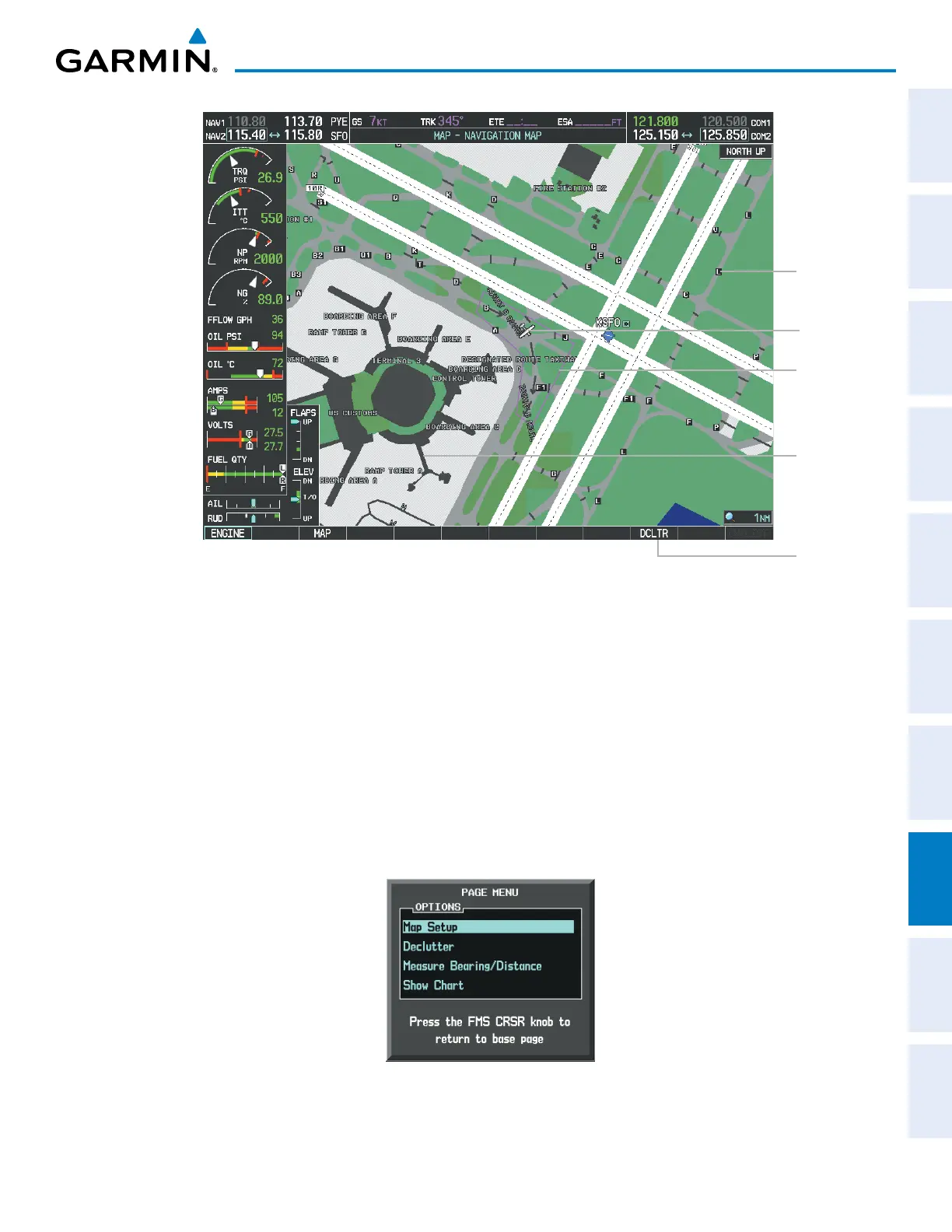
DCLTR
Softkey
Removes
Taxiway
Markings
Airport
Features
Taxiway
Identification
Airport Hot
Spot Outline
Figure 8-14 SafeTaxi Depiction on the Navigation Map Page
Aircraft
Position
The DCLTR Softkey (declutter) label advances to DCLTR-1, DCLTR -2, and DCLTR-3 each time the softkey is
pressed for easy recognition of decluttering level. Pressing the DCLTR Softkey removes the taxiway markings and
airport feature labels. Pressing the DCLTR-1 Softkey removes VOR station ID, the VOR symbol, and intersection
names if within the airport plan view. Pressing the DCLTR-2 Softkey removes the airport runway layout, unless
the airport in view is part of an active route structure. Pressing the DCLTR-3 Softkey cycles back to the original
map detail. Refer to Map Declutter Levels in the Flight Management Section.
Configuring SafeTaxi range:
1) While viewing the Navigation Map Page, press the MENU Key to display the PAGE MENU.
2) Turn the large
FMS
Knob to highlight the Map Setup Menu Option and press the
ENT
Key.
Figure 8-15 Navigation Map PAGE MENU, Map Setup Option



 To Next Page