190-00870-02 Rev. A
Garmin G950 Pilot’s Guide for the Pilatus PC-6
53
FLIGHT INSTRUMENTS
SYSTEM
OVERVIEW
FLIGHT
INSTRUMENTS
EIS
AUDIO PANEL
& CNS
FLIGHT
MANAGEMENT
HAZARD
AVOIDANCE
AFCS
ADDITIONAL
FEATURES
APPENDICES INDEX
Vspeeds (Glide, V
X
, and V
Y
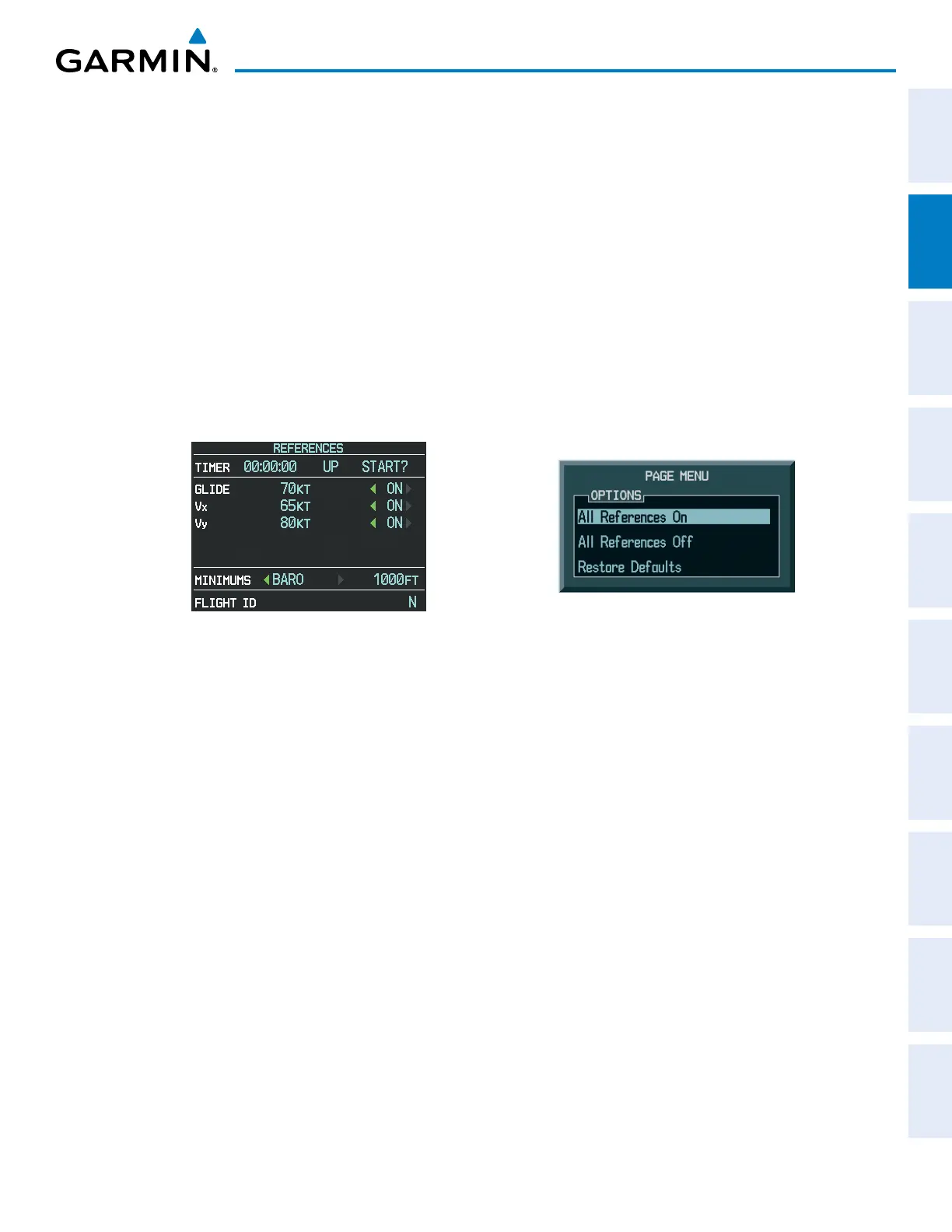
,) can be changed and their bugs enabled/disabled from the References Window
(Figure 2-5). When enabled (on), the Vspeed bugs appear at their respective locations to the right of the
airspeed scale.
Changing Vspeed values and enabling/disabling Vspeed bugs:
1) Select the
TMR/REF
Softkey.
2) Turn the
large FMS
Knob to highlight the desired Vspeed.
3) Use the small FMS Knob to change the Vspeed in 1-kt increments (when a speed has been changed from a
default value, an asterisk appears next to the speed).
4) Press the
ENT
Key or turn the large FMS Knob to highlight the ON/OFF field
5) Turn the
small FMS
Knob clockwise to ON or counterclockwise to OFF.
6) To remove the window, press the
CLR
Key or select the
TMR/REF
Softkey.
Figure 2-5 References Window
Figure 2-6 Timer/References Menu
Enabling/disabling all Vspeed bugs together:
1) Select the
TMR/REF
Softkey.
2) Press the
MENU
Key.
3) To view all Vspeed bugs, highlight ‘All References On’ and press the
ENT
Key (Figure 2-6).
4) To remove all Vspeed bugs, turn the FMS Knob to highlight ‘All References Off’ and press the
ENT
Key.
Restoring all Vspeed defaults:
1) Select the
TMR/REF
Softkey.
2) Press the
MENU
Key.
3) Turn the
FMS
Knob to highlight ‘Restore Defaults’ and press the
ENT
Key.



 To Next Page