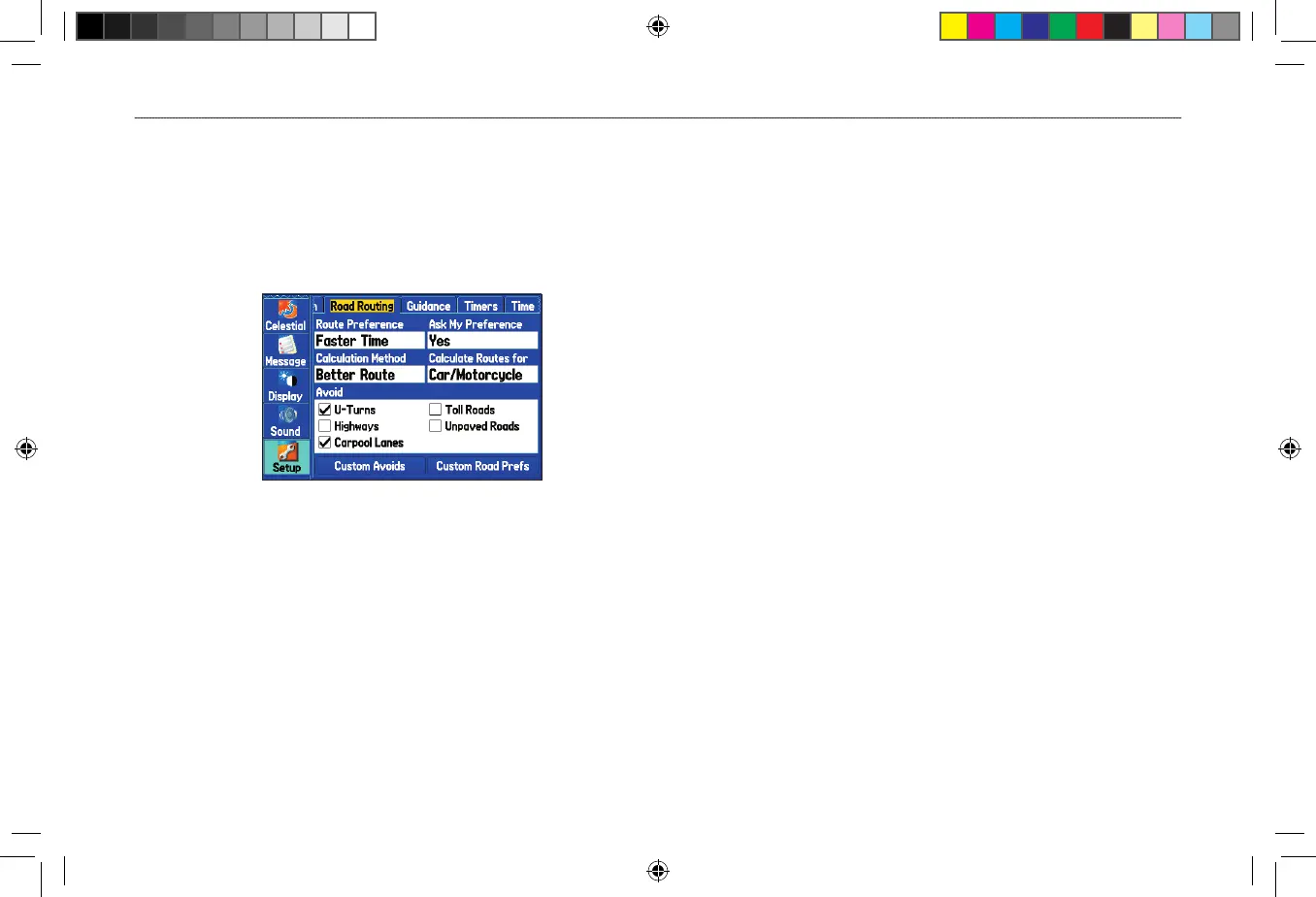
Road Routing Sub Tab
Use the Road Routing sub tab to select road routing settings.
To access the Road Routing sub tab
1. Highlight the Setup tab from the Main Menu.
2. Select the Road Routing sub tab.
Road Routing Sub Tab
Route Preference—allows the unit to calculate routes based on:
• Faster Time—routes calculated are faster to drive but might
be longer in distance.
• Shorter Distance—routes calculated are shorter in distance
but might take more time to drive.
• Off Road—creates a direct line from your current location to
your destination. This is useful when traveling outside of the
detailed map coverage area or where no roads exist.
Ask My Preference—determines whether you are asked to select a
Route Preference before route calculations.
Calculation Method—sets how the unit searches for the route.
• Quickest Calculation—calculates the route the quickest, but
it might not produce the best route.
• Quick Calculation—takes a bit more time to calculate but
generates a better quality route.
• Better Route—generates an even better quality route but uses
a longer calculation time.
• Best Route—generates the most optimal route but takes the
longest time to calculate.
Calculate Routes for—sets route calculation for the particular
vehicle you are operating to optimize the route for your vehicle type.
Avoid
—allows you to avoid certain road types and maneuvers on
your route. The unit uses these road types only if alternative routes
take you too far out of your way or if no other road is available.
Custom Avoids—allows you to enter specific areas and roads that
you would like to avoid in your navigation.
Custom Road Prefs
—allows you to avoid or use Major, Medium,
and Minor roads using a slider scale. This is useful if you want to
avoid major highways, for example. Select Auto Set to use preset
values.












 To Next Page