GPSMAP
®
4000/5000 Series Owner’s Manual 89
Sonar
Split-frequency Sonar View
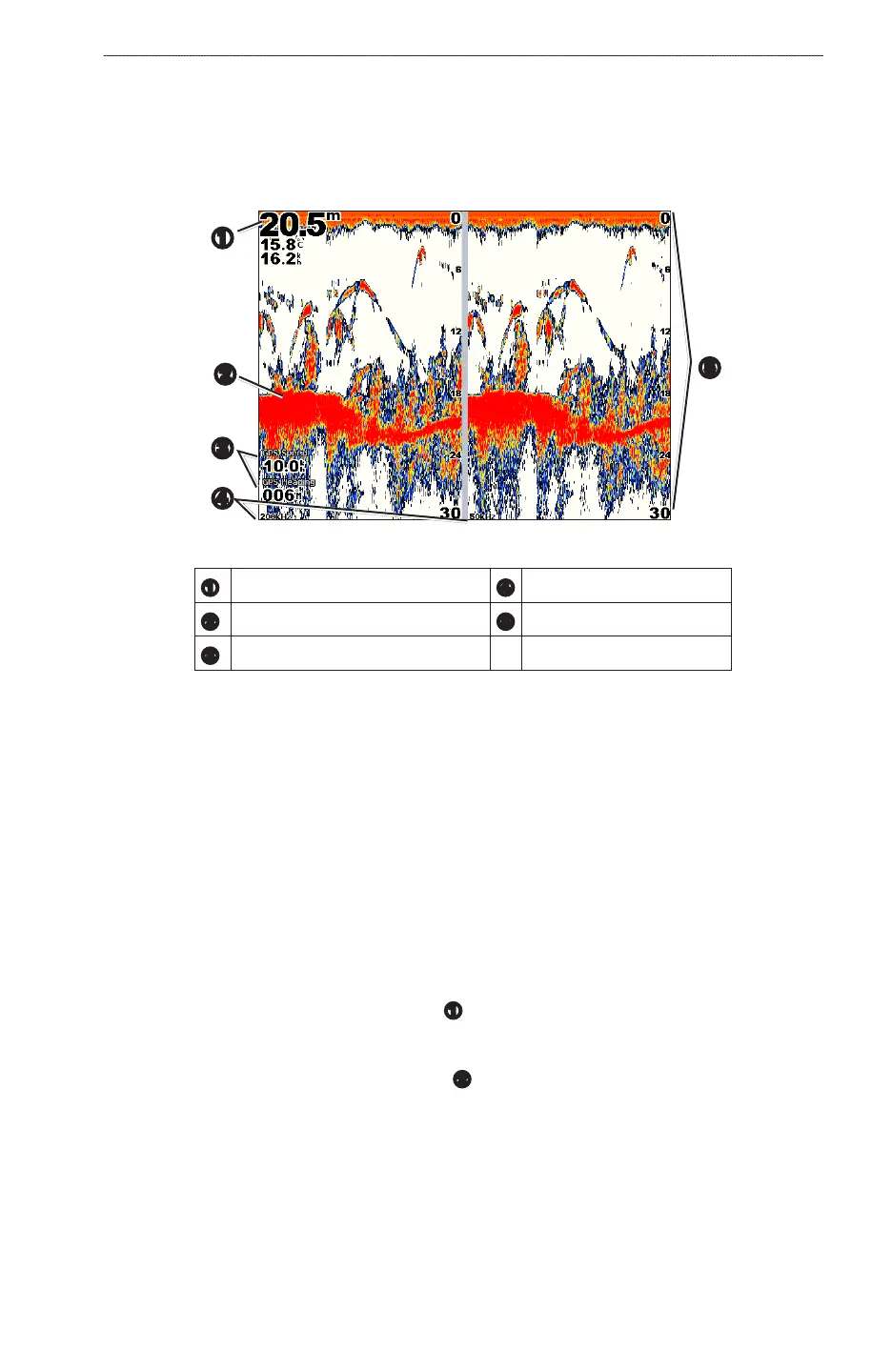
In the split-frequency sonar view, the left side of the screen shows a full-view graph of 200 kHz frequency
sonar data, and the right side of the screen shows a full-view graph of 50 kHz frequency sonar data.
: The split-frequency sonar view requires the use of a dual-frequency transducer.
From the Home screen, select > .
Split-frequency Sonar View
➋
➊
➌
➍
➎
➊
Depth, temperature, and water speed
➍
Transducer frequencies
➋
Bottom
➎
Range
➌
GPS speed and GPS heading
Transducer Temperature Log
If you are using a temperature-capable transducer, the Temperature Log screen keeps a graphic log of
temperature readings over time. The current temperature and depth appear in the upper-left corner of the
screen. The temperature appears along the right side and the time elapsed appears along the bottom. The graph
scrolls to the left as information is received.
From the Home screen, select > .
Setting the Temperature Log Range and Time Scales
You can indicate the amount of time and the range of temperatures that appear in the transducer temperature
log.
1. From the Home screen, select > .
2. Select .
3. Complete an action:
• Selectto set the time-elapsed scale
➊
. The default setting is 10 minutes. Increasing the time-
elapsed scale allows you to view temperature variations over a longer period of time. Decreasing the
time-elapsed scale allows you to view more detail over a shorter period of time.
• Select to set the temperature-range scale
➋
. The default setting is 4 degrees. Increasing the
temperature-range scale allows you to view more variation in temperature. Decreasing the temperature-
range scale allows you to view more detail in the variation.
• Select to recalculate the automatic depth scale range. Reset appears only when the scale
setting is set to .













 To Next Page