Using Sonar
54 GPSMAP 400/500 Series Owner’s Manual
When connected to a transducer, the following chartplotters can be used as
shnders:
GPSMAP 431s GPSMAP 441s
GPSMAP 531s GPSMAP 536s
GPSMAP 541s GPSMAP 546s
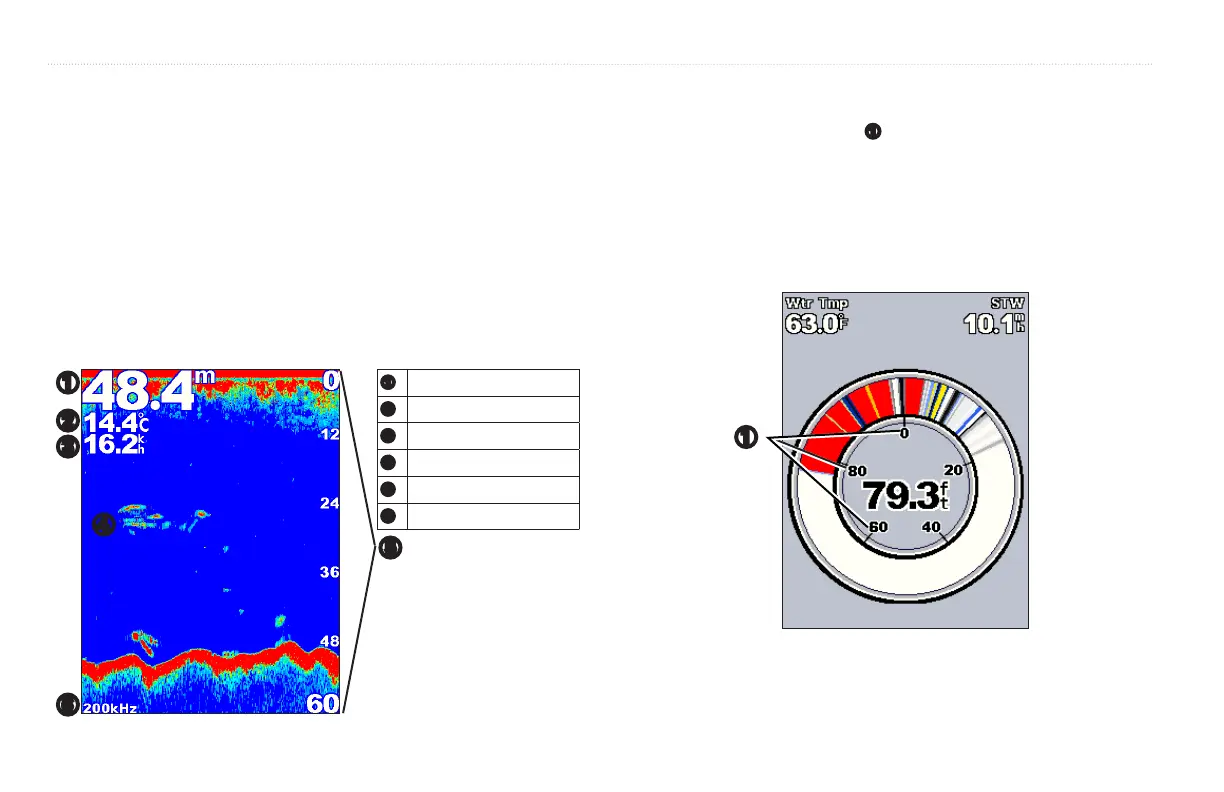
Select the Full Screen option to view a full-screen graph of the transducer’s
sonar readings.
From the Home screen, select > .
➊
Depth
➋
Temperature
➌
Speed
➍
Suspended targets
➎
Range
➏
Transducer frequency
➊
➏
➎
➍
➌
➋
(GPSMAP 431s/531s/536s only) Use the Flasher screen to display sonar
information on a circular depth scale
➊
. The scale indicates what is beneath
your boat. It is organized as a ring that starts at the top and progresses
clockwise. Sonar information ashes on the ring when it is received at the
depth indicated. The colors indicate different strengths of the sonar return.
(When using the white default color scheme, red indicates the strongest return,
blue indicates the weakest return, and white indicates no return.)
From the Home screen, select > .
➊













 To Next Page