Using Charts
18 GPSMAP 400/500 Series Owner’s Manual
For settings and options related to Full Screen Map, Waypoints & Tracks,
Other Vessels, and Data Bars, see “Navigation Chart Menu” on page 9.
To customize the appearance of the Fishing Chart screen, select >
(page 11).
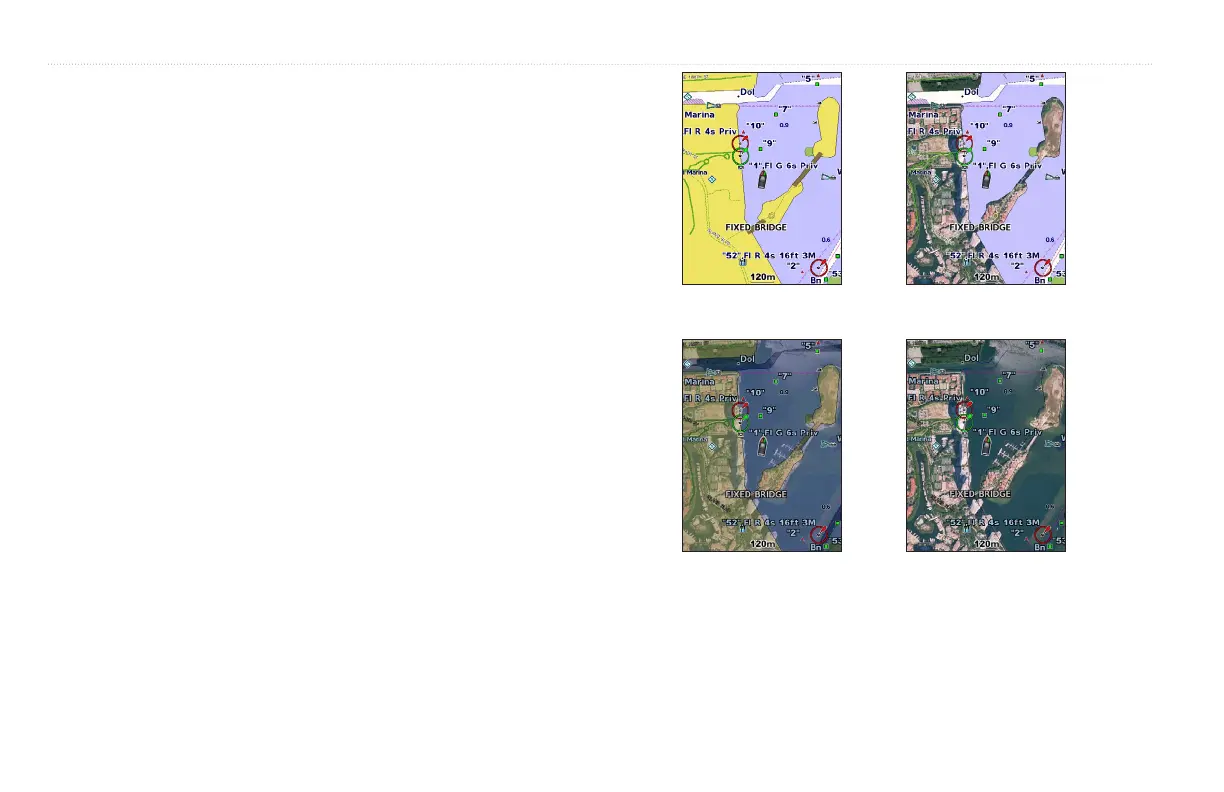
You can overlay high-resolution satellite images on the land, sea, or both
portions of the Navigation chart when using a preprogrammed BlueChart g2
Vision SD card.
1. While viewing the Navigation chart, press .
2. Select > .
3. Select one of the following:
• —standard chart information is shown on the map.
• —standard chart information is shown on water with photos
overlaying the land.
• —photos overlay both the water and the land at a specied opacity.
The higher you set the percentage, the more the satellite photos will
cover both land and water.
: When enabled, the high-resolution satellite images are only present
at lower zoom levels. If you cannot see the high-resolution images in your
BlueChart g2 Vision region, either zoom in further using the key, or
set the detail level higher (page 12).













 To Next Page