4 nüvi 700 Series Owner’s Manual
GettinG Started
Step 4: Congure the
nüvi
To turn on your nüvi, slide the Power
key to the left. Follow the on-screen
instructions.
Step 5: Acquire Satellites
Go outdoors to an open area, out of
garages, and away from tall buildings.
Stop your vehicle, and turn on the nüvi.
Acquiring satellite signals may take a
few minutes.
The bars indicate GPS satellite
strength. When at least one of the bars
are green, the nüvi has acquired satellite
signals. Now you can select a destination
and navigate to it. For more information
about GPS, see page 47 and visit
www.garmin.com/aboutGPS.
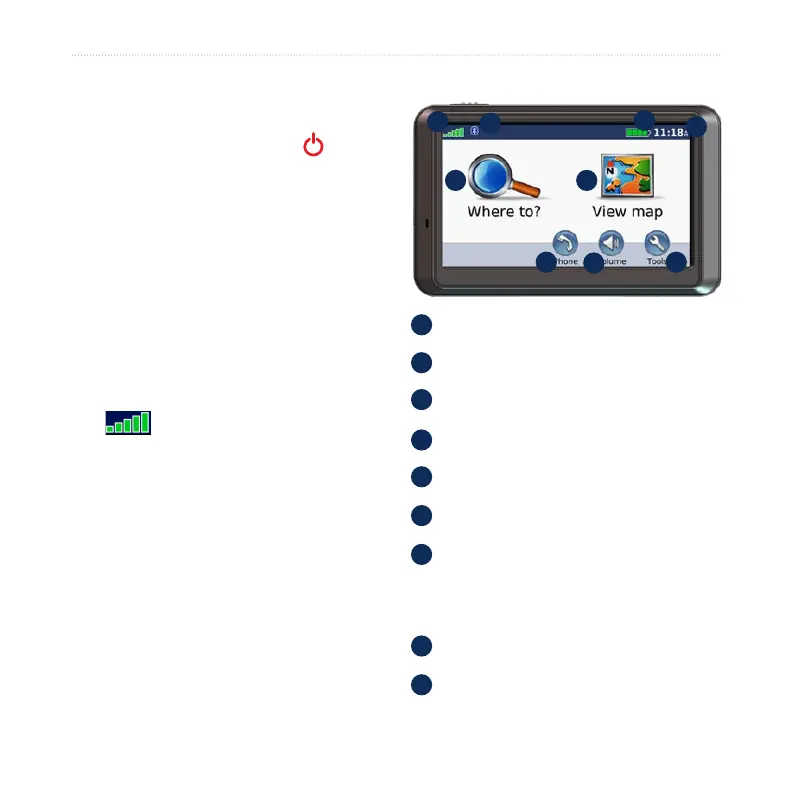
Step 6: Use the nüvi
B
A
C
D
E F
G
H
I
A
GPS satellite strength.
B
Bluetooth
®
technology status.
C
Battery status.
D
Current time; touch to change time.
E
Touch to nd a destination.
F
Touch to view the map.
G
Touch to make a call when connected
to a compatible mobile phone (nüvi
710, 760, 770 only).
H
Touch to adjust the volume.
I
Touch to use the tools such as media
players, settings, and help.



 To Next Page