nüvi 700 Series Owner’s Manual 3
GettinG Started
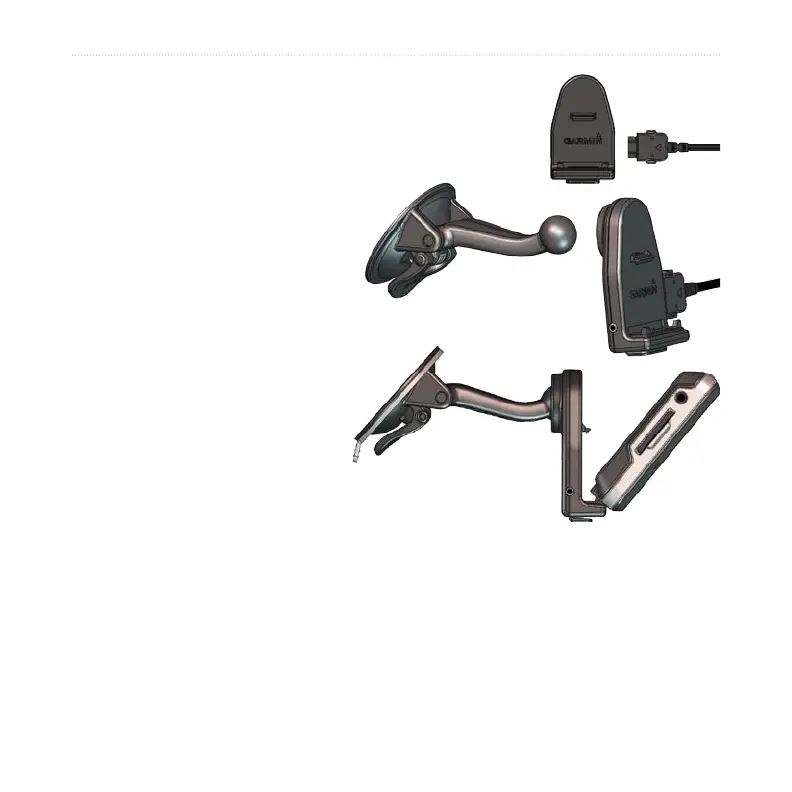
Step 1: Mount the nüvi
1. Plug the vehicle power cable into the power connector
on the right side of the cradle.
2. Snap the cradle onto the
suction cup arm.
3. Clean and dry your
windshield and the suction
cup with a lint-free cloth.
Remove the clear plastic
from the suction cup. Place
the suction cup on the
windshield.
4. Flip the lever back, toward
the windshield.
5. Fit the bottom of your nüvi
into the cradle.
6. Tilt the nüvi back until it
snaps into place.
7. Plug the other end of the vehicle power cable into a power outlet in your
vehicle. Your unit should turn on automatically if it is plugged in and your vehicle
is running.
8. If you are using a trafc receiver in Europe, secure the trafc receiver’s antenna
to the windshield using the suction cups. (Trafc receiver included in some nüvi
710, 750T, 760, 770 packages.)



 To Next Page