nüvi 700 Series Owner’s Manual 9
Where to
Finding a Place by
Spelling the Name
If you know the name of the location you
are looking for, you can spell it using the
on-screen keyboard. You can also enter
letters contained in the name to narrow
the search.
1. Touch Where to > Points of
Interest > Spell Name.
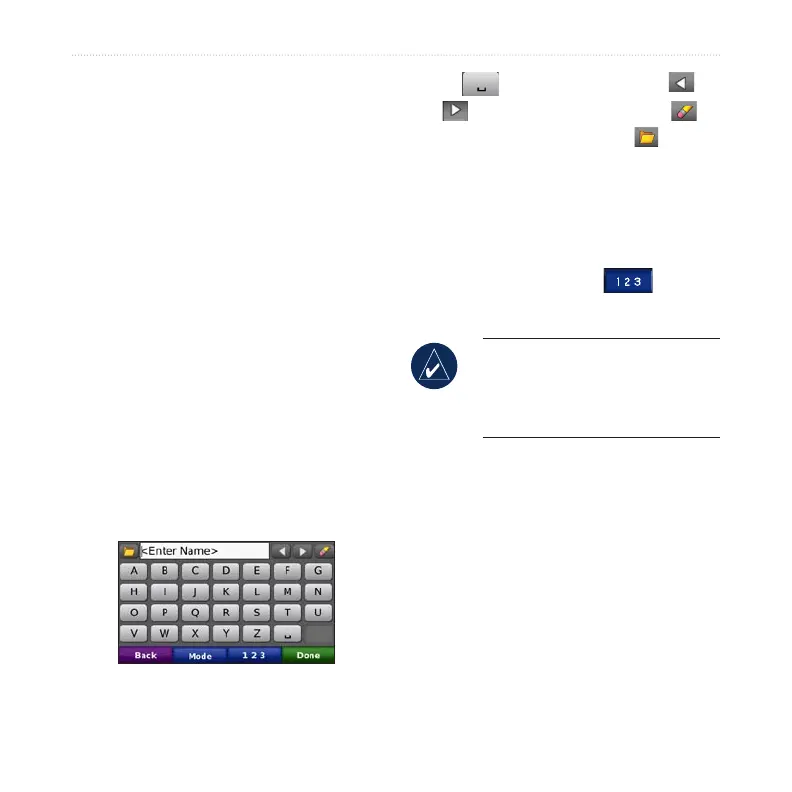
2. Using the on-screen keyboard,
enter letters in the name. Touch
Done.
Using the On-Screen
Keyboard
When an on-screen keyboard appears,
touch a letter or number to enter it.
Touch to add a space. Touch
and to move the cursor. Touch
to delete the character. Touch to
enter words you have recently typed and
selected.
Touch Mode to change the keyboard
mode to use diacritical characters or
special characters. Touch to enter
numbers.
TIP: You can change the
keyboard layout to QWERTY,
which is like a standard computer
keyboard layout. See page 35.
Finding Recently Found
Places
Your nüvi stores the last 50 of your
recent nds in the Recently Found list.
The most recently viewed places appear
at the top of the list. Touch Where to >
Recently Found to view your recently
found items.



 To Next Page