32 nüvi 700 Series Owner’s Manual
USinG fM traffic
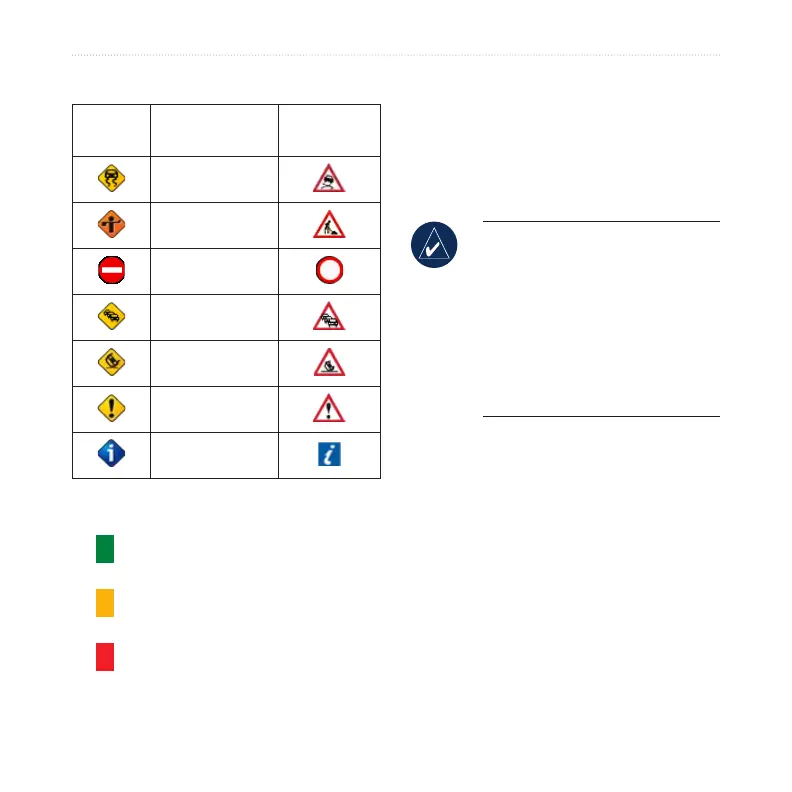
Trafc Icons
North
American
Meaning International
Road Condition
Road
Construction
Road Closed
Slow Trafc
Accident
Incident
Travel
Information
Severity Color Code
Green = Low severity; trafc is
owing normally.
Yellow = Medium severity; trafc is
a bit congested.
Red = High severity; trafc is
heavily congested or
stopped.
Trafc Subscriptions
See pages 39–40 for information about
adding a trafc subscription. For more
information about trafc subscriptions,
go to www.garmin.com/fmtrafc.
NOTE: You do not need to
activate the subscription included
with your FM trafc receiver (if it
came with one). The subscription
activates automatically after your
nüvi acquires satellite signals
while receiving trafc signals
from the pay service provider.



 To Next Page