CS 5000
User Manual
©2009 GARRETT METAL DETECTORS 31 PN 1530100 REV H
10.8.3 COUNTER
Since the current traffic count of the CS 5000 is usually displayed, this touchpad will be needed only for
resetting the counter. Pressing and holding this touchpad for ten (10) seconds causes the counter to
return to zero (0). Whenever the LCD displays information other than the current traffic count, pressing
this touchpad will cause the count to appear.
10.8.4 VOLUME
When this touchpad is pressed, the volume level of the unit’s audible alarm will be
displayed on the LCD display. By using the + and - touchpads, operators can raise or lower the vol-
ume.
10.8.5 + AND -
These touchpads will be used to increase or decrease various numerical settings and for certain On/
Off functions.
10.8.6 PROGRAM
When this touchpad is pressed, the settings for Program and Sensitivity will appear on the LCD
display.
All of the preceding touchpad functions will be available to operators of the detector at all times. The
ACCESS touchpad will be used only by supervisors.
10.9 ACCESS TOUCHPAD
This touchpad will be used only by supervisory management personnel. It permits changing the
Program and Sensitivity codes and also is used to control such functions as synchronization of multi-
ple units, pulse frequency and tone. The unit further protects security of control settings by maintaining
a non-resettable sequence code that indicates any attempt at seeking access to the settings. A Tamper
Alarm sounds within 10 seconds after the ACCESS touchpad is pressed unless a proper access code
is entered. Follow supervisors’ instructions concerning response to this Tamper Alarm.
10.10 OPERATORS’ RESPONSIBILITIES
•Theprimaryresponsibilityofanyoperatoristofollowallinstructionsofsupervisors.
•These directives will govern the response of operatorstoalarmsandother situations that will be
encountered. The basic continuing responsibility of the operator will be to ensure that the CS 5000
operates properly at all times as indicated by its LCD panel and that ALL alarms are investigated.
•RememberthatthecauseofeveryalarmMUST be determined.
10.11 OPERATORS’ INSTRUCTIONS
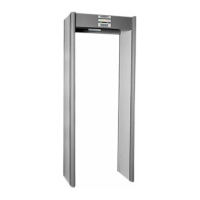
All personnel who are associated with the detector should watch a video presentation on the
Magnascanner CS 5000 in addition to studying this User Manual. Carefully following the instructions
in the Manual will help ensure the security of any facility this walk-through detector is expected to
protect.
As described in the CONTROLS section of this manual, CS 5000 controls are located in the top sec-
tion of the archway. If the green READY light is not visible on the control panel, press the OPERATE
touchpad. Operators can also adjust volume of the alarm and can reset the traffic counter.










 To Next Page