D20/D200
Installation and Operations Guide
GE Energy
994-0078-2.00-7 General
98
Full
Power-up and Test, continued
Procedure
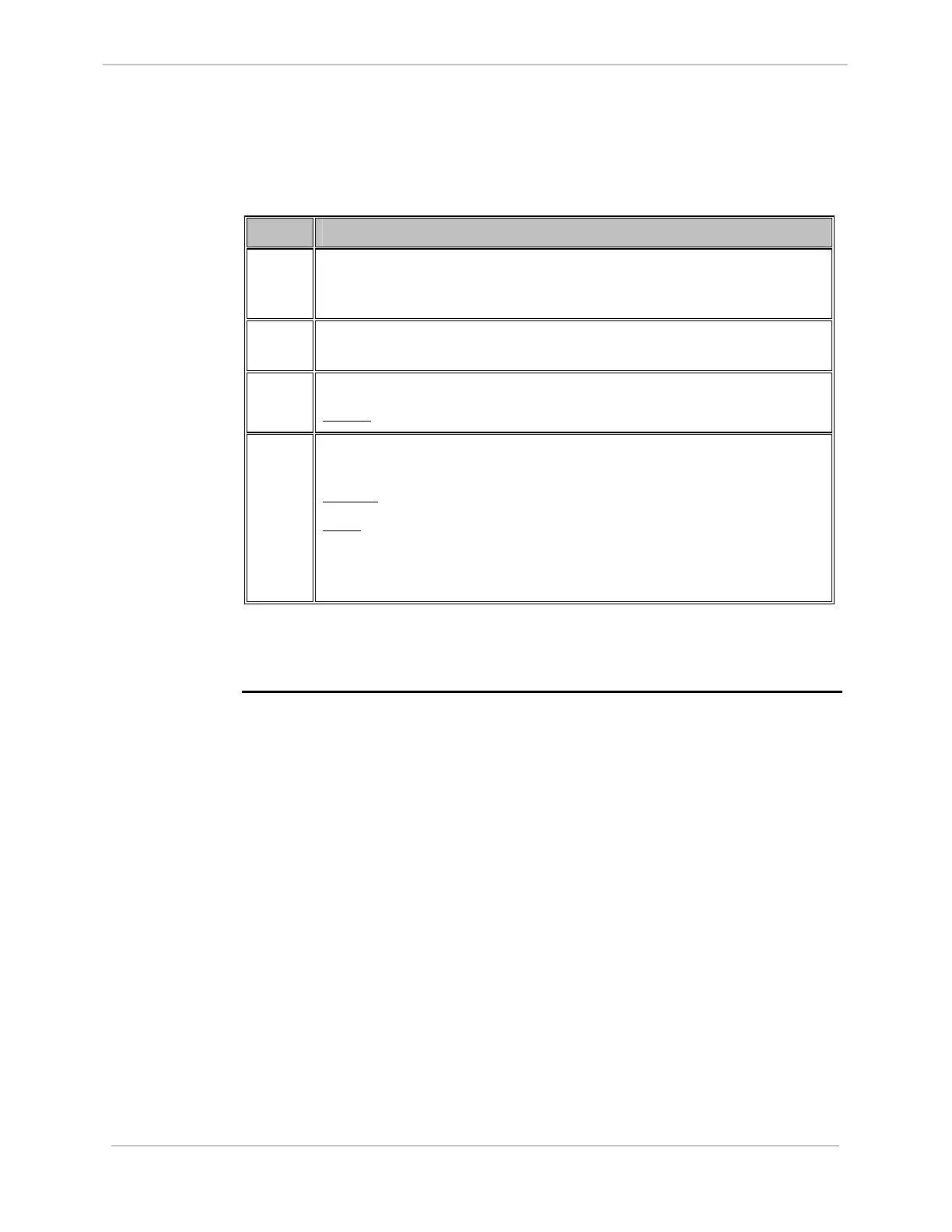
Follow these steps to verify either hardware or software switch-over.
Step Action
1
Connect a WESMAINT cable to the female DB-9 WESMAINT II+ port
on the front panel of the CCU B D20ME/ME II board, which was
originally the Standby unit.
2
Attach the other end of the WESMAINT II+ cable to the serial
communications port of the PC or terminal.
3
Login to WESMAINT through the emulator you are using.
Result:
The WESMAINT Main Menu is displayed.
4
If you can login to WESMAINT, this indicates that CCU B is the Active
CCU.
Results:
Fail over has occurred.
Note:
If the previously Active A CCU powers-up after a fail over
from CCU A to CCU B, then you will see STNBY at top left
when you login to WESMAINT on CCU B. This can take up
to a minute to occur.
Note:
If you cannot login to WESMAINT on a CCU, then the unit is powered down. A
D20MEA> or D20MEB> prompt is seen on your emulator screen.



 To Next Page