20
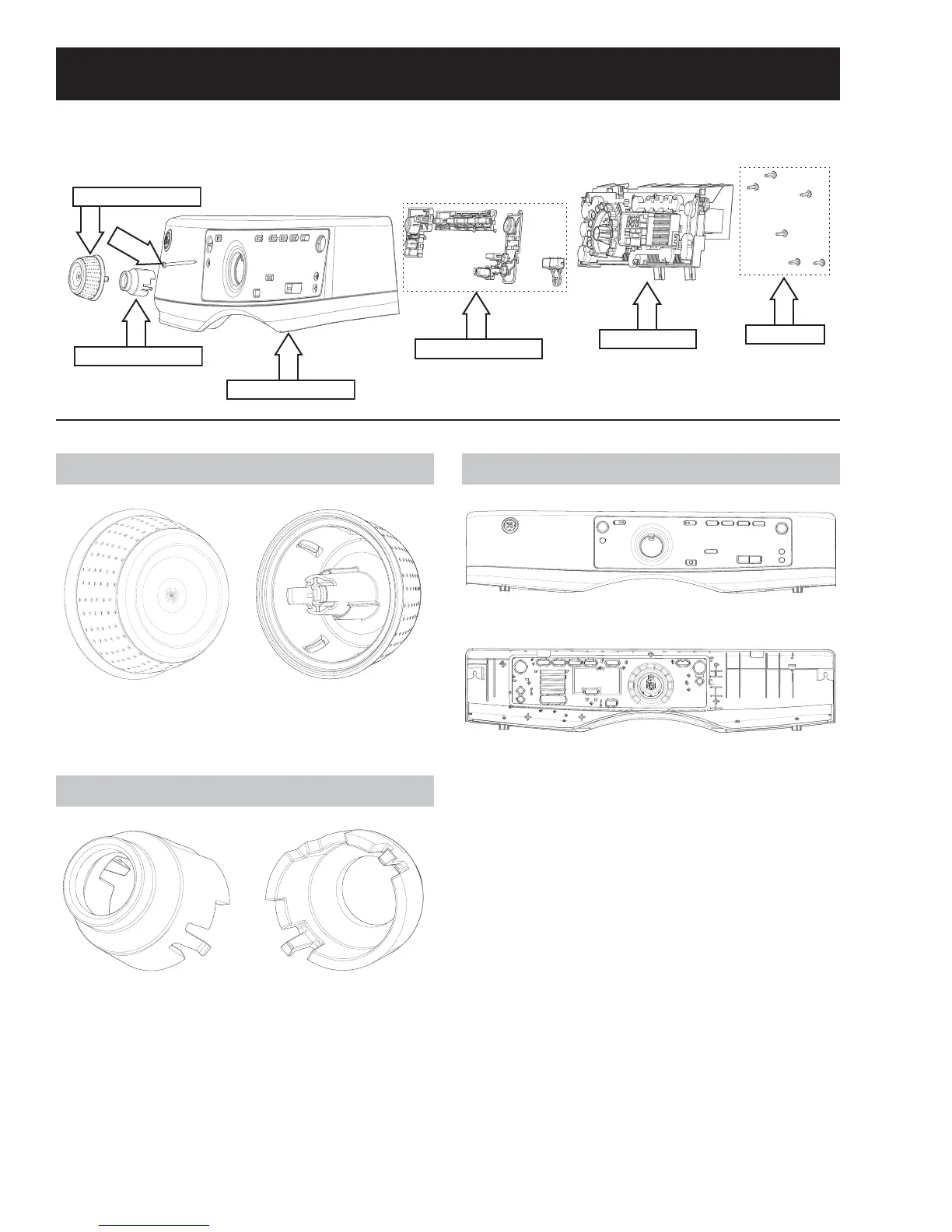
Cycle Select Knob
Front View Rear View
*UDVSWKHNQRE¿UPO\DQGSXOOIRUZDUGWRUHPRYH
Knob Retainer
Front View Rear View
Knob Retainer Removal
*UDVSWKHNQREUHWDLQHU¿UPO\DQGSXOOIRUZDUGWR
remove.
Control Panel
Front View
Rear View
The control panel is a plastic housing with graphics.
The button trees, knob, knob retainer and UI board
must be obtained separately.
Control Panel Removal
1. Remove the cycle select knob by pulling it for-
ward.
2. Remove the knob retainer by pulling it forward.
3. Remove the T-20 control panel screw located
behind the knob retainer.
4. Lift the control panel straight up and tilt it for-
ward.
5. Remove all main board wire harness connec-
tions and remove the control panel.
Control Panel Components
Control Panel Exploded View
Cycle Select Knob
Knob Retainer
Button Trees
Control Board
5/16" hex
Control Panel
T-20



 To Next Page