– 61 –
Service Mode Test Sequence
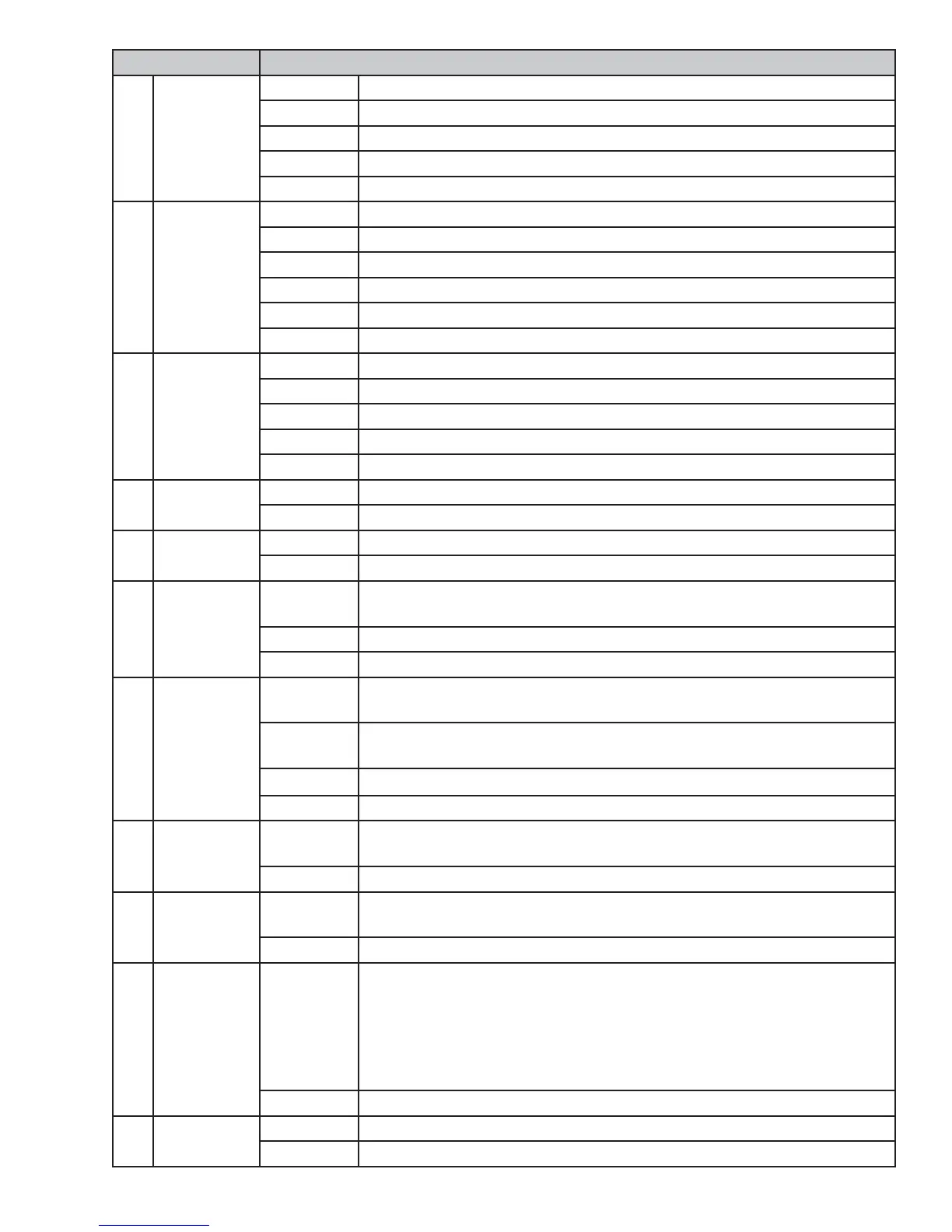
t14 Spin Test Enter Displays “estimated” and “current” rpm. Unit begins spinning at 410 rpm.
Start Ramps up to 1050 rpm.
Start Ramps up to 1150 rpm.
Start Ramps up to 1300 rpm.
Power Ramps down and returns to service mode screen.
t15 Dispenser
Test
Enter Displays “pre-wash” and dispenser moves to position 1.
Start Displays “main detergent” and dispenser moves to position 2.
Start Displays “fabric softener” and dispenser moves to position 4.
Start Displays “bleach” and dispenser moves to position 3.
Start Repeats above sequence, starting with “main detergent.”
Power Drains and returns to service mode screen.
t16 Bulk Pumps
Test
Enter Displays “left detergent pump;" water fi lls and primes left detergent.
Start Displays “softener pump” and begins priming.
Start Displays “right det pump” and begins priming.
Start Continues cycling through the bulk pumps.
Power Drains and returns to service mode screen.
t17 Bulk Sensors
Test
Enter Displays the status of Left Detergent, Softener and Right Detergent.
Power Returns to service mode screen.
t18 Auto Spin
Profi le
Enter Slowly ramps up to 90, then 120, then 410.
Power Interrupts and returns to service mode screen.
t19 Bulk Manual
Priming
Enter Displays “prime left detergent,” “prime softener,” "prime right detergent”
with one highlighted.
Enter Begins priming selected, with water on to rinse it from dispenser drawer.
Power Drains; then returns to service mode screen.
t20 Bulk Primed
Status
Enter Displays “left detergent pump,” “softener pump,” "right detergent pump”
with one highlighted.
Enter Displays “left det primed status;" choose status “yes” (lines primed) or
“no” (lines not primed).
Enter Returns back to “Bulk Primed Status.”
Power Returns to service mode screen.
t21 Steam Enter Displays "Steam" tumbles at 43 rpm in 15/3/15 increments. Enables
steam generator throughout duration of test.
Power Steam Generator turns off, drum stops, returns to service mode screen.
t22 Overnight
Ready
Enter Unit begins a slow tumble clockwise then counterclockwise. Overnight
ready fan is energized.
Power Returns to service mode screen.
t23 OOB Test Enter The unit spins at a low RPM and displays the out of balance number
measured by the inverter. Check 255 means the inverter has not yet
checked the out of balance value. Once the 255 is updated, any number
below 15 is normal out of balance operation. Any number between 15
and 20 is marginally acceptable. Any number greater than 20 means an
abnormal out of balance is detected.
Power Returns to service mode screen.
t24 Slow Ramp
Test
Enter Slowly ramps to the maximum spin speed.
Power
Returns to service mode screen.


 To Next Page