– 34 –
Bulk Dispenser Switch
The bulk dispenser switch has 3 outlet hoses. When
these hoses are connected to the bulk dispenser
switch, a tab on the connector presses against the
switch, causing it to close. If the switch is closed,
the power board enables the Smart Dispense™
option and allows 12 VDC to be supplied to the 3
relay coils that supply power to the 3 pumps in the
Smart Dispense system. The power board supplies
DC ground to the other side of the relay coil for the
pump it wants to turn on.
For information pertaining to the Smart Dispense
pedestal, see publication # 31-9169.
To remove the bulk dispenser switch:
1. Remove the top panel. (See Top Panel.)
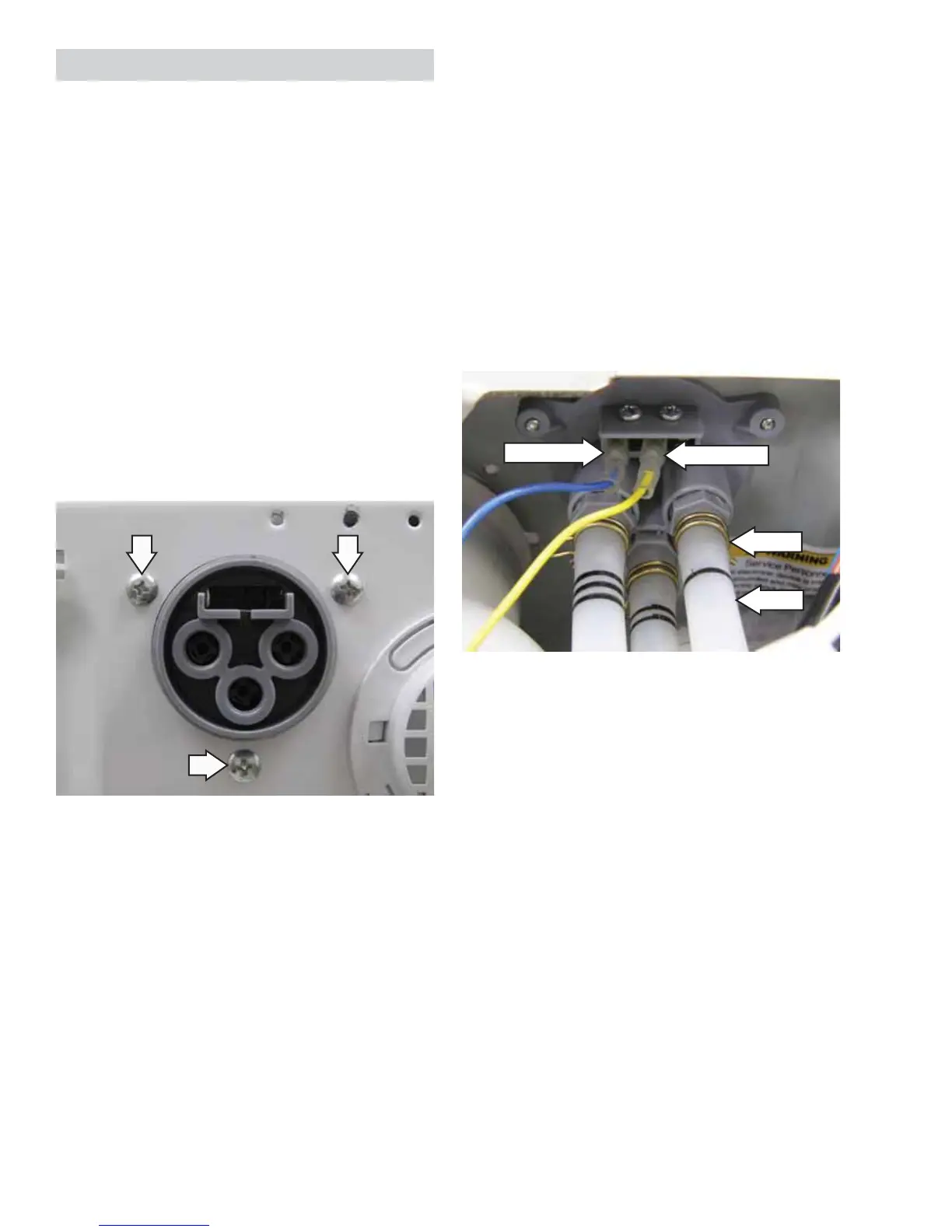
2. Remove the 3 Phillips-head screws from the bulk
dispenser switch.
3. Disconnect the 2 wires from the bulk dispenser
switch.
4. Remove the 3 bulk dispenser switch outlet hoses
from the bulk dispenser switch.
Note: The bulk dispenser switch outlet hoses are
diffi cult to remove.
a. Squeeze each clamp and slide it back.
b. Carefully break each outlet hose loose by
inserting a small, fl at blade screwdriver
under the hose to break the seal.
c. Remove the outlet hoses.
Disconnect
Disconnect
Clamp
Hose


 To Next Page