The GE TransPort PT900 is a portable ultrasonic flow meter designed for measuring liquid flow in various applications. This quick-start guide provides essential information for setting up, operating, and maintaining the device, ensuring accurate and reliable measurements.
Function Description
The TransPort PT900 operates on the principle of ultrasonic transit-time measurement, where transducers are clamped onto the exterior of a pipe to measure the flow rate of liquids without interrupting the process or requiring pipe modifications. This non-invasive method makes it ideal for temporary or spot measurements, troubleshooting, and applications where process downtime is critical. The system consists of a portable transmitter, a tablet for control and display, and clamp-on transducers. The transmitter processes the ultrasonic signals, and the tablet, running a dedicated application (APP), provides a user interface for configuration, data display, and logging. The device is designed for use with a wide range of pipe materials and liquid types, making it versatile for various industrial and commercial settings.
Usage Features
The TransPort PT900 offers a comprehensive set of features designed to facilitate ease of use and accurate measurements.
Initial Setup and Configuration
- Registration: Upon first use, users are prompted to register their PT900. Registration provides access to software and firmware upgrades, service bulletins, application information, and updated technical information, ensuring the device remains current and optimized. While optional, skipping registration will result in a reminder popup for the first five APP launches.
- APP Installation: The PT900 APP is installed on a dedicated Android tablet. The installation process involves opening the "My Files" folder on the tablet, selecting the APP from the SD folder, and enabling the "Unknown sources" security option in the tablet's settings to allow installation of software not from official app stores. This ensures secure and controlled software deployment.
- Language Selection: The APP allows users to select their preferred language (English, Chinese, German, Japanese, Italian, French, Dutch, or Korean) upon initial launch, enhancing user accessibility and convenience.
- License Agreement: Users must accept the PT900 License Agreement to proceed with the APP installation, outlining the terms and conditions of software usage.
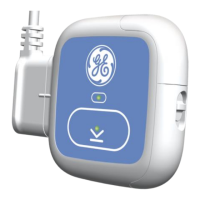
- Pairing the Tablet and Transmitter: The tablet and transmitter communicate wirelessly via Bluetooth. To establish a connection, the tablet and transmitter must be turned on and fully charged. The APP initiates a scan for available transmitters, which are identified by their serial numbers. A pairing request appears on the tablet, requiring user confirmation. The transmitter's blue LED flashes during the pairing process, and the pairing is only complete after confirmation on both devices. This secure pairing mechanism ensures that the tablet connects to the correct transmitter.
- Mounting the Transmitter: The PT900 transmitter is housed in a durable, rubberized enclosure suitable for indoor or outdoor use. It can be placed in an optional hard shell carrier case or mounted directly onto the pipe using a soft strap or a magnetic clamp. The mounting method depends on the application and environmental conditions. It is important to note that for safe use of the soft strap or magnetic clamp, the pipe temperature must be within -20°C and +40°C.
- Units of Measurement: Before taking measurements, users can select their preferred global measurement units (Metric or English) from the "Units of Measurement" menu. This selection automatically populates default units for all measurement parameters. Users can further customize units for specific parameters if multiple options are available, ensuring data is displayed in a familiar and relevant format.
- Channel Activation: The PT900 supports multiple measurement channels. Users can activate Channel 1 (and subsequent channels) from the "Setup Channel" menu by sliding a toggle switch from "Off" to "On," enabling the channel for configuration and measurement.
- Programming Pipe Parameters: The "PIPE" menu allows users to specify all relevant pipe parameters, including material (e.g., Steel, Carbon), standard (e.g., ANSI), nominal size, outer diameter, wall thickness, and lining details (if applicable). Accurate input of these parameters is crucial for the flow meter to calculate flow rates precisely.
- Programming Fluid Parameters: The "FLUID" menu requires users to input fluid-specific parameters such as minimum and maximum sound speed, fluid type (e.g., water, glycol), temperature, glycol in water percentage, kinematic viscosity, and average factor. These inputs enable the PT900 to accurately account for the fluid's properties during flow measurement.
- Programming Transducer Parameters: The "TRANSDUCERS" menu is used to specify transducer type (clamp-on or wetted), Reynolds correction factor, and meter factors. This configuration ensures the correct interpretation of ultrasonic signals based on the chosen transducers.
- Programming Transducer Placement: The "PLACEMENT" menu allows users to configure the mounting method of the transducers. For clamp-on transducers, one of six possible traverse configurations is displayed, based on the programmed transducer information. A two-traverse installation is typically used. The system calculates and displays the "Transducer Spacing" value, which is the correct distance between the upstream and downstream transducers, essential for accurate installation of the clamping fixture on the pipe.
Measurement and Display
- Setting Up Measurements for Display: The PT900 APP can display up to 10 different variables simultaneously. Users can customize their display screen by accessing the "SET UP MEASUREMENTS" menu. Here, they can select the channel (CH1, CH2, Average, or General) and the desired measurement variable (e.g., Volumetric flow, SNR Up, Sound Speed, Amp Disc Up, AI 1) from drop-down lists.
- Selecting the Measurement Screen: After configuring the desired measurements, users can choose from multiple display screen options: multiple numeric, single numeric, or graphical. This flexibility allows users to view data in a format that best suits their needs for real-time monitoring and analysis.
Maintenance Features
The TransPort PT900 is designed with features that aid in monitoring its operational status and ensuring continued performance.
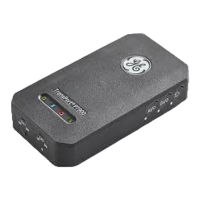
- LED Indicators: The transmitter is equipped with four colored LEDs (Power, Bluetooth, Status, and Battery) that provide real-time information on the meter's status.
- Power LED: A solid green light indicates the meter is powered on, no light means it's off, and a blinking green light signifies power save mode.
- Bluetooth LED: A solid blue light indicates a successful Bluetooth link to a transmitter. A blinking blue light means the device is in the click-button confirmation pairing process. A solid red light indicates the meter is on but Bluetooth is idle or not linked. No light means Bluetooth is in configuration mode.
- Status LED: A solid green light indicates the meter is in measure mode without errors. A red light signifies an error during measure mode. No light means the meter is in configure mode.
- Battery LED: A solid green light indicates a fully charged battery (>99%) with the AC adapter connected, or a high battery level (>20%) without the AC adapter. A blinking green light means the battery is charging. A red light indicates a low battery level (≤20%) requiring immediate charging. A blinking red light signifies a very low battery level (≤10%), indicating the meter will soon run out of power. If the light is off, the battery is completely discharged, and the AC adapter is connected. These indicators provide immediate visual feedback on the device's power and operational health, allowing users to take timely action for charging or troubleshooting.
These features collectively contribute to the TransPort PT900's functionality as a reliable, user-friendly, and versatile portable ultrasonic flow meter for liquids.

 Need help?
 General




 To Next Page