Operation
CG-1220 DTR
4-1
4.0 OPERATION
This section of the manual explains in detail how to operate the DTR. Table 4-1
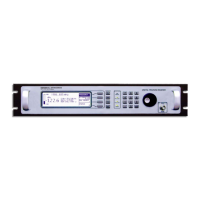
describes the function of each control and indicator shown in Figure 4-1.
1 32 4 5 6 7
Figure 4-1 DTR Controls and Indicators
TABLE 4-1 CONTROLS AND INDICATORS
CONTROL OR INDICATOR FUNCTION
1. Receiver Status
Display
The Receiver Status Display is a 240x64-pixel graphical display that indicates the
selected frequency, power level, operational mode, and other user-selectable
features such as the Spectral Display (detailed in Section 4.2.4).
2. Soft Keys The Soft-Key interface lends flexibility to the unit and allows the user to select and
navigate menus. The function of each key is defined by text displayed on the
screen immediately to the left of each key and will change with context.
The dedicated Navigation Keys allow the user to move quickly between menus.
HELP
The HELP key on the front panel is used to assist the user by describing the
highlighted menu item. When pressed, a help screen is displayed and assists the
user by describing or clarifying the highlighted item. If pressed when a menu item
is not highlighted, a summary of the help screen is displayed.
PREV
The PREV key is used to back out of menus. Pushing it after a menu item has been
selected cancels the input.
PAGE
An or , appearing at the bottom-right or top-right of the screen, indicates that
more menu choices are available. Use PAGE to show these additional choices.
SHIFT
3. Navigation
Keys
The SHIFT key is a “Dual Function” key. When used in conjunction with the other
navigational keys, it performs alternate functions. SHIFT+PAGE reverses the PAGE
function. SHIFT+HELP toggles LOCAL/REMOTE Mode.
4. Status Indicators The Status Indicators indicate 1) LOCAL/REMOTE mode; 2) Failure in critical
internal sub-systems (downconverter chain Phase-Locked Loops (PLLs) and loss of
phase lock in receiver); 3) Power.
5. Numerical Keypad A numeric keypad allows the user to enter numeric entries and control parameters.
6. Spin Knob The Spin Knob is used to provide real-time frequency tuning and to edit other
system parameters. It also allows the user to cycle through menus and choices.
7. IF Monitor The IF Monitor taps the frequency being input into the DSP board. The BNC
Connector on the front panel is a buffered 70 MHz Intermediate Frequency (IF)
monitor port. The IF monitor port has a 50-Ohm output impedance.


 To Next Page