31 WWW.GENESISRESCUE.COM
4.8 Operating SLi Equipment
To start the battery-operated tool, press the on/off switch. The workspace lighting LEDs
switch on and the four control LEDs on the control panel briey light up green; this is a
control function. The motor begins to idle. In this state, if the tool is not operated using the
rocker switch on the control handle, the drive switches off automatically after 30 seconds
and must then be restarted. However, the data connection remains active for a further 2
minutes and only switches off completely once this time has elapsed.
The pressure used on the rocker switch will determine the the movement speed of the tool.
The maximum cutting, expansion or pushing force is only obtained by fully depressing and
holding the rocker switch.
Closing the cutter / Opening the spreaders / Extending the rescue ram
The main direction of tool movement is triggered by pressing the rocker switch to the left
with your index nger (grooved/convex side of the rocker switch).
Opening the cutter / Closing the spreaders / Retracting the rescue ram
The opposite direction is triggered by pressing the control rocker to the right with your thumb
(curved/concave side of the rocker switch).
Dead man's circuit
When the rocker switch is released, it returns to the zero position automatically. This
always brings the tool to a stop in any situation, including under load. The motor switches
off automatically after 30 seconds.
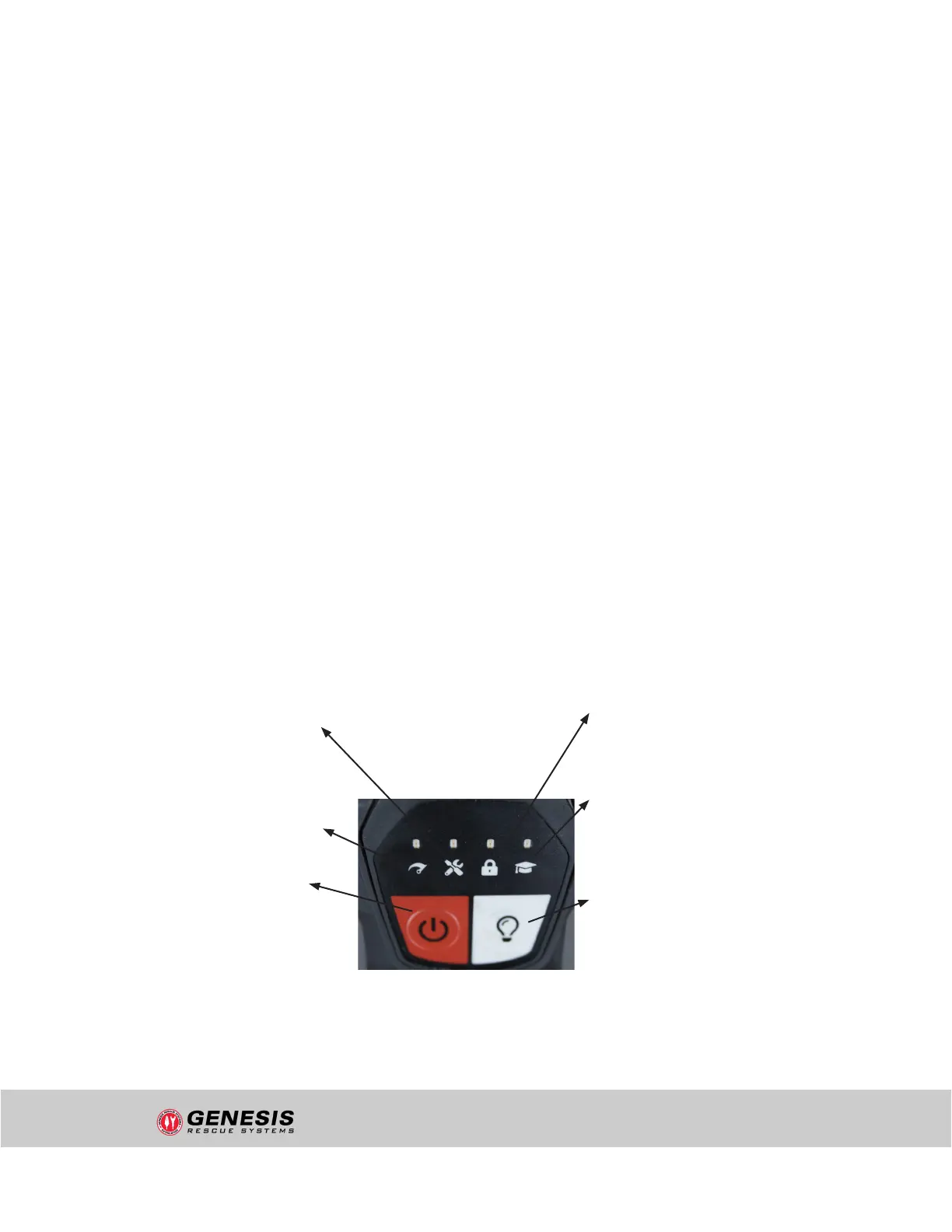
LED - Service & Maintenance:
Lights up if a service interval has
been reached or the tool is being
accessed externally.
LED - Maximum Pressure Display:
Lights up as soon as the tool has built
up maximum pressure.
ON/OFF Button:
When this button is pressed, the
motor starts to rotate at idle speed.
If the rocker switch is not pressed
for 30 seconds, the tool switches off
automatically.
LED - Theft Mode:
Lights up when anti-theft
protection is activated.
LED - Training Mode:
Lights up as soon as training
mode has been activated and
set via the app.
LIGHT CONTROL Button:
Individual adjustment of the
light mode in 5 steps at the
touch of a button.
"uncontrolled if printed"


 To Next Page