MPS2000
12
Press either [◀]
DATA
or
DATA
[▶] button to select the User-set number to be modified.
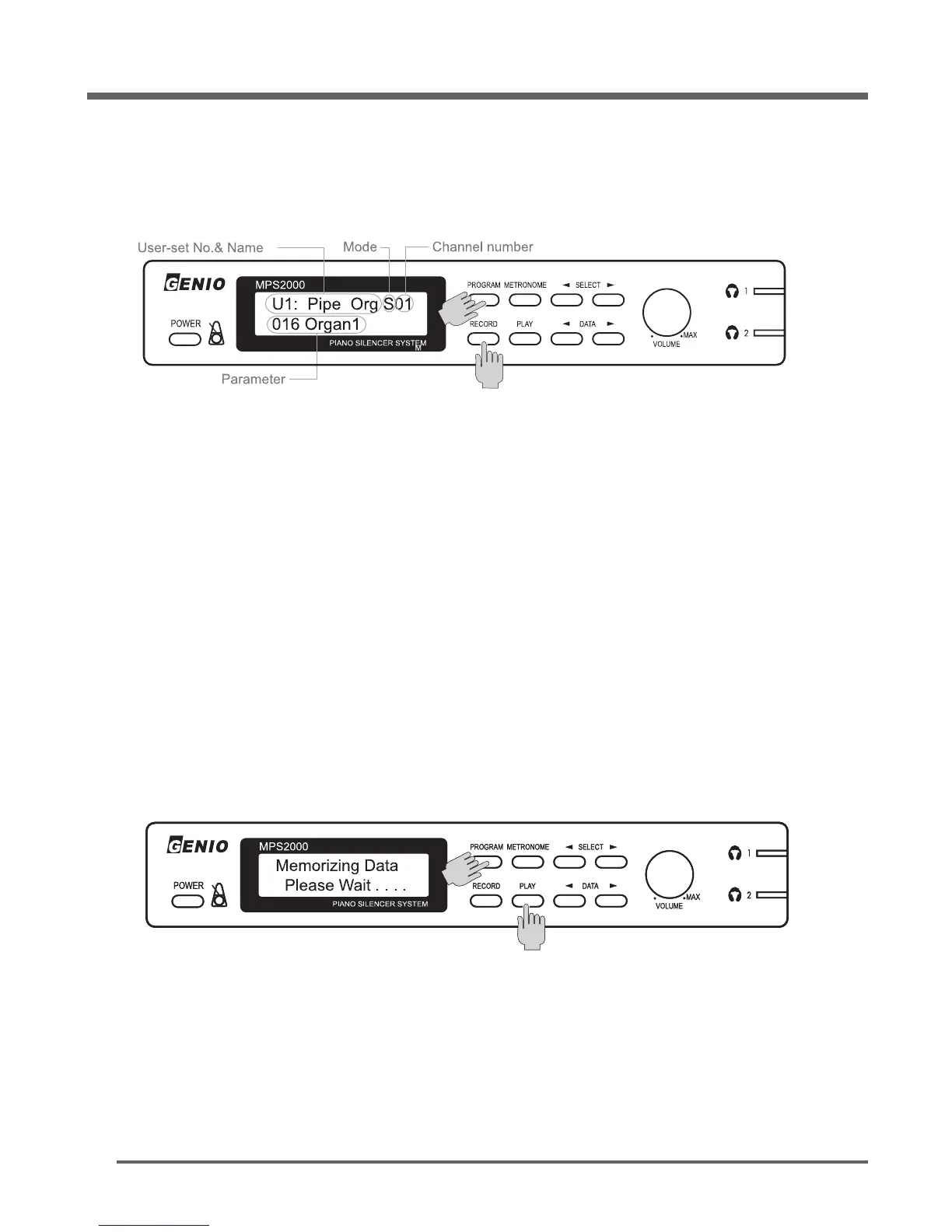
Press the [
PROGRAM
] and the [
RECORD
] buttons together to move onto the edit mode.
Press either [
PROGRAM
] (◀Channel) or [METRONOME] (Channel▶) button to select the channel
for editing. 16 channels are available to edit in the system.
Press either [◀]
SELECT
or
SELECT
[▶] button to check and select the parameter to be modified.
Please refer to Parameter information of User-set.
Press either [◀]
DATA
or
DATA
[▶] button to adjust the value of the parameter.
Press the [◀]
DATA
and the
DATA
[▶] buttons together to take off the instrument sound from the
selected channel.
Repeat the same procedure as above to modify another channel.
Press the [
PROGRAM
] and the [PLAY] buttons together to finish and return to normal mode and
memorize the edited data.
Press the [◀]
SELECT
and the
SELECT
[▶] buttons together to finish and return to the normal mode
without memorizing edited data.
S01: The single mode means that sound effects only selected channel.To check by listening
edited, press the [PLAY] button.
How to edit User-set


 To Next Page