MPS2000
28
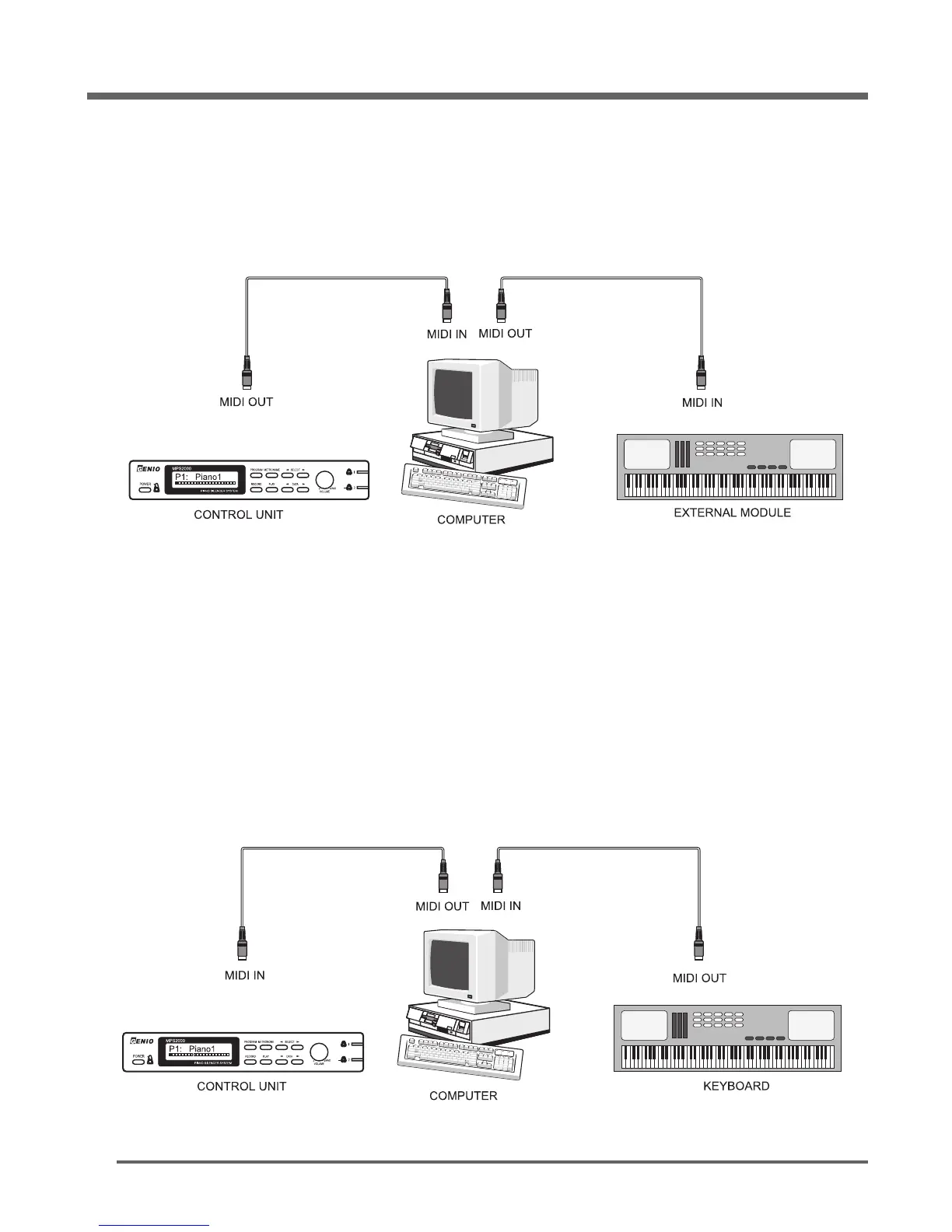
In order to send MIDI data to a General MIDI synthesizer or computer, connect a MIDI cable between
the MIDI Out port of the MPS2000 and the MIDI In port of your synthesizer or computer. See the
diagram below.
Note:
1. Most computers do not have a MIDI interface built-in. You may need to add a MIDI interface to your
computer before you can connect it to your MPS2000 .
In order to receive MIDI data from a General MIDI keyboard synthesizer or computer, connect a
MIDI cable between the MIDI Out port of the external device and the MIDI In port of the MPS2000 .
See the diagram below.
You can connect MIDI In and Out cables at the same time. If connecting to a computer, be sure to
turn "Patch Through" off in your software to avoid "double notes".
Although only Piano and Church Organ sounds are available from the MPS2000 keyboard, several
additional sounds are available when connected to an external MIDI source.
Connect your MPS2000 to external MIDI Equipment


 To Next Page