MPS2000
16
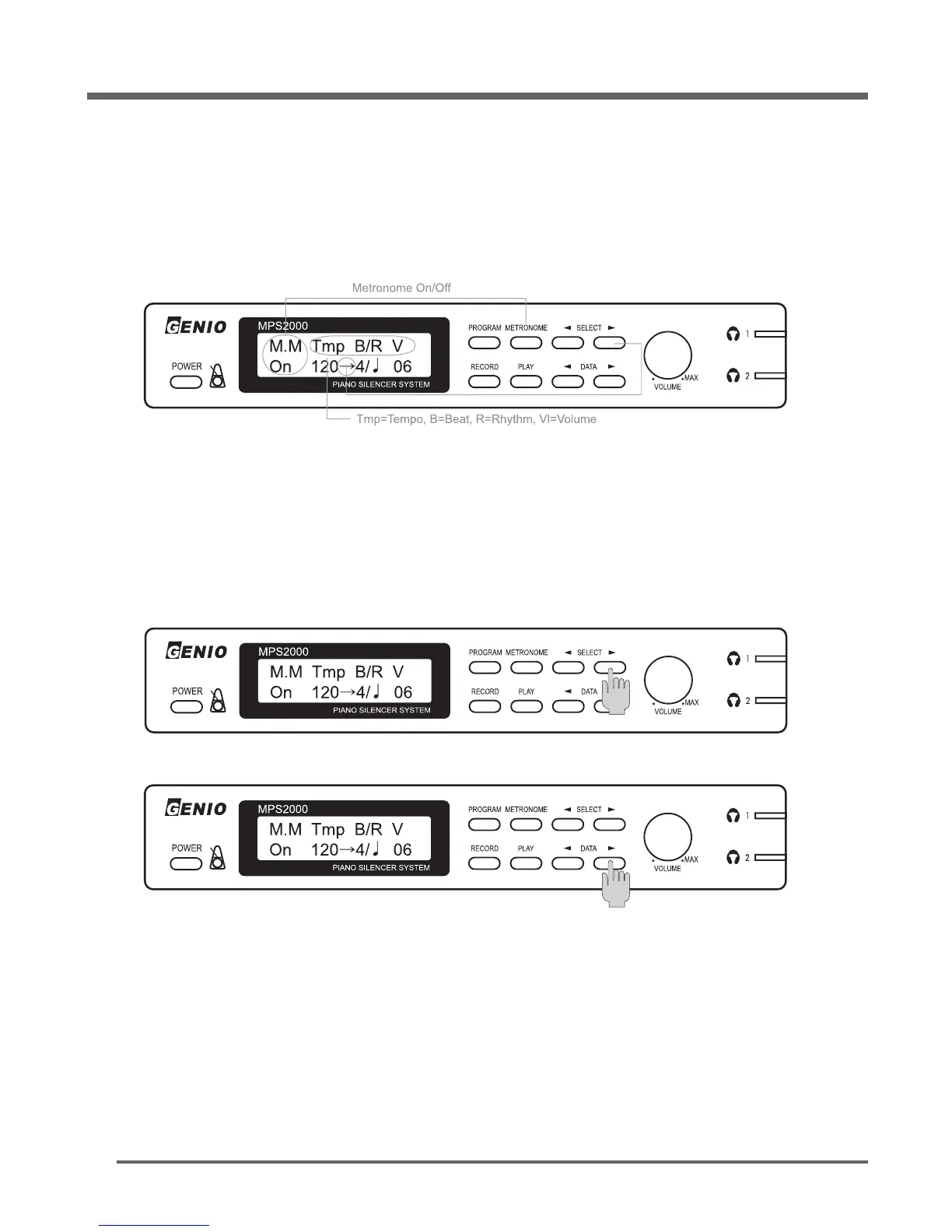
The built-in metronome has adjustable parameters for Tempo, Beat, Rhythm, and Volume.
Here is how to adjust each of these.
Press the [METRONOME] button, then display shows 5 abbreviated words.
Press either [◀]
SELECT
or
SELECT
[▶] button to select the parameter you wish to set.
Press either [◀]
DATA
or
DATA
[▶] button to set the value.
When you finish the settings, press the [METRONOME] button to start operating.
Press the [METRONOME] button to stop operating.
Note:
1. To change the instrument while operating the metronome, press the [
PROGRAM
] button to change
the instrument while the Metronome is operating.
If the display shows the instrument number and name, press the applicable buttons to select the new
instrument sound you want to play with.
(LED is flickering and tic tack sound is working while the metronome is operating)
M.M shows with under the letter either On and Off status of the metronome activating currently.
The cursor (Left arrow icon) indicates the current parameter can be changed the value user wants.
Tmp is the abbreviated name of the Tempo its value shows just below the letter from 30 to 255
Value shows the current tempo, which defaults to 120 beats per minute (Press either [◀]
DATA
or
DATA
[▶] button to adjust the tempo up or down).
Metronome


 To Next Page