BRAIN 17 36 732788 - Rev. A_1
ENGLISH
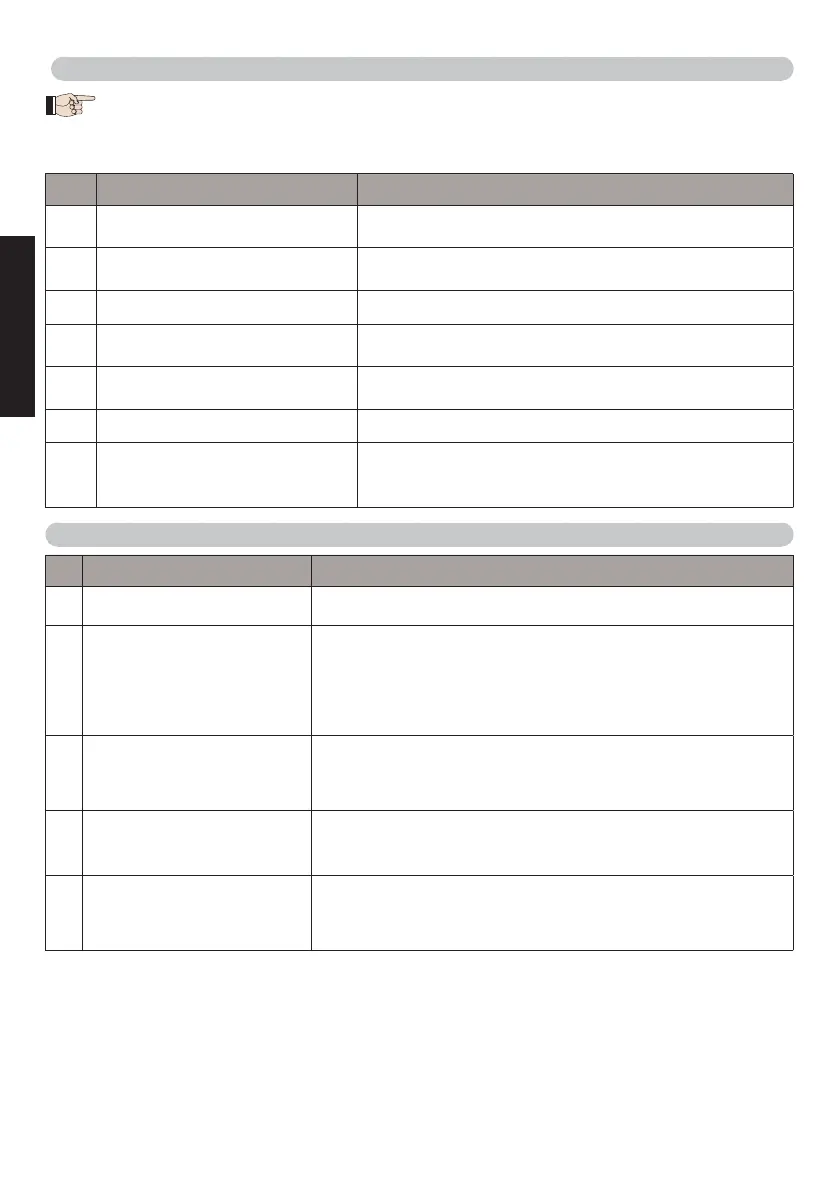
8.2 ALARMS
When there is an ALARM the ERROR LED will begin to flash. By simultaneously pressing +
and - the display will show the corresponding alarm number.
The following table contains all the alarms that can be viewed on the display.
N° ALARM Solution/Description
20
Obstacle on MOTOR 1 (only with
encoder)
Remove any possible obstacle on leaf 1
21
Obstacle on MOTOR 2 (only with
encoder)
Remove any possible obstacle on leaf 2
25
LOCK 1 output short-circuit Remove the cause of the short-circuit
27
Nr. of consecutive obstacles
exceeded during opening
Remove any possible obstacle.
Should the problem persist, repeat SETUP
28
Nr. of consecutive obstacles
exceeded during closing
Remove any possible obstacle.
Should the problem persist, repeat SETUP
30
RQFZ radio code memory full Cancel the radio codes.
31
Breach alarm
A movement was made with the automated system in
status St = 00 or 01.
Perform an operation cycle.
9. TROUBLESHOOTING
Description Solution
A
The board does not turn on
• Ensure that the board is receiving the 230V~
• Ensure that fuse F1 is intact
B
The gate will not open after
an OPEN pulse
• Check that the safety devices and STOP are connected
to the negative and ensure that the corresponding LEDs
are ON
• Check the photocells (alignment, engagement)
• Check that the SETUP has been completed correctly.
Repeat if necessary
C
The gate does not reverse
when the photocells are
engaged
• Check that the traditional photocells are correctly wired and
that the BUS photocell configuration is correct (if present).
If necessary, repeat the acquisition of the BUS G-WAY
devices
D
The gate does not reverse
when encountering an
obstacle
• Ensure that the encoders on motors are enabled
• Check the obstacle detection sensitivity
E
The gate will not close
• Check that the photocell wiring and alignment is correct
• Check that there is no OPEN signal active
• Check which function logic has been chosen (automatic
or semi-automatic)



 To Next Page