English
-27-
Flash (Camera Mode Only)
This camera has two flash settings. To change flash setting use either the hot key
(Right Button) or Option Setting.
1. Auto-flash(
): the flash fires automatically according to light conditions. Use this
mode for general photography.
2. Flash Off(
) : the flash will not fire under any circumstances. Use this mode when
taking images in a place where flash photography is prohibited, or when the
subject is distant (beyond the range of the flash).
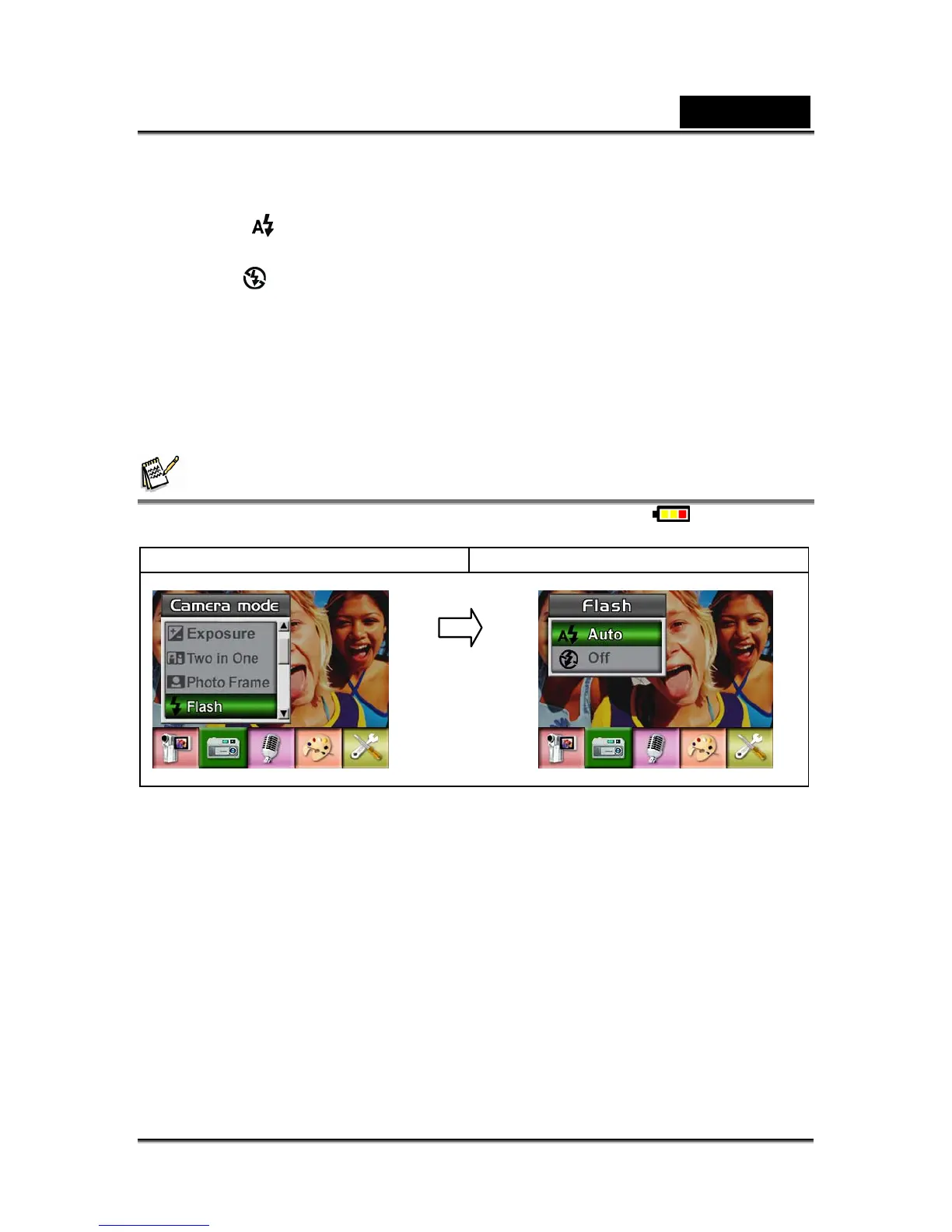
To change Flash setting:
1. When in Camera Mode, use Up/Down Buttons to select Flash Option, then press
Enter Button to switch to Flash submenu.
2. Use Up/Down Buttons to move between 2 settings.
3. Press Enter Button to validate the setting and exit.
NOTE
z The flash will be disabled automatically when battery power is low ( )
Display screen Flash Option
Self-timer (Camera Mode Only)
The self-timer allows you to take pictures with a ten-second time delay. Activate
Self-timer using either the hot key (Left Button) or Option Setting. The self-timer LED
on the front of the camera beneath the flash light will also blink. The speed of blinking
will increase just before the picture is taken.
To enable Self-timer:
1. When in Camera Mode, use Up/Down Buttons to select Self-timer, then press
Enter Button to switch to Self-timer submenu.
2. Use Up/Down Buttons to choose On or Off.
3. Press Enter Button to validate the setting and exit.
Enter Button



 To Next Page