34
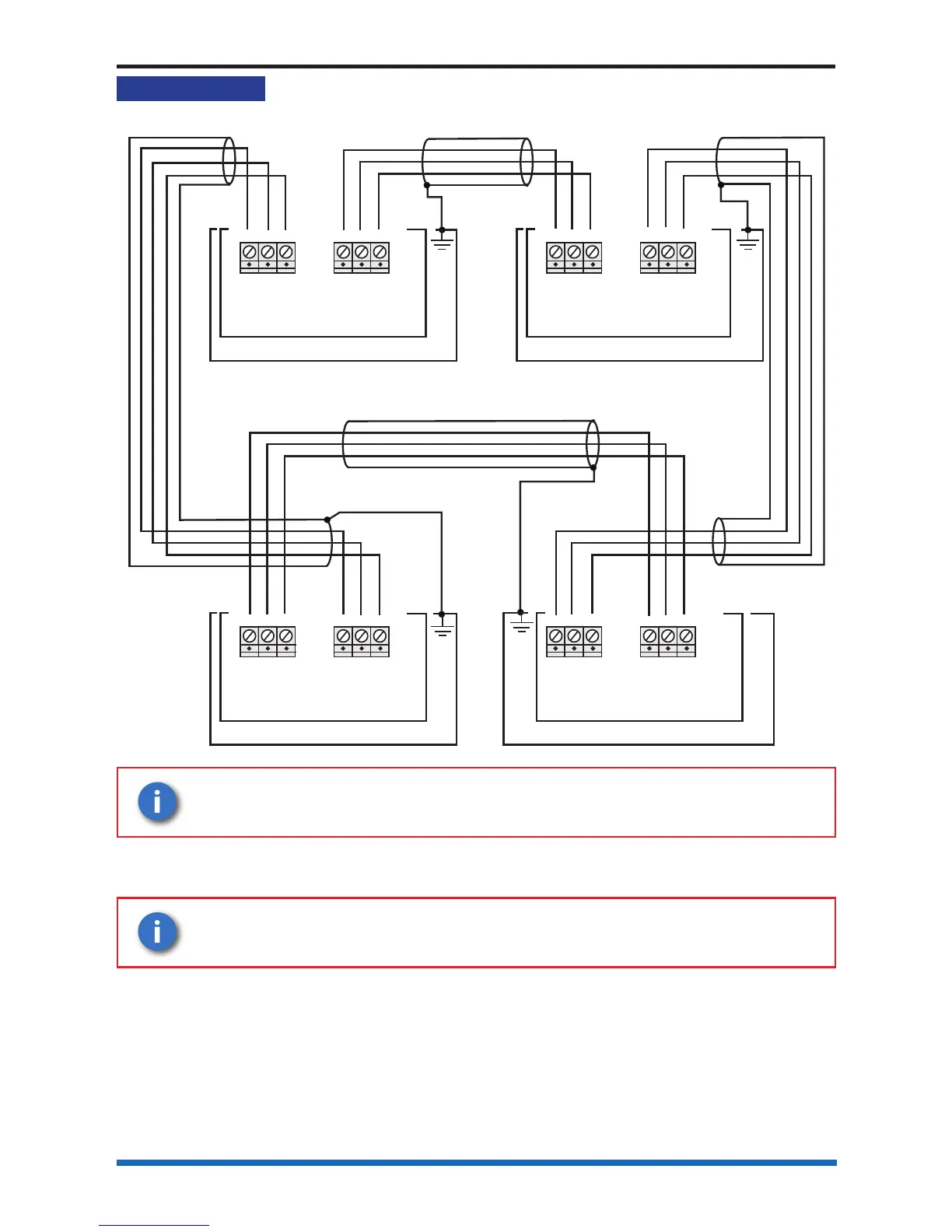
Network wiring
Network wiring
Cable screen
N/C
N/C
Cable screen
N/C
N/C = No connection
Control Panel
L1-
0V L1+
PB1B
L2-
0V L2+
PB1A
MASTER CONTROL BOARD
Connections for Network card in
Card 2
Control Panel
L1-
0V L1+
PB1B
L2-
0V L2+
PB1A
Connections for Network card in
Card 2
Control Panel
L1-
0V L1+
PB1B
L2-
0V L2+
PB1A
MASTER CONTROL BOARD
N/C
Control Panel
L1-
0V L1+
PB1B
L2-
0V L2+
PB1A
MASTER CONTROL BOARD
Connections for Network card in
Card 2
Control Panel
L1-
0V L1+
PB1B
L2-
0V L2+
PB1A
MASTER CONTROL BOARD
Connections for Network card in
Card 2
Control Panel
L1-
0V L1+
PB1B
L2-
0V L2+
PB1A
MASTER CONTROL BOARD
The cable screen must be connected to an earth terminal in the
backbox, as shown.
Where a multicore cable is being used ensure the unused cores (cores without signal)
are connected to 0V
.
When using a cable having 2 pair with screen, use 1 pair for 0V and
use the other pair for L - and L+ connections.



 To Next Page