40
Tools for S-Quad
Tools for S-Quad
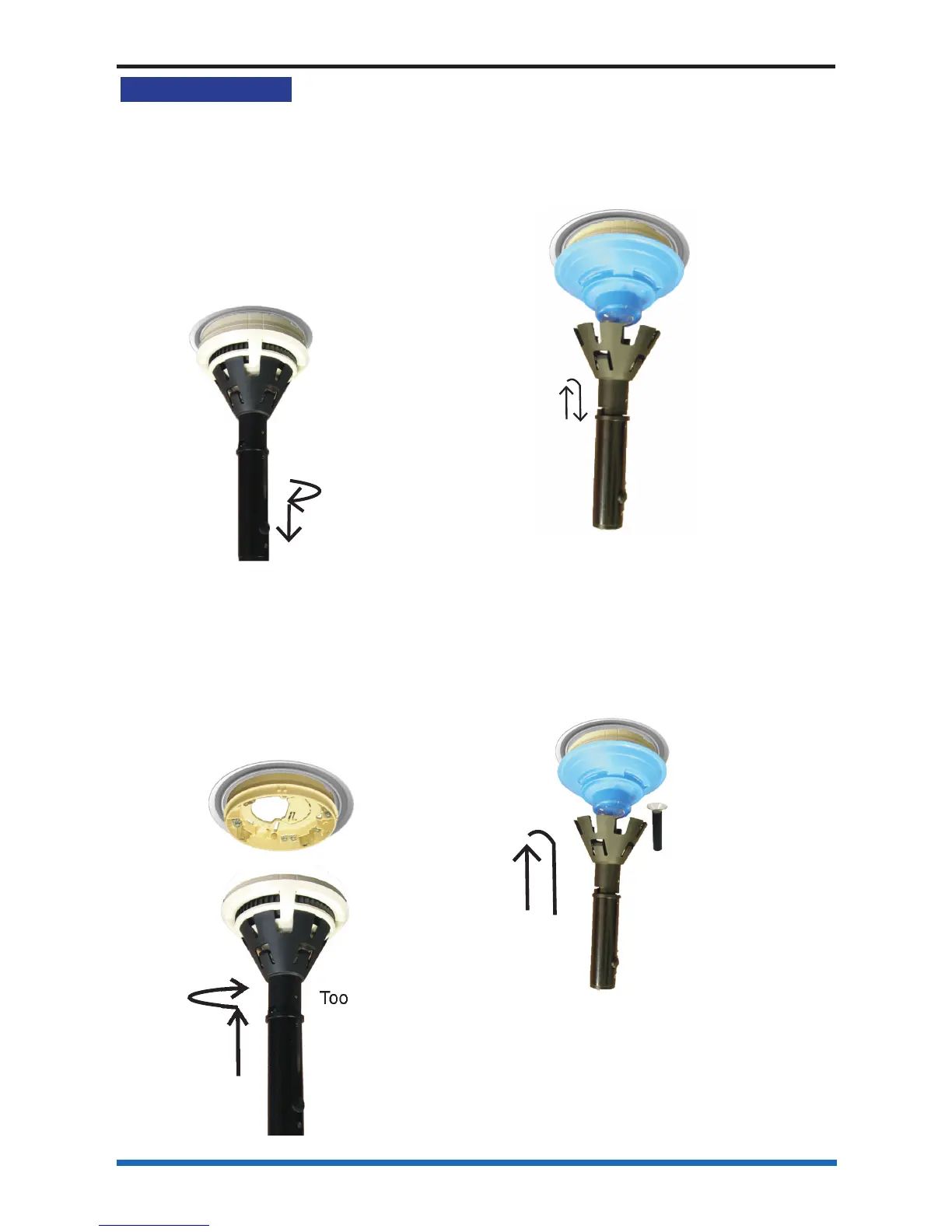
An extractor tool allows removal and
fi tting of the S-Quad device head into the
base. By fi tting a screw-on adaptor, the
tool can be used to remove the sensor
dust cover.
To remove an S-Quad
Fit the tool onto the S-Quad. Turn
S-Quad anticlockwise until it stops and
remove the S-Quad from the base.
S-Quad
tool
To fi t an S-Quad
Fit the S-Quad on to the tool. Offer
S-Quad to base and rotate clockwise
until it moves upwards in to the base and
rotate it again until it clicks and goes no
further, the lines on the base and S-Quad
will align.
Base
S-Quad
Tool
To fi t a dust cover
Place the dust cover onto the tool inside
the cradle. Offer the cover to the S-Quad,
locate and push to fi t it onto the assembly.
Withdraw the tool when the dust cover is
in place.
Tool
Dust cover
To remove a dust cover
A dust cover remover tool must be fi tted
to the main tool to extract the dust cover.
Press the pad of the dust cover remover
tool onto the dust cover, this creates an
air tight grip, to allow the cover to be
pulled off from the S-Quad.
Tool
Dust cover
remover tool
Dust cover



 To Next Page