33
Replacing the Battery Pack
CAUTION:
There is danger of explosion if the battery is incorrectly replaced.
Replace the battery only with the Tablet PC manufacturer’s battery
packs. Discard used batteries according to the dealer’s instructions.
Do not attempt to disassemble the battery pack.
A battery pack can get hot due to long working hours. Do not touch a
hot battery pack with bare hands. After removing a battery pack, put it
in a well-ventilated area.
NOTE: You can hot swap one battery pack while the other one is supplying
the power. The appropriate temperature range for hot swapping the battery
pack is between -21°C (-5.8 °F) and 45 °C (113 °F).
To replace the battery pack, follow these steps:
1. Skip this step if you are hot swapping the battery pack.
Turn off the Tablet PC and disconnect the AC adapter. After turning off
the Tablet PC, allow a cool-down time of at least 5 minutes before
removing the battery pack.
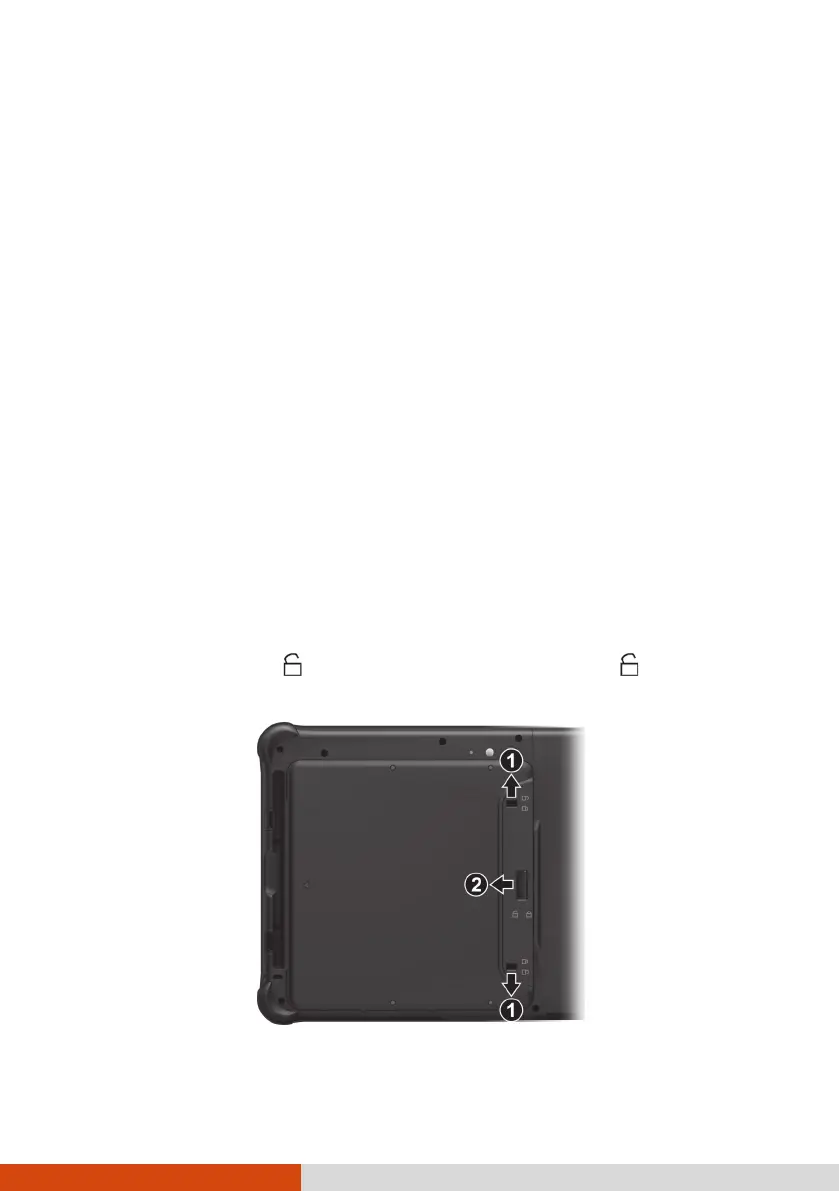
2. Locate the battery cover. Slide the two small locks outward to the
unlocked position ( ) (
) and then release the latch ( ) (
) to open
the battery cover.



 To Next Page