9. Service
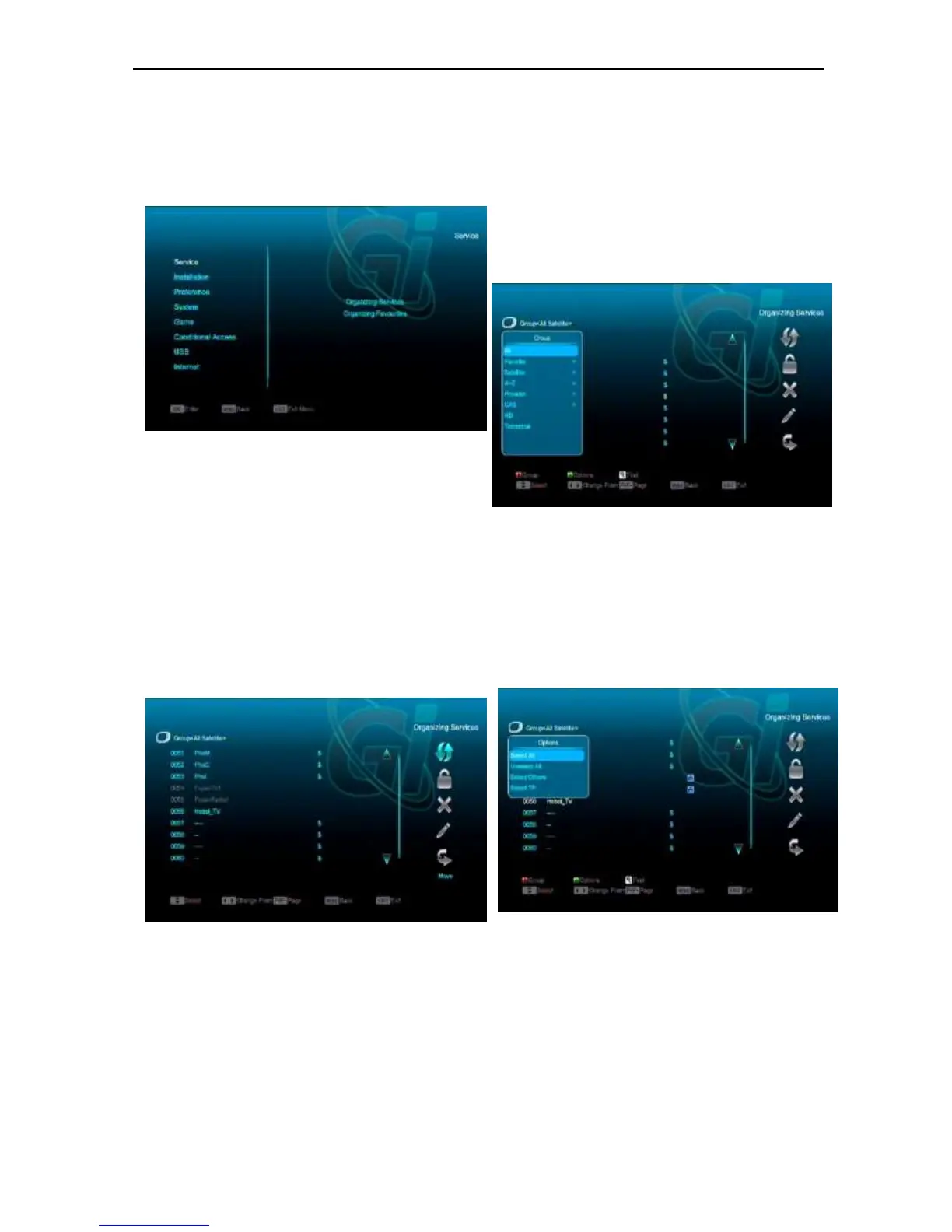
When you press [Menu] key to enter menu, there will
display the picture like below:
Press [Up/Down] key you can select the submenu
of Organizing services and Organizing favourites.
Press [OK] key to enter the “Organizing Service”. If
Menu Lock is “On”, it will display an dialogue for
user to key in password. The default Password is
“0000”.
Press [Menu] key to go back to main menu.
9.1 Organizing Service
When you enter to “Organizing Service” menu, there will
display the screen like below.
1. You can move highlight by press [Channel
Up/Channel Down] key and [OK] key to
select the programs which you want to edit.
2. You can press [Page Up/Page Down] key
to implement the Page Up/Page Down
function.
3. You can use [Red] key to switch different
Group.
4. You can press [Green] key to select the
programs by different select mode.
5. Press color key can implement the
corresponding function in “Organizing
Services”.
Groups
1 Press [Red] key can open the “Groups” window
like above
2 You can press [Up/Down] key to move
highlight and press [OK] key to select group.
3 Press [Menu] key to close “Groups” List.
Options
1. Press [Green] key can open the “Options”
window like above.
2. You can press [Up/Down] key to move
highlight and press [OK] key to confirm the
select mode.
3. Press [Menu] key to close “Options” List.
Move


 To Next Page