EasyManua.ls Logo

Giada Q30 - Quick Installation; Interface Description

Giada Q30
38 pages
Print Icon
To Next Page IconTo Next Page
To Previous Page IconTo Previous Page
Loading...
ARM digital signage System user guide
5
1:Quick Installation
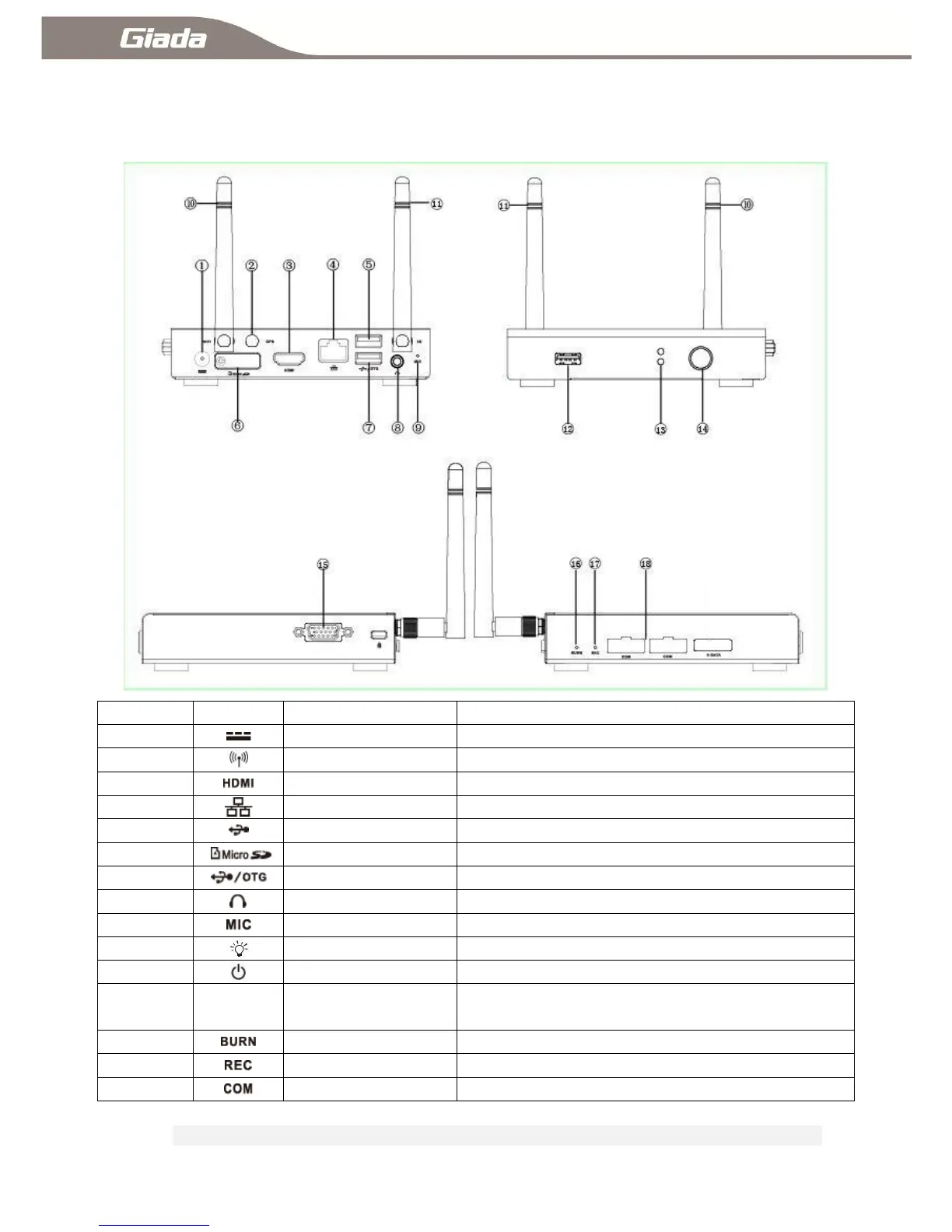
1-1:Interface description
Position
Description
Usage
DC-IN
Connect the power adapter
⑩②
Wifi/GPS/3G ANT
Receive Wifi/GPS/3G signal
HMDI Port
Connect the HDMI digital monitor
RJ45 Port
Connect the network
USB2.0 Port
Connect USB devices
`
Card reader
TF data memory card
USB2.0/OTG Port
Connect USB devices, OTG & host function Interface
earphone/SPDIF
Connect earphone/SPDIF
MIC
Build-in MIC
LED
Computer work state
Power button
Power ON / OFF the computer
VGA &COM Port
Connect VGA analog Monitor or Connect the serial
port equipment
Burn button
System ROM Burning button
Recovery button
Restore factory default
COM
Connect COM serial communication device
NoteCorrect specifications depend on the actual models, all specifications are subject to change without prior notice.