BIOS Setup - 36 -
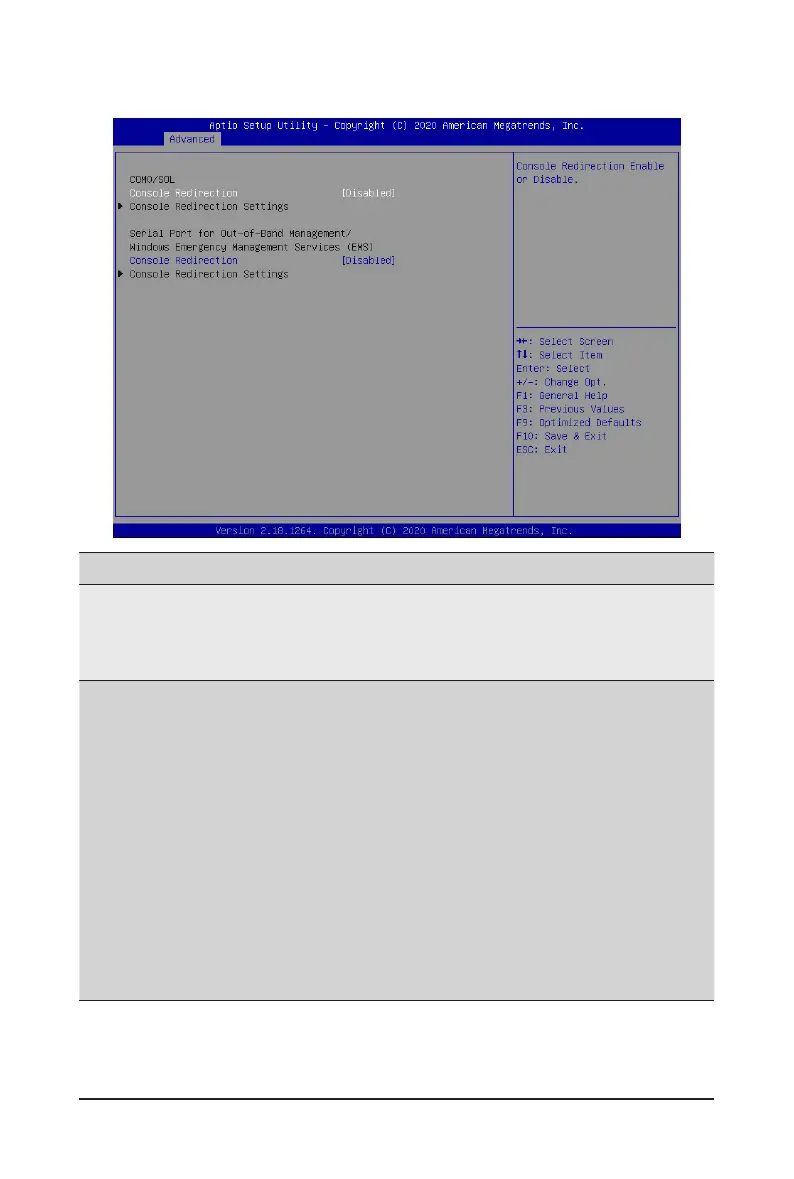
2-2-5 Serial Port Console Redirection
(Note) Advanceditemspromptwhenthisitemisdened.
Parameter
Description
COM0/Serial Over LAN
Console Redirection
(Note)
Selectwhethertoenableconsoleredirectionforspecieddevice.Console
redirection enables the users to manage the system from a remote
location.
Options available: Enabled, Disabled. Default setting is Disabled.
COM0/Serial Over LAN
Console Redirection Settings
Press[Enter]tocongureadvanceditems.
Please note that this item is congurable when COM0/Serial Over
LAN Console Redirection is set to Enabled.
Terminal Type
– Selects a terminal type to be used for console redirection.
– Options available: VT100, VT100+, ANSI, VT-UTF8. Default setting
is ANSI.
Bits per second
– Selects the transfer rate for console redirection.
– Options available: 9600, 19200, 38400, 57600, 115200. Default
setting is 115200.
Data Bits
– Selects the number of data bits used for console redirection.
– Options available: 7, 8. Default setting is 8.


 To Next Page