BIOS Setup - 40 -
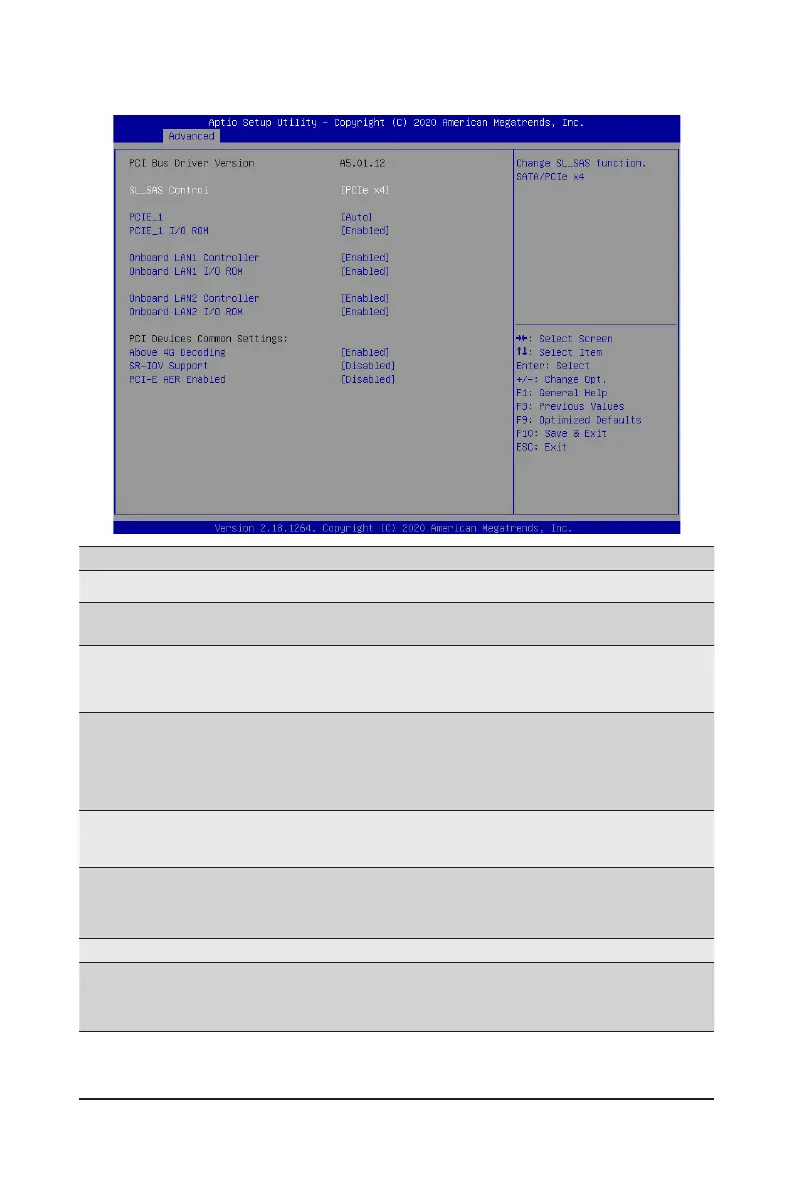
2-2-7 PCI Subsystem Settings
Parameter
Description
PCI Bus Driver Version
Displays the PCI Bus Driver version information.
SL_SAS Control
Change the SL_SAS function.
Options available: Disabled, SATA, PCIe x4. Default setting is PCIe x4.
PCIE_1
LanesConguration
Change the PCIe lanes.
Options available: Disabled, Auto, x16, x8x8, x8x4x4, x4x4x8,
x4x4x4x4. Default setting is Auto.
PCIE_1 I/O ROM
When enabled, this setting will initialize the device expansion ROM for
the related PCI-E slot.
Options available: Enabled, Disabled. Default setting is Enabled.
Onboard LAN 1/2 Controller
(Note1)
Enable/Disable the onboard LAN devices.
Options available: Enabled, Disabled. Default setting is Enabled.
Onboard LAN 1/2 ROM
(Note1)
Enable/Disable the onboard LAN devices, and initializes device
expansion ROM.
Options available: Enabled, Disabled. Default setting is Enabled.
PCI Devices Common Settings
Above 4G Decoding
Enable/Disable memory mapped I/O to 4GB or greater address space
(Above 4G Decoding).
Options available: Enabled, Disabled. Default setting is Enabled.
(Note1) This section is dependent on the available LAN controller.


 To Next Page