18
Using the phone
Gigaset E490/E495 / AUS / A31008-M2105-C401-2-7619 / starting.fm / 04.01.2011
Version 4, 16.09.2005
Illustration in the user guide
The operating steps are shown in abbreviated form.
Example
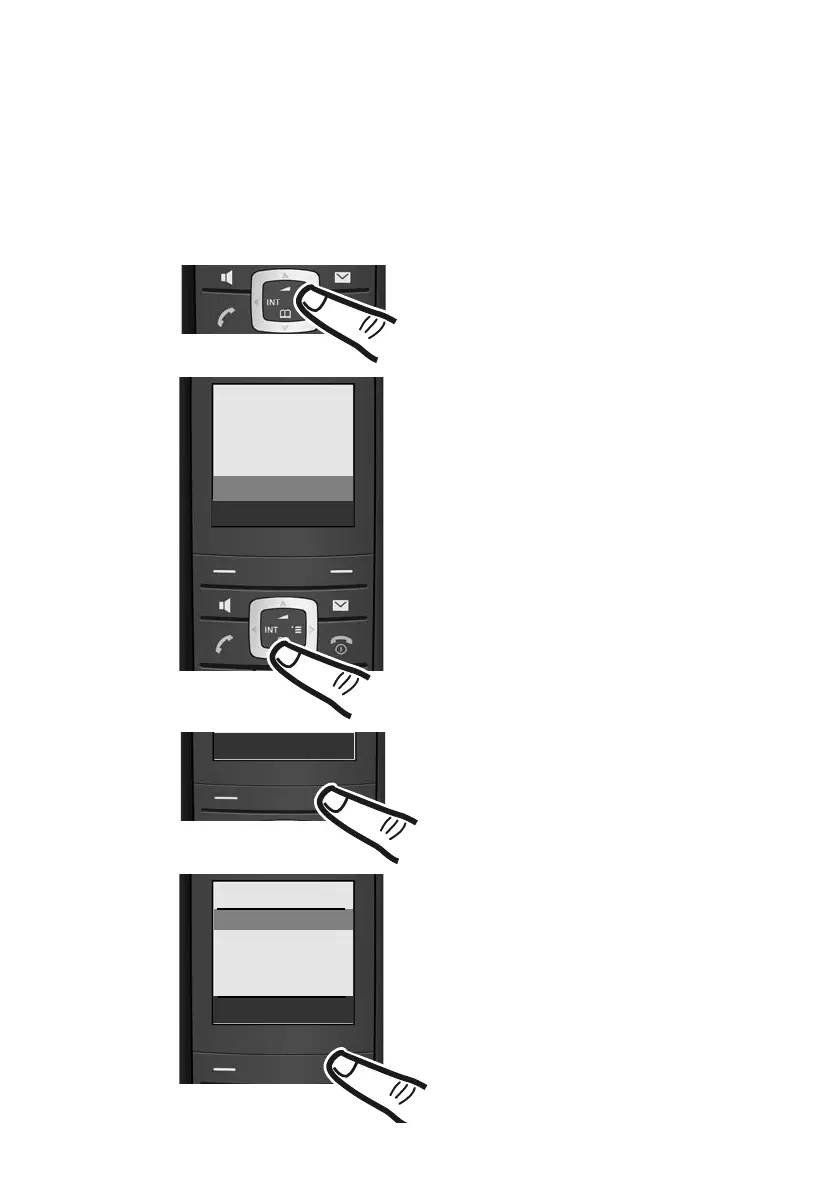
The illustration:
v ¢ Ð ¢ Date/Time
means:
¤ To display the main menu, press the
right side of the control key in idle
status.
¤ Press the bottom of the control key
until Ð Settings is highlighted by
the bar.
¤ Press the display key §OK§ to open the
submenu.
î SMS
ê Sel. Services
ì Alarm Clock
í Add. Features
Ð Settings
Ý OK
Settings
Date/Time
Audio Settings
Display
Handset
Ý OK
Date/Time is already indicated.
¤ Press the display key §OK§ to open the
function menu.
To enter the time and date, proceed as
described on page 12.



 To Next Page