The battery should always be kept clean, especially on its top side, and the terminals should be coated
with Vaseline.
CAUTION
NEVER USE FUSES WITH A CAPACITY HIGHER THAN THE RECOMMENDED CAPACITY. USING
A FUSE OF UNSUITABLE RATING MAY SERIOUSLY DAMAGE THE VEHICLE OR EVEN CAUSE
A FIRE.
CAUTION
ORDINARY AND DRINKING WATER CONTAINS MINERAL SALTS THAT ARE HARMFUL FOR
THE BATTERY. FOR THIS REASON, YOU MUST ONLY USE DISTILLED WATER.
CAUTION
CHARGE THE BATTERY BEFORE USE TO ENSURE OPTIMUM PERFORMANCE. FAILURE TO
CHARGE THE BATTERY ADEQUATELY BEFORE BEING PUT INTO OPERATION WILL LEAD TO
A PREMATURE FAILURE OF THE BATTERY.
Phonic wheel
- Ensure that the tone wheel is correctly installed on the scooter and connected to the electrical system.
- Turn the key switch to "ON".
- Access the tone wheel connector on the system side.
- Carry out the following measurements using the special tool.
Specific tooling
020331Y Digital multimeter
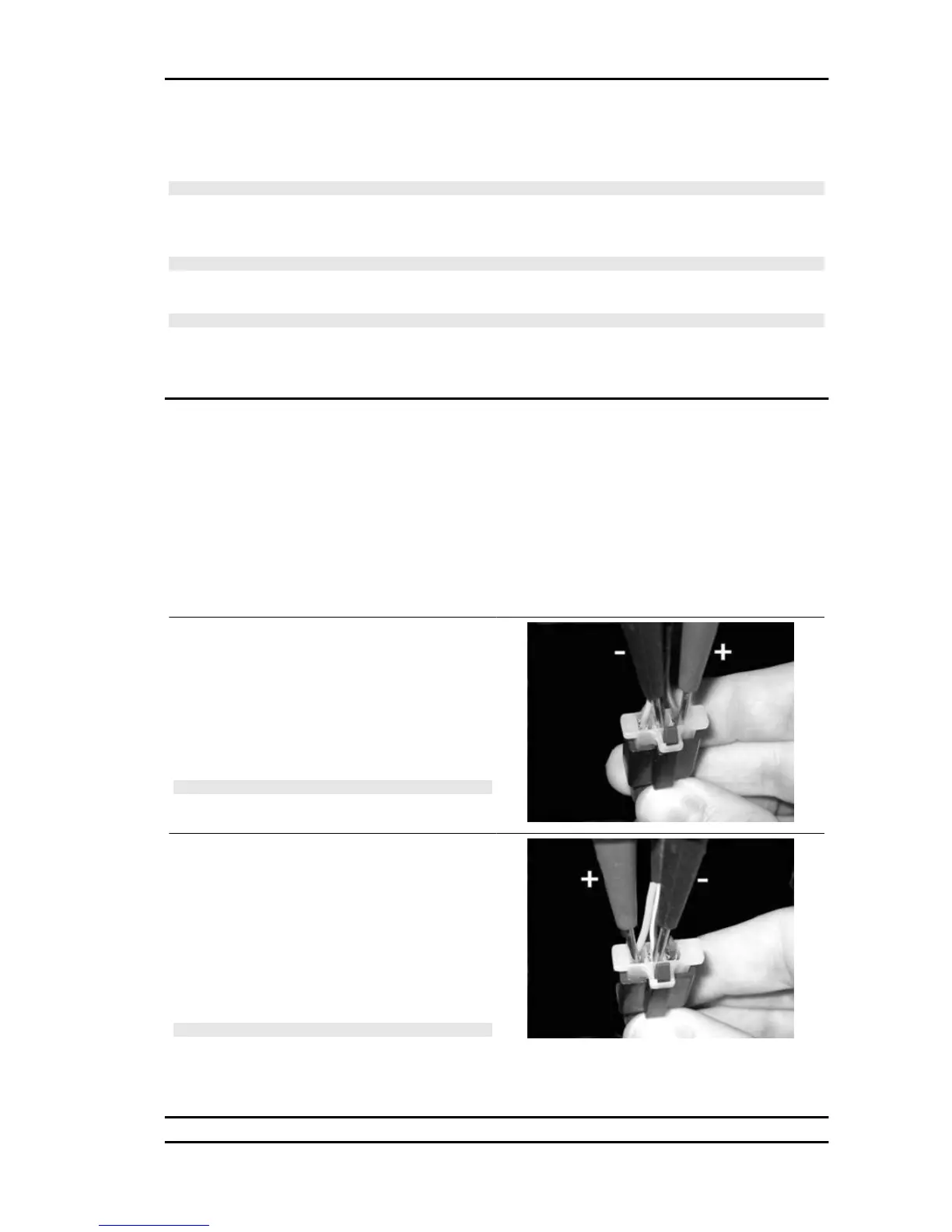
Check the supply voltage.
Keeping the connector in the position shown in the
photo, check for battery voltage (12 V) with the
polarity shown.
If incorrect values are measured, check the elec-
trical system and the digital instrument.
N.B.
A DROP IN VOLTAGE OF 1 V IN RELATION TO THE BAT-
TERY VOLTAGE CAN BE CONSIDERED NORMAL.
Check the signal
Move the positive rod to the position shown in the
photo. Turn the front wheel very slowly and check
that the measured voltage is 0 V or battery voltage,
depending on the position taken up.
This condition should be repeated 16 times during
a complete revolution of the wheel.
N.B.
THE DIGITAL MULTIMETER IS NOT ABLE TO DISPLAY
THE VOLTAGE WHEN THE WHEEL IS ROTATED FAST.
If other voltages are measured or there is no alternation, replace the tone wheel.
Nexus 500 euro 3 Electrical system
ELE SYS - 71










 To Next Page