21
ASPEC® POSITIVE PRESSURE MANIFOLD | USER'S GUIDE
SETUP
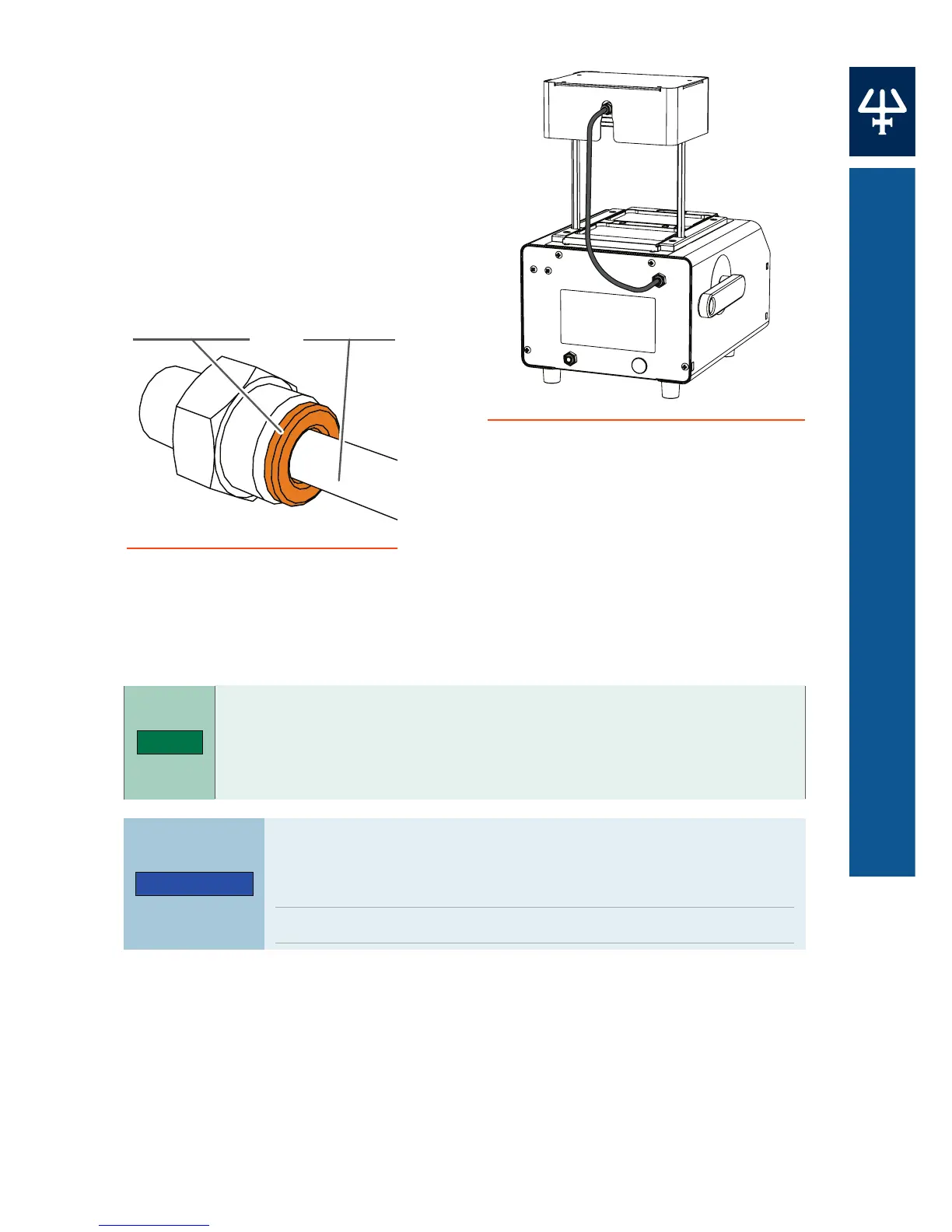
Connect the Gas Supply
1. Locate the gas tubing supplied in
the accessory kit. Connect the
tubing from the rear quick
connect port on the manifold to
the quick connect port on the
upper right side on the rear of the
ASPEC PPM.
2. Insert the gas wall supply tubing (1/4" OD, not provided) into the
Gas Inlet quick connect port on the back of the instrument.
The orange plunger insert will automatically engage
the tubing. Pull back the tubing to check for proper
engagement. Depress the orange plunger insert to release
the tubing.
Ensure that the process control dial is set to Dry and
the SPE control dial is set to O before connecting the
gas supply.
Do not exceed 15 psi inlet pressure.
3. Use an external regulator to slowly increase pressure to the system
upto15psi.
4. Switch the process control dial to SPE.
Figure 14
Gas Supply Connection (Rear View)
Figure 15
Quick Connect Port with Tubing
Plunger Insert
Gas Tubing













 To Next Page