TX6160 INSTRUCTION MANUAL
12
LCD ICONS
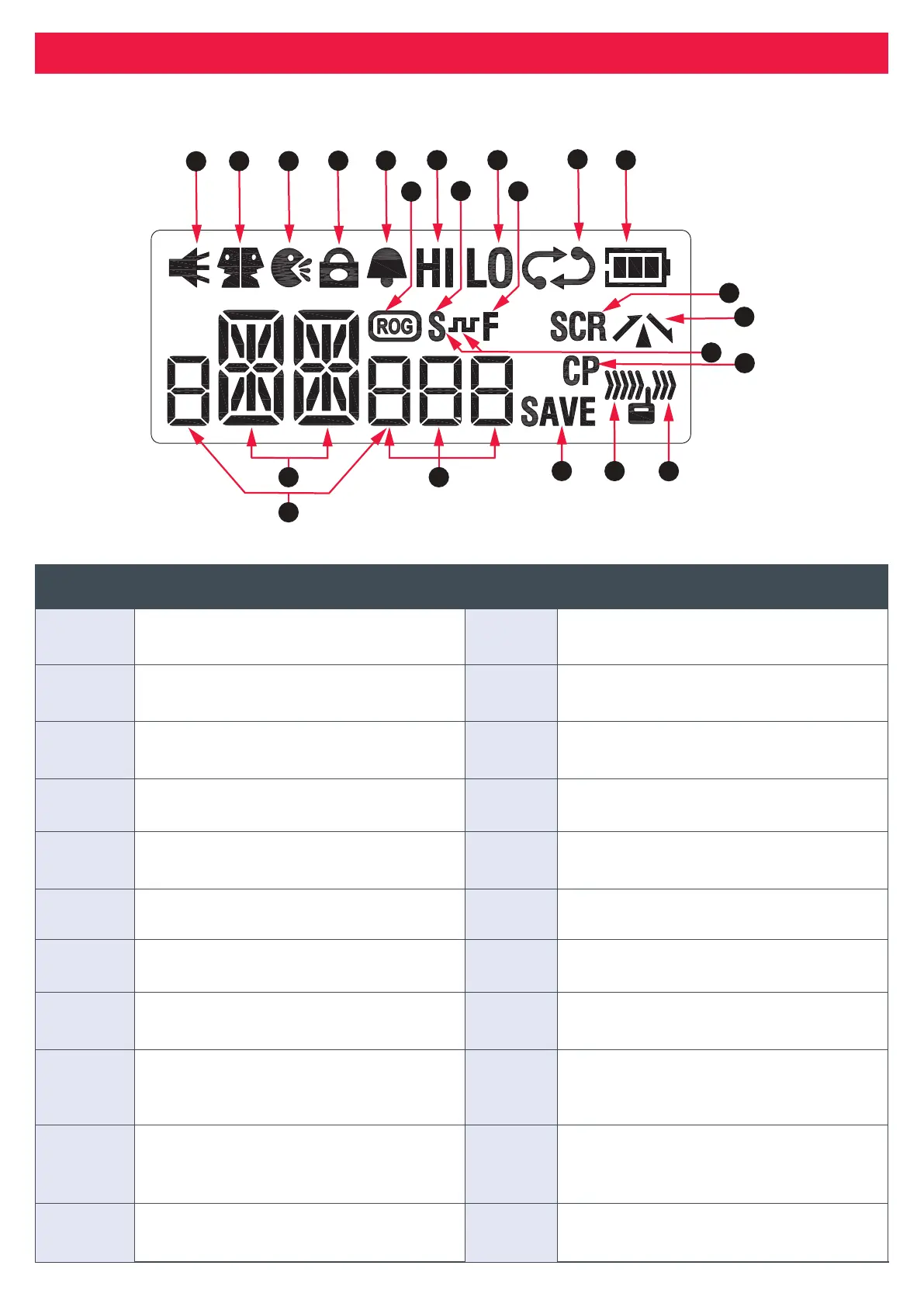
The gure and table below describes the icons on the LCD screen of the TX6160 radio.
TX6160 Instrucon Manual
14 June 2018
© 2018 Standard Communicaons Pty Ltd trading as GME. All rights reserved.
13
50158
Content
LCD Icons
The gure and table below describes the icons on the LCD screen of the TX6160 radio.
1
2 3
8
6
14
13
16
17
18
19
2021
22
15
10
The following table describes the icons on the LCD screen, as labeled in the diagram above.
Label No. Descripon Label No Descripon
1 Monitor icon: Appears when the
Squelch is open.
12 Baery icon: Displays baery charge
level.
2 Dual Watch icon: Appears when Dual
Watch is acve.
13 Scrambler icon: Appears when
Scrambler is enabled.
3 VOX icon: Appears when VOX mode is
acve.
14 Duplex icon: Appears on channels
where Duplex is enabled.
4 Key Lock icon: Appears when the
keypad is locked.
15 DCS Silent icon: Appears when Silent
mode is acve using DCS.
5 Buon Beep icon: Appears when
buon conrmaon tones are on.
16 Compander icon: Appears when the
compander is acve.
6 Roger Beep Icon: Appears when the
Roger Beep tones are acve.
17 Receive icon: Appears when receiving
signals.
7 High Power icon: Appears when High
TX power is selected.
18 Transmit icon: Appears when
transming.
8 CTCSS Silent icon: Appears when Silent
mode is acve using CTCSS.
19 Power Save icon: Appears when the
radio is sleeping.
9 Low Power icon: Appears when Low TX
power is selected.
20 CTCSS/DCS display: Displays the
selected CTCSS or DCS tone when Silent
mode is acve.
10 Funcon icon: Appears when the
funcon ‘F’ key is pressed to acvate
secondary funcons.
21 Channel display: Displays the selected
channel in use.
11 Scan icon: Flashes when radio is
scanning.
22 Baery charge status: Displays the %
baery charge level at switch on.
The following table describes the icons on the LCD screen, as labeled in the diagram above.
Label No. Description Label No Description
1
Monitor icon: Appears when the
Squelch is open.
12
Battery icon: Displays battery charge
level.
2
Dual Watch icon: Appears when Dual
Watch is active.
13
Scrambler icon: Appears when
Scrambler is enabled.
3
VOX icon: Appears when VOX mode is
active.
14
Duplex icon: Appears on channels
where Duplex is enabled.
4
Key Lock icon: Appears when the
keypad is locked.
15
DCS Silent icon: Appears when Silent
mode is active using DCS.
5
Button Beep icon: Appears when
button conrmation tones are on.
16
Compander icon: Appears when the
compander is active.
6
Roger Beep Icon: Appears when the
Roger Beep tones are active.
17
Receive icon: Appears when receiving
signals.
7
High Power icon: Appears when High
TX power is selected.
18
Transmit icon: Appears when
transmitting.
8
CTCSS Silent icon: Appears when Silent
mode is active using CTCSS.
19
Power Save icon: Appears when the
radio is sleeping.
9
Low Power icon: Appears when Low
TX power is selected.
20
CTCSS/DCS display: Displays the
selected CTCSS or DCS tone when
Silent mode is active.
10
Function icon: Appears when the
function ‘F’ key is pressed to activate
secondary functions.
21
Channel display: Displays the selected
channel in use.
11
Scan icon: Flashes when radio is
scanning.
22
Battery charge status: Displays the %
battery charge level at switch on.



 To Next Page