16 17
7.4 Insert/replace the baery
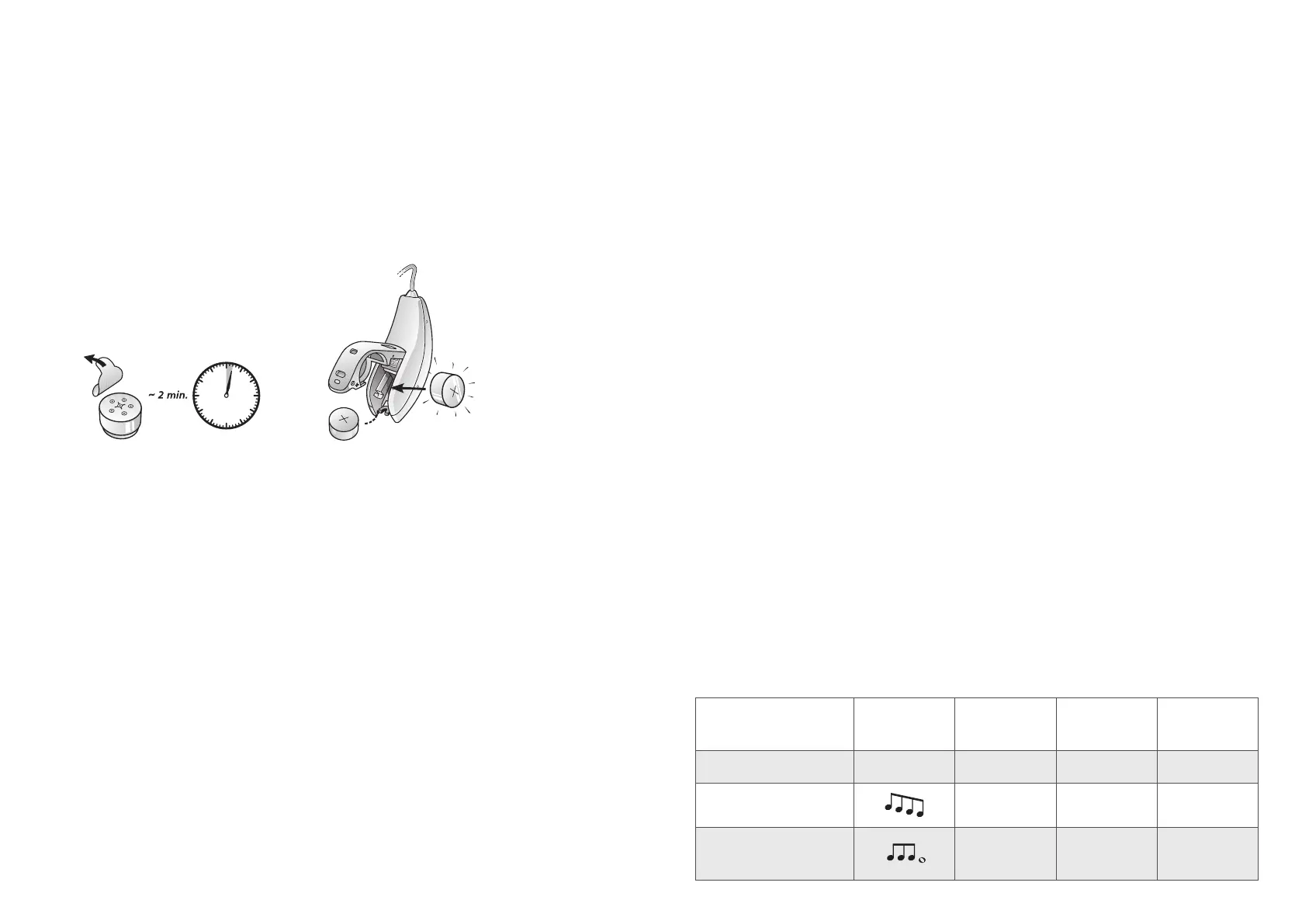
1. Prepare the new baery. Remove the protecve foil to acvate the
baery - wait for 2 minutes before inserng the baery into the
hearing aid
2. Open the baery door completely by using your ngernail
3. Insert the new baery with the posive side (+) facing upwards.
Always insert the baery in the door: never directly into the hearing
aid
4. Gently close the baery door
i
WARNING: BATTERIES MAY LEAK. REMOVE THE BATTERY IF YOU LEAVE
THE HEARING AIDS UNUSED FOR LONGER PERIODS.
WARNING: DO NOT RECHARGE ZINK-AIR BATTERIES - THEY MAY LEAK
OR EXPLODE.
WARNING: BATTERIES CONTAIN DANGEROUS SUBSTANCES AND
SHOULD BE DISPOSED OF CAREFULLY IN THE INTEREST OF YOUR
SAFETY AND FOR THE ENVIRONMENT. ALSO, KEEP BATTERIES AWAY
FROM CHILDREN, MENTALLY DISABLED PERSONS, AND PETS.
i
Please observe the following:
1. Always use new Zinc-Air baeries that have a minimum remaining shelf
life of 1 year.
2. To save baery, turn o your hearing aids when they are not in use.
3. At night, switch o the hearing aid and open the baery door
completely to allow moisture to evaporate. This prolongs the lifespan
of the hearing aid.
4. If the hearing aids frequently lose connecon to wireless accesso-
ries, contact your hearing care professional for a list of appropriate
baeries.
7.4.1 Lowbaeryindicator
When the baeries are low on power, your hearing aids reduce the
volume, and play a melody every 15 minutes unl they are empty and turn
o.
i
NOTE: Keep spare baeries on hand.
7.4.2 Lowbaeryindicatorwhenpairedwithwirelessaccessories
The baeries drain faster when you use wireless funconalies like
streaming from your smartphone or from your TV with our TV Streamer 2.
As the baery power goes down, the dierent wireless funcons stop
working. A short melody every ve minutes indicates that baery power is
too low.
The table below shows how the funconality shis with the power level of
the baery.
Baery level Signal Hearing aid
Remote
Control
Streaming
Fully charged
P P P
Low
P P O
Depleted
(change baery)
P O O



 To Next Page