Gocycle
®
Owner’s Manual for G3, March 2016
© Karbon Kinetics Limited. All Rights Reserved. 43
6 OPERATION
6.1
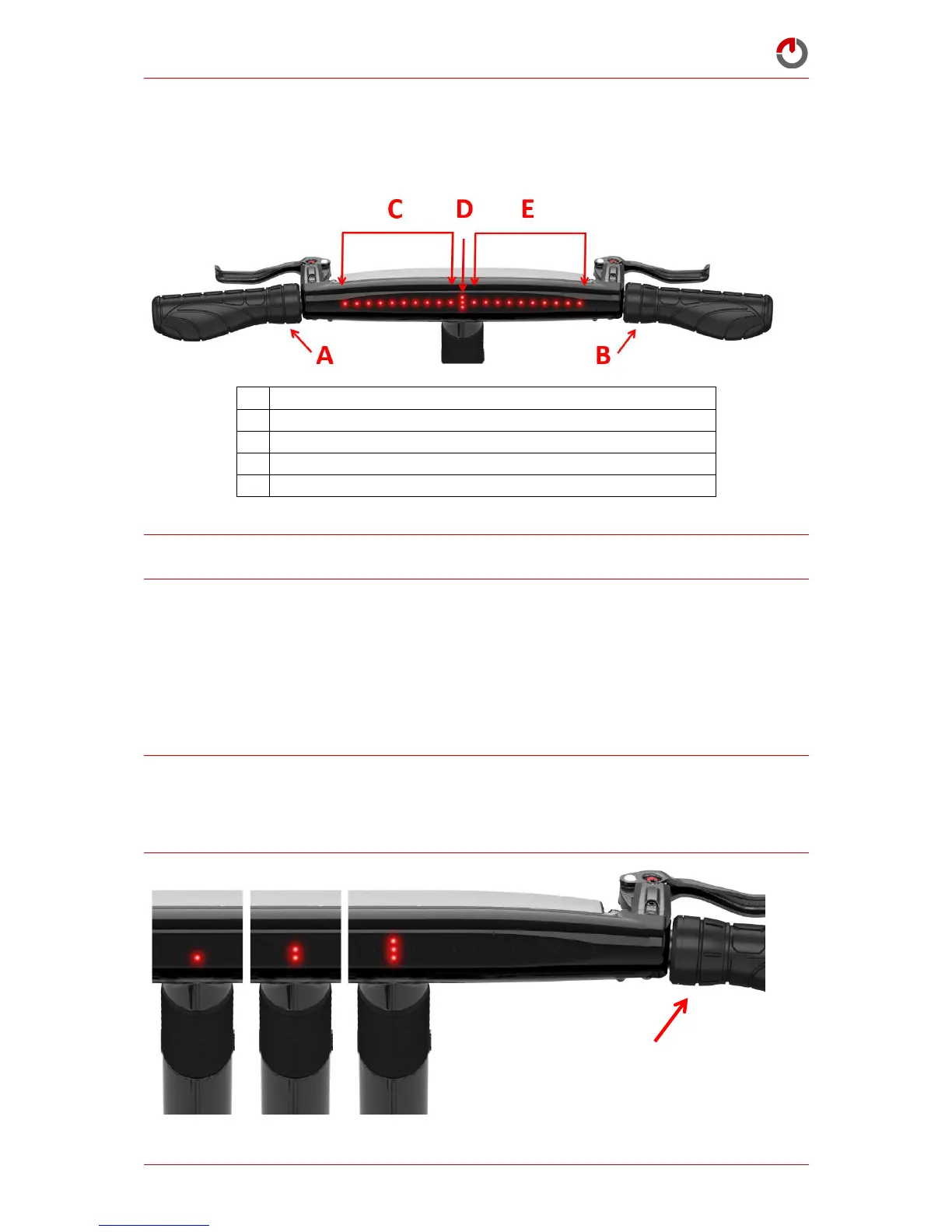
Familiarising Yourself with Gocycle Dashboard Display
NOTE: If the Gocycle is stationary (including when on charge) for more than one minute (60
seconds), the display screen saver will be shown. Press either button to view the charge state.
6.2
Understanding Electronic Gear Shifting
Your Gocycle is equipped with electronic shifting. Whilst riding, rotate the right-hand selector
B “wrist down” to shift up a gear. Your Gocycle includes a predictive downshift feature.
When slowing down, your Gocycle will automatically downshift from 3rd gear to 2nd
gear (at 7 LEDs) and from 2nd gear to 1st gear (at 3 LEDs). It is possible to override the
automatic downshift by rotating the right-hand selector B “wrist up” to shift to a lower gear.
WARNING! Electronic shifting can appear to be sensitive compared to traditional mechanical shifting.
Familiarise yourself with upshifting and downshifting before riding on busy roads or in traffic.
Take extra care when wearing gloves. Gloves will reduce the sensitivity of your fingers and thumbs
and may cause an unwanted gear selection.



 To Next Page