NETWORK SETUP
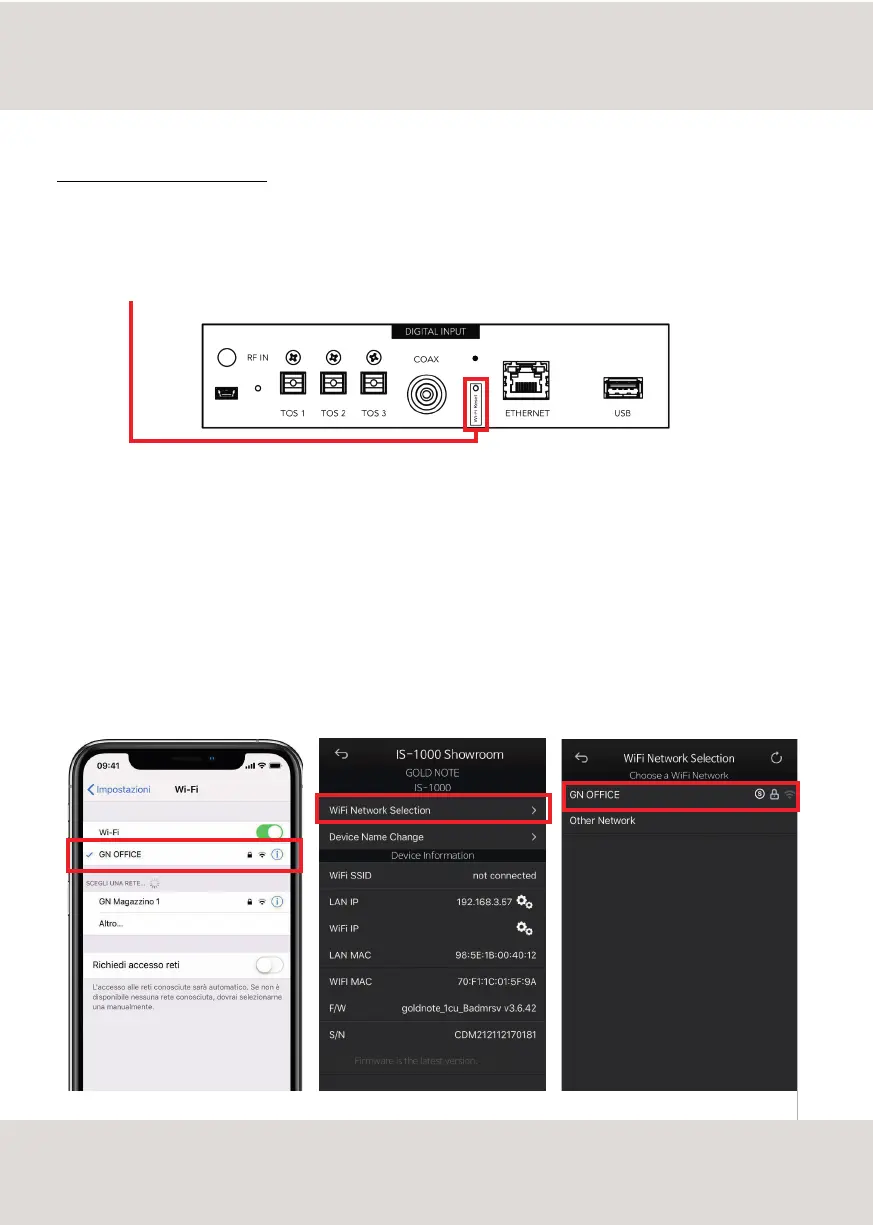
[in App screen][in App screen][mobile device screen]
LED
2 - turn ON the Wi-Fi on your mobile device and scan the networks to find GOLD-NOTE_XXX
3 - connect to GOLD-NOTE_XXX using "password" as password
4 - open the App and go into DEVICE SETUP > Wi-Fi Network Selection (see page 11)
5 - here are listed the wireless connections available, select the one you want to use with IS-1000
6 - IS-1000 is now connected to the selected Wi-Fi network
7 - connect your mobile device to the same network used by IS-1000
IS-1000 WIFI WIZARD MODE
In case your router doesn't support the WPS function or you can't access it, use the Wi-Fi Wizard Mode:
1 - to press and hold for 5 seconds the Wi-Fi Reset button on the rear panel of IS-1000 and release it when the blue
led start flashing - IS-1000 will create its own wireless network
16



 To Next Page