14
ART MONITOR7/G2+
Settings menu
SOU S5110/ART 7 VIDE ENTL O DOOR RY SYSTEM KIT
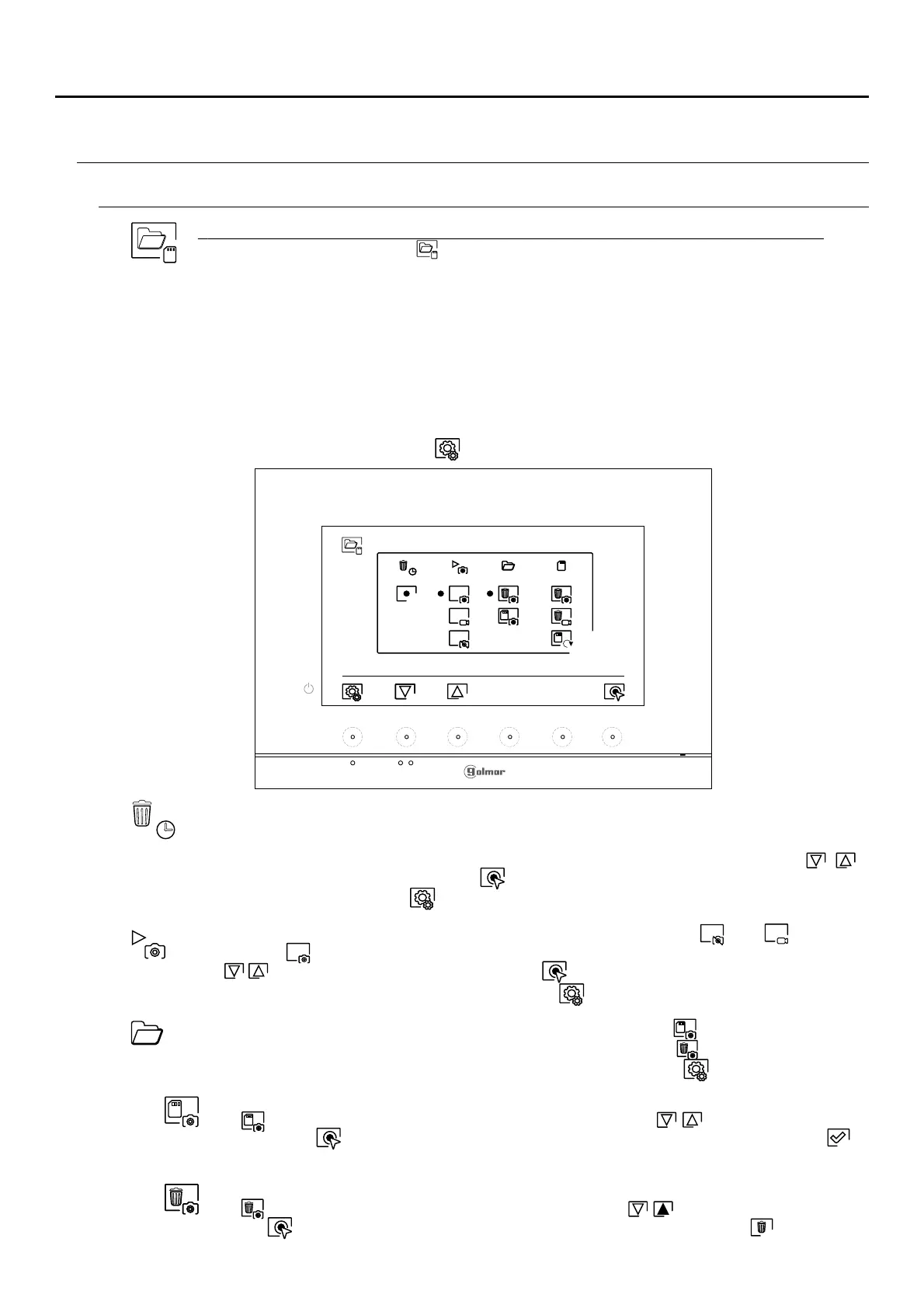
Automatically deleting images/videos, image recording mode, internal memory and Micro SD card: Press
the hidden button below icon to access the settings screen. In some countries, the law does not
permit the storage of images or videos for more than 30 days after recording. The automatic deletion
function performs this task for you. You can disable this function if your country's legislation does not
require it, or under your responsibility.
If you have not inserted a Micro SD card into your monitor, only still images can be recorded in the
internal memory of the monitor (up to 100). If you have inserted one, the images and videos will
always be recorded on the card, and the images in the internal memory cannot be displayed until
you copy them to the card.
Press the hidden button below icon to return to the settings menu.
From this menu, you can select the image recording mode, delete contents, copy from the internal
memory to the Micro SD card and format the card. Any of these actions (copy/delete) will require
confirmation.
In some countries, the law does not permit the storage of images or videos for more than 30 days after
recording. The automatic deletion function performs this task for you. You can disable this function if
your country's legislation does not require it, or under your responsibility. To disable this function, go
to the option to be modified by pressing the hidden buttons below corresponding icons / ,
then press the hidden button below icon to enable/disable the automatic deletion function. Press
the hidden button below icon to return to the settings menu.
If you have inserted a Micro SD card into the monitor, you can copy previously recorded still
images on the monitor to the new Micro SD card and then delete the still images from the
internal memory of the monitor. Press the hidden button below icon to return to the settings
menu.
To copy the still images recorded on the monitor to the Micro SD card, go to the option with icon
by pressing the hidden buttons below corresponding icons / . Press the hidden button
below icon to access the card format menu, then press the hidden button below icon to
perform this function.
To delete the still images recorded in the internal memory of the monitor, go to the option with icon
by pressing the hidden buttons below corresponding icons / . Press the hidden button below
icon to access the card format menu, then press the hidden button below icon to perform this
function.
Continúa
To select the image recording mode during the reception of a call: still image video and without
recording , go to the desired option by pressing the hidden buttons below corresponding icons
/ , then press the hidden button below icon to select the recording mode. To return to the
settings menu, press the hidden button below icon .










 To Next Page