Tuning a station
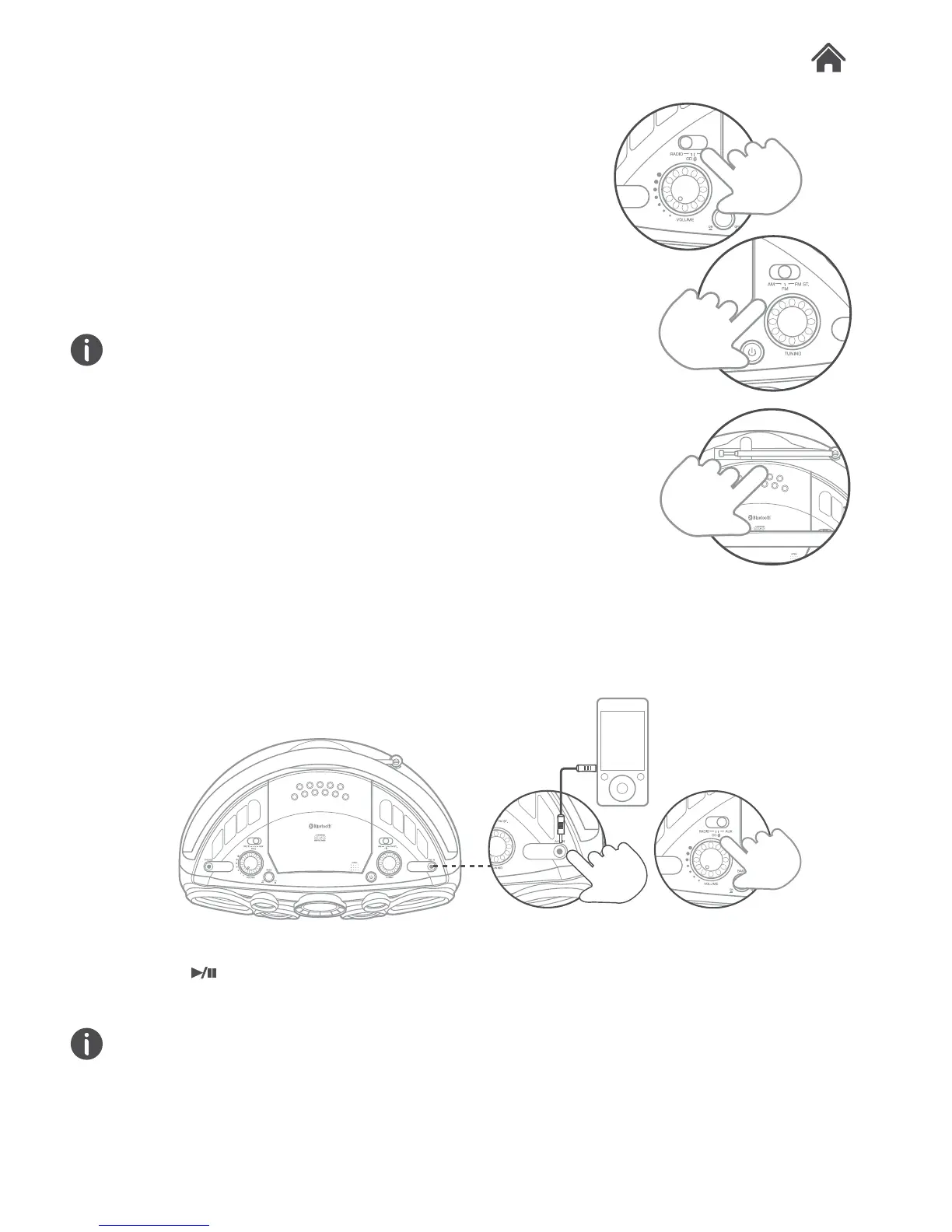
1. Slide the FUNCTION (F) switch to the RADIO position.
2. Set the required band with the BAND selection switch (J).
To listen to an FM station in stereo set the FUNCTION
switch to FM ST.
3. Tune the station by rotating the TUNING control (L).
4. The built-in AM antenna and external FM telescopic antenna
are directional.
When receiving an FM broadcast, fully extend the telescopic
antenna and angle it for the best reception.
For AM broadcasts, vary the position of the unit until the best
reception is located.
5. Adjust the volume to a comfortable listening level using the
VOLUME control (E).
Aux In Mode
It is possible to connect an external audio source like an MP3
player using a 3.5mm audio cable (not supplied).
1. Connect one end of the cable to the MP3 player headphone
output and the other end to the AUX input (M) on the right
hand side of the unit.
1. Slide the FUNCTION (F) switch to the AUX position.
2. Press
on the external audio source EG:-MP3 player.
The volume output is affected by the volume level on the
source EG: MP3 player so make sure that is set to about
70-80% ( not too loud to avoid distortion ).
3. Adjust the VOLUME control (E) on the unit to the required
listening level.
Radio Operation
4.6
4.7
AUX
AC~


 To Next Page