Quick Setup3
Power On/Off and Function Selection
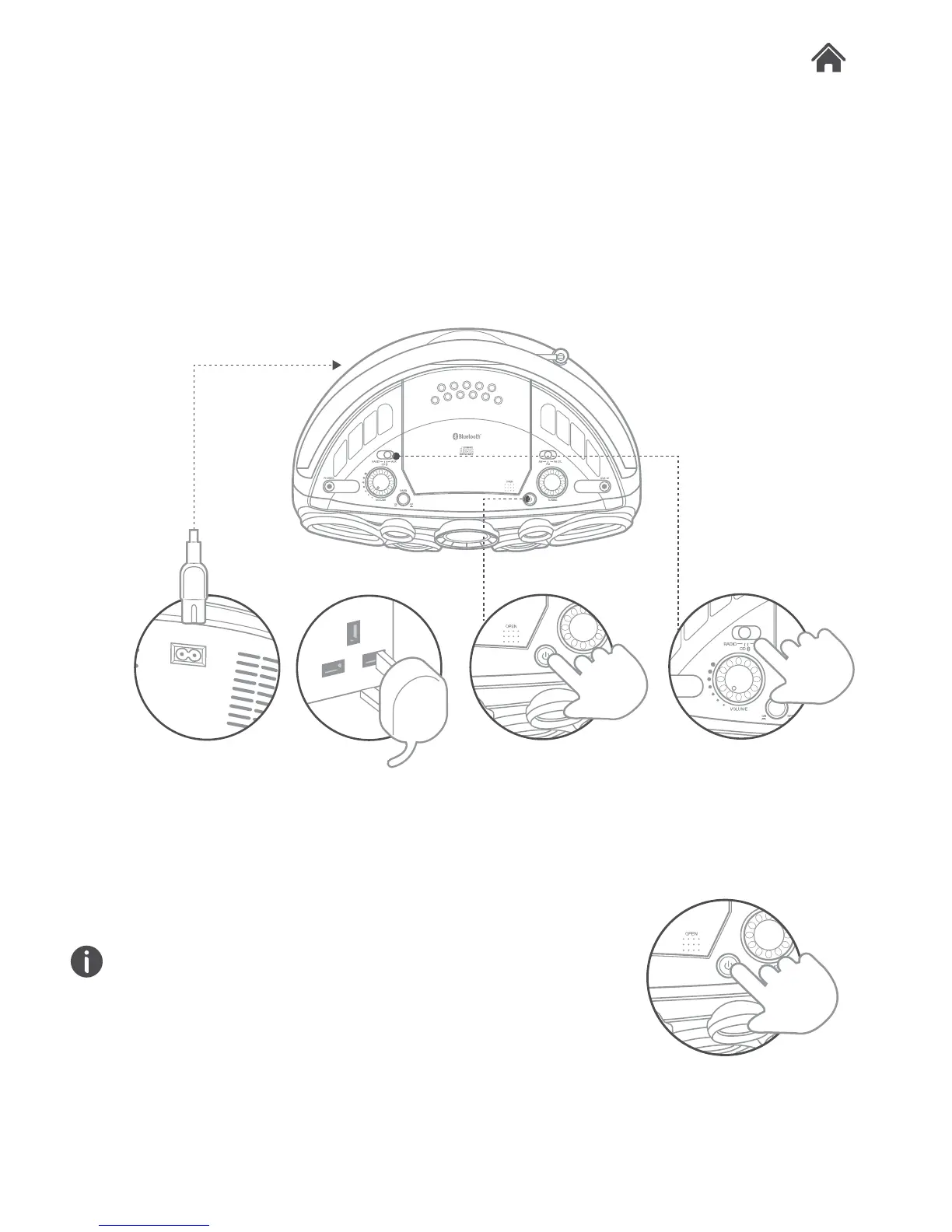
1. This CD Boombox is supplied with a mains cable.
To connect the power insert the figure 8 shaped end in the
rear of the unit (N).
2. Insert the UK plug into a household power socket, and
switch the power on.
3. Press the STANDBY button (I) to wake from Standby mode
4. Set the FUNCTION switch (F) to either RADIO /CD /Bluetooth
or AUX.
Standby & Auto Standby
1. Press the STANDBY button (I) to wake from Standby mode.
2. Press the STANDBY button (I) again to enter Standby mode.
Due to new ECO regulation requirements this product
incorporates a power saving feature.
3. When in CD, Bluetooth or AUX mode, once audio playback
has ceased and the unit has stood idle for approximately 15
minutes, it will switch into a ‘power-down’ power saving
mode.
4. To wake the unit up, press the STANDBY button (I).
3.1
3.2


 To Next Page