Front View2.2
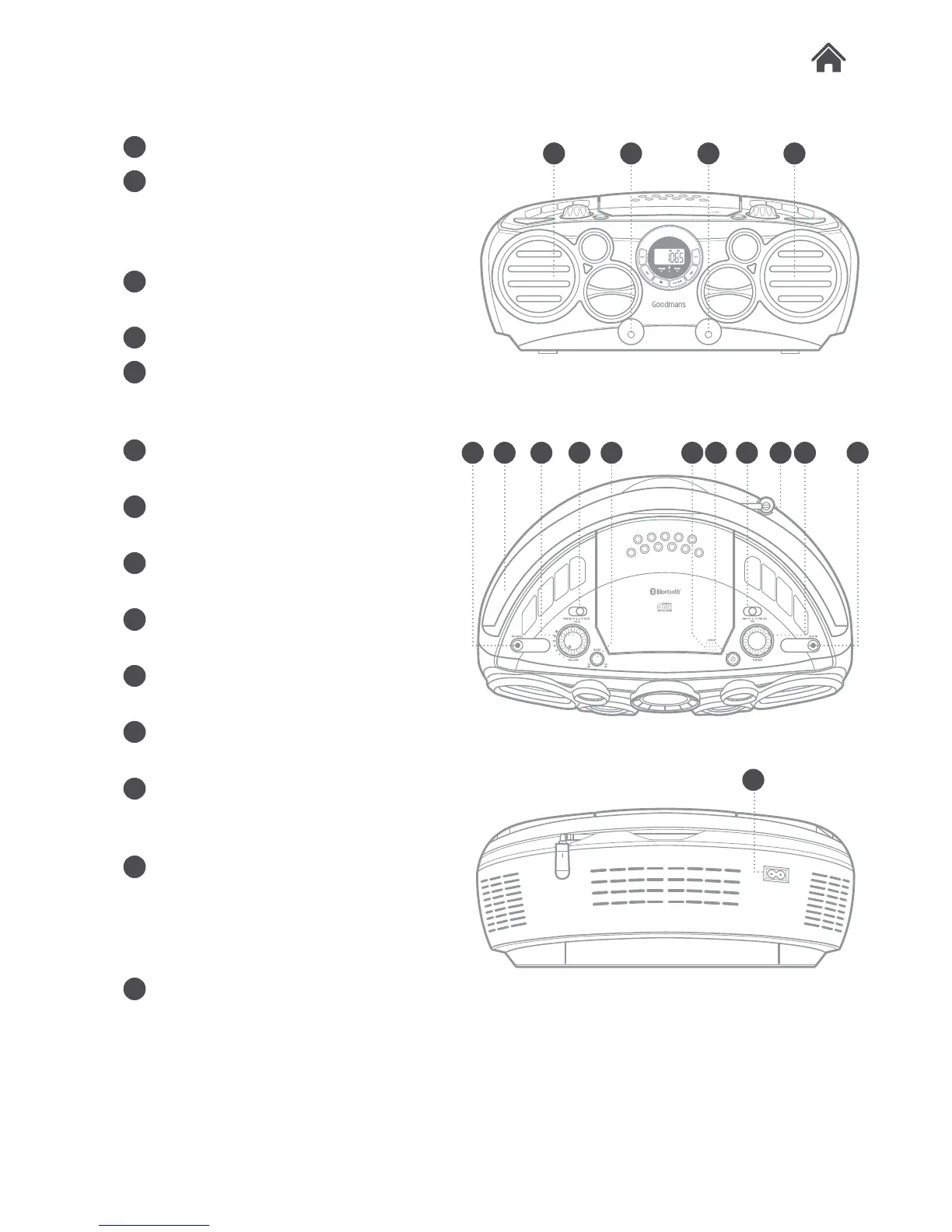
A SPEAKERS. Stereo speakers.
B BASS PORTS. Bass pressure
release ports.
C PHONES output. Connect
earphones to this socket.
D Carry handle.
E VOLUME control. Rotate to
increase or decrease the volume
output.
F FUNCTION switch. Enable RADIO /
CD /Bluetooth or AUX functions.
G BASS button. Press to enhance the
bass output.
H CD compartment. Press ‘OPEN’ to
release the CD compartment lid.
I STANDBY button. Press to wake or
enter STANDBY mode.
J RADIO BAND switch. Set the radio
band from AM, FM or FM STEREO.
K Telescopic antenna. Extend for the
best radio reception.
L RADIO TUNING control. Rotate to
scan up or down the selected band
frequencies.
M AUX INPUT socket. Connect
external audio sources with a 3.5mm
audio cable.
N AC mains input socket. Connect
the mains cable to this socket.
A B B A
AC IN ~
ANT.
N
C E FD HG I J LK M
Top View
Rear View
2.3
2.4


 To Next Page