10 11
WARNING: Use caution when using your GoPro as part of
your active lifestyle. Always be aware of your surroundings to
avoid injury to yourself and others.
Abide by all local laws when using your GoPro and related
mounts and accessories, including all privacy laws, which may
restrict recording in certain areas.
CHARGING THE BATTERY
For the best experience with your new camera, we recommend fully
charging the battery before rst use.
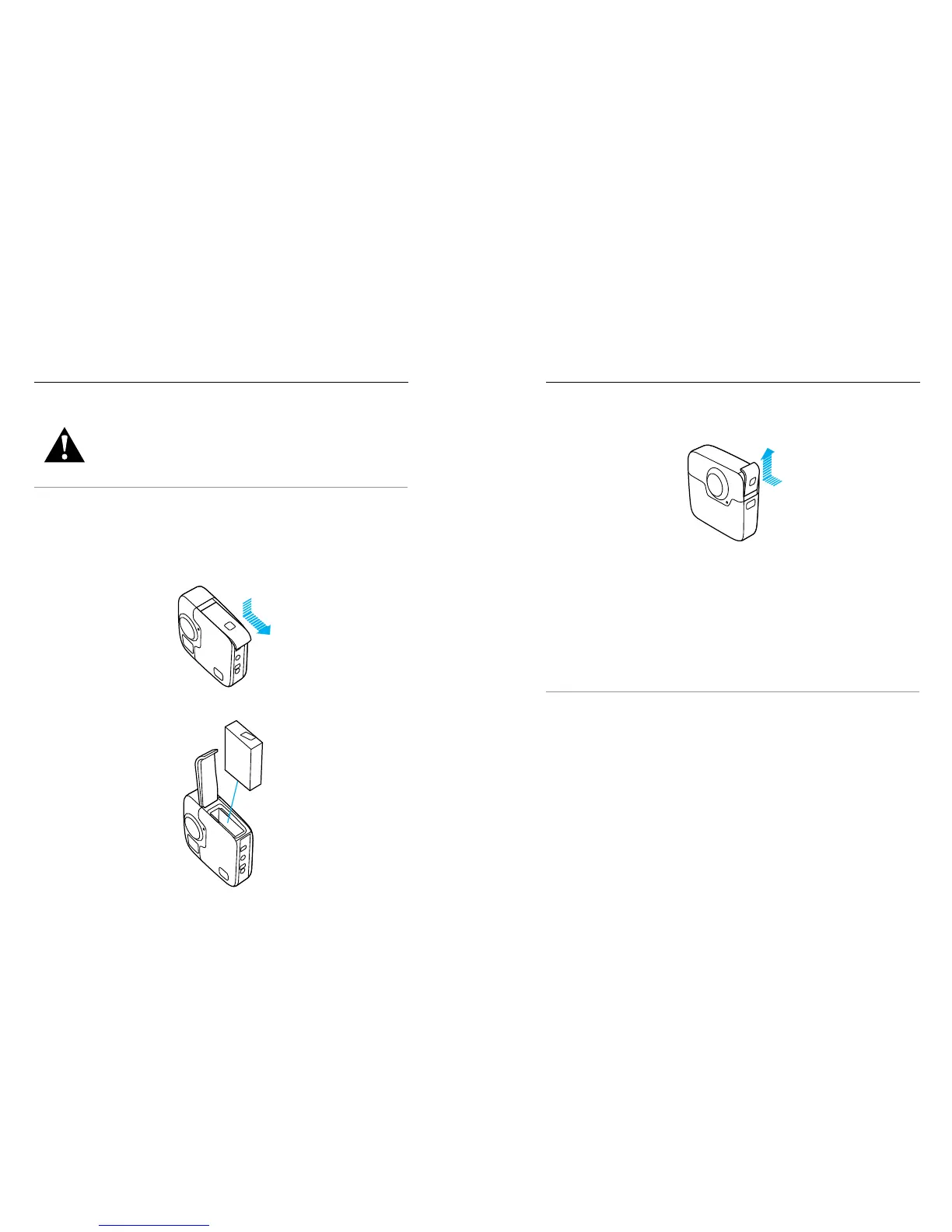
1. Hold down the Latch Release button on the battery door, then slide
the door open.
2. Insert the battery, then close the door.
GETTING STARTED
3. Hold down the Latch Release button on the side door, then slide the
door open.
4. Connect the camera to Supercharger or another wall charger
(both sold separately) using the included USB-C cable.
The camera status light on the front of the camera turns on during
charging and turns o when charging is complete.
For wall chargers, the battery charges to 100% in about 3.5 hours.
Supercharger charges the battery in about 2 hours. For more information,
see Battery Information (page 68).
PRO TIP: For fastest charging, use GoPro’s Supercharger (sold
separately) and its included cable. You can also charge your camera with
a USB-compatible wall charger or auto charger.
GETTING STARTED













 To Next Page