19
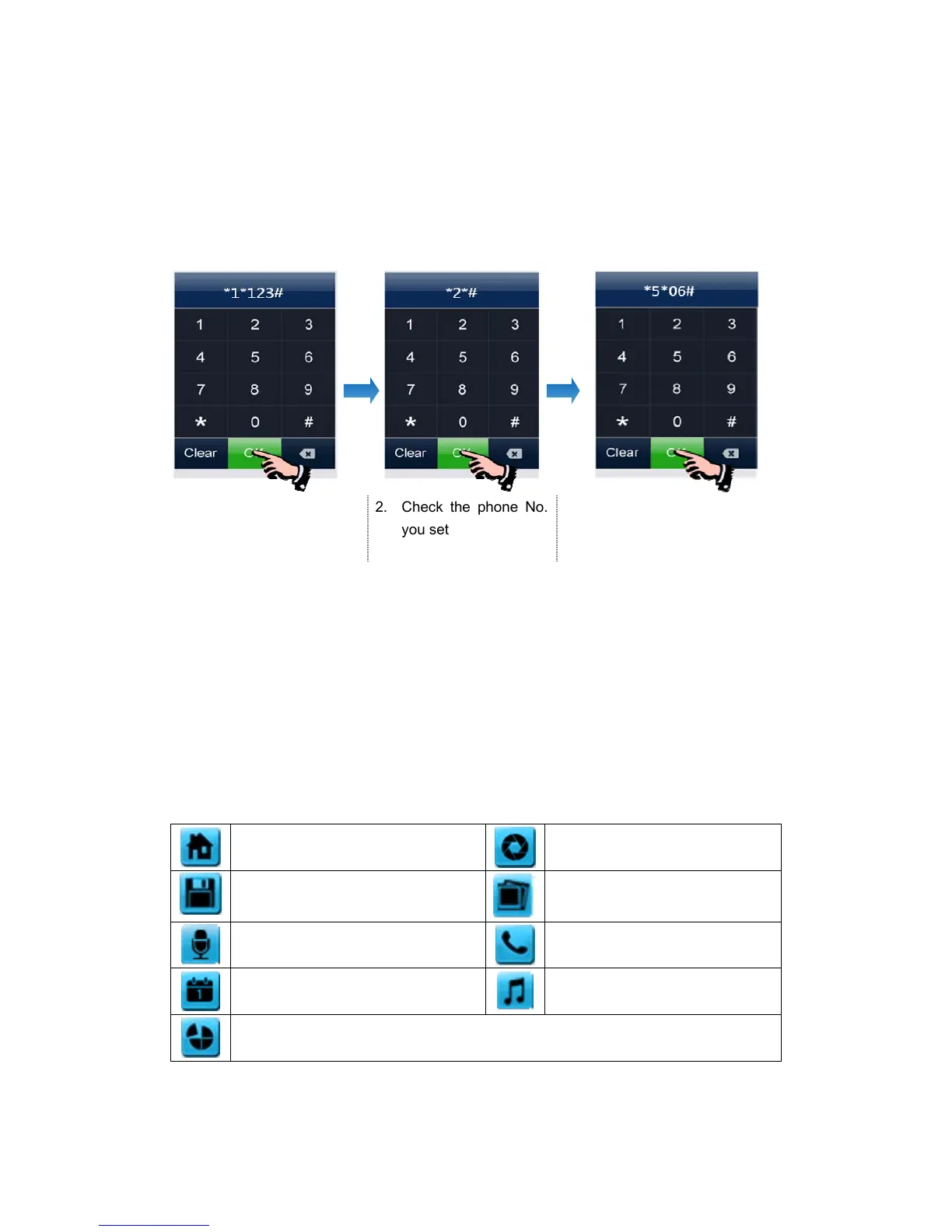
4. Set ring time before call forwarding,
*5* Æ Ring Time Æ # Æ OK
Remark: The ring time range = [1s ~ 30s], and you must input 2 figures.
For example:
1. Set "
123" as forwarding
phone number
2. Check the phone No.
you set
3. Set the waiting time: "0
6s"
6.6.2. Control the Door Station by Telephone
When no one answers the call from door station, the call will be transferred to your
telephone. During the talk, input 2 + ‘#’ to open the door.
6.7 Setting page
Press [Setting] icon to set up the system.
Icon Definition:
return to [Main Screen]
enter [Camera] setting page
enter [Monitor Record] setting page
enter [Photo Frame] setting page
enter [Voicemail] setting page
enter [Intercom] setting page
enter [General] setting page
enter [Melody] setting page
restore factory setting
Remarks: The [Photo Frame] setting is not available in this version.



 To Next Page