Model G7943/G7944 (Mfd. Since 09/17)
-31-
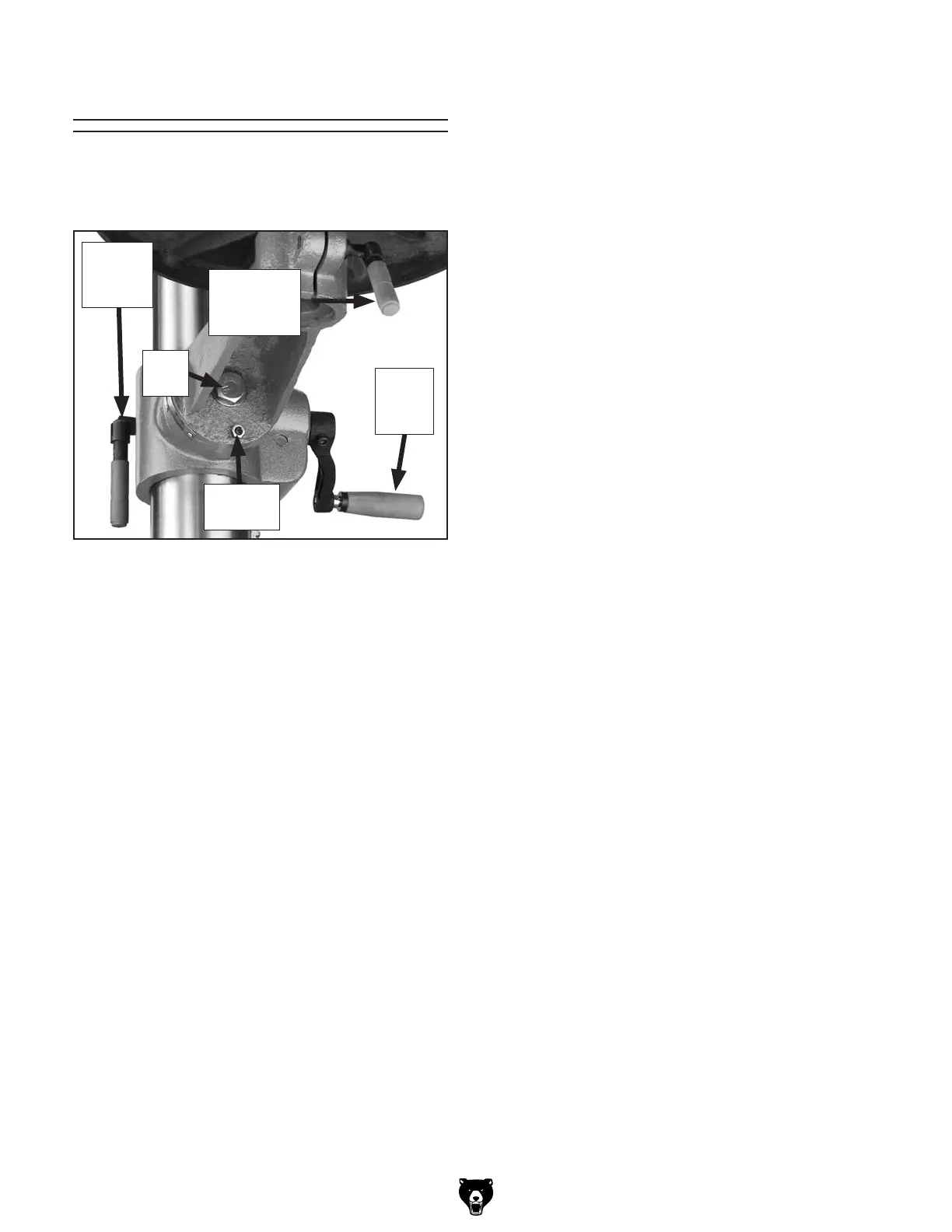
The table can raised/lowered, rotated, and tilted
90° left or right. Table adjustment controls are
shown in Figure 32.
Positioning Table
Table Height
1. Loosen the column lock lever.
2. Adjust the height.
3. Tighten the column lock lever.
Table Rotation
1. Loosen the table rotation lock lever.
2. Rotate the table as necessary.
3. Tighten the table rotation lock lever.
Table Tilt
1. Tighten the location pin nut to draw the loca-
tion pin out of the hole.
Note: The location pin is friction fit in the hole
to lock the table at 0°. When reinstalling, set
the table to 0°, back the nut off, and tap the
pin back in the hole.
2. Loosen the lock bolt and tilt the table to the
desired angle (make sure the small lock lever
is locked, so the table won't fall out).
3. Tighten the lock bolt.
Figure 32. Table adjustment controls.
Location
Pin Nut
Lock
Bolt
Table
Height
Crank
Table
Rotation
Lock Lever
Column
Lock
Lever


 To Next Page