Model 613-VS2-LES, Log End Slicer Operation
R-1176866 613-VS2-LES_CJL20160114.doc:1/15/2016 4:21 PM Grote Company 33
Main Screen
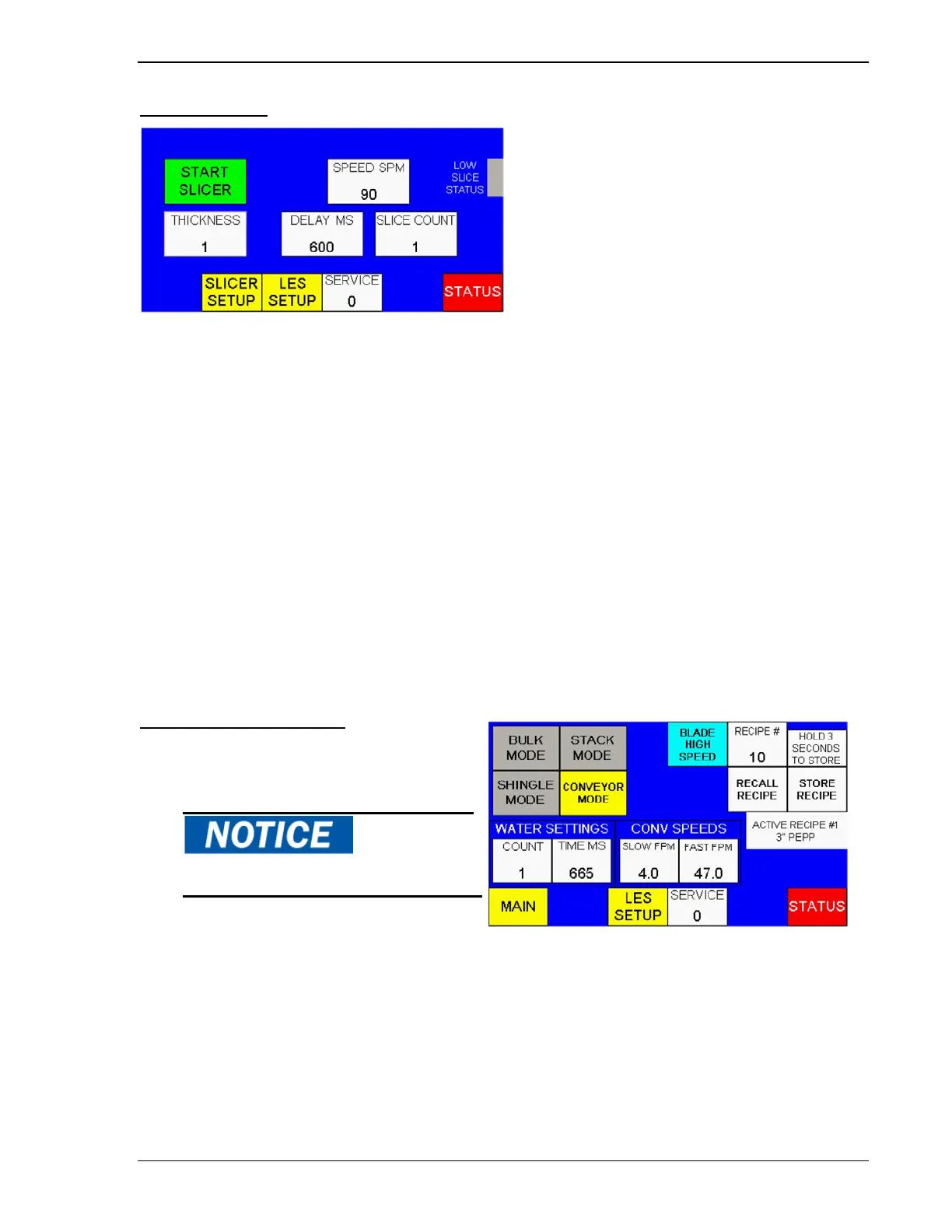
Figure 28. HMI, Main Screen
The Main Screen displays the Start/Stop, Slice Speed, Slice Delay, and Slice Count and Buttons.
START/STOP SLICER - Touch this button to start or stop the slicer.
SPEED (SPM) – This parameter sets the stroke speed in strokes per minute. The range is 37-90.
SLICE COUNT – In Stack or Shingle Mode, this parameter sets the number of slices in a stack or
shingle. The range is 1-99.
DELAY – In Stack or Shingle Mode, this parameter sets the delay in milliseconds from the completion of
a stack or shingle to the beginning of the next. The conveyor runs at fast speed for the Delay period and
slow speed while slicing. The range is 0-999 milliseconds.
SLICER SETUP – Switches to the Slicer Setup screen
LES SETUP – Switches to the LES Setup screen
SERVICE – Switches to the service screen. A password is required to access this screen
STATUS – Switches to the Status screen
THICKNESS (OPTIONAL) – Indicates the slice thickness which is manually set on the machine. Refer to
the Setup section.
Slicer Setup Screen
The Setup Screen displays the mode buttons,
water and conveyor settings.
BULK MODE – Touch to run the slicer in Bulk
Mode. In this mode, the slicer slices
continuously onto the conveyor. The conveyor
runs continuously. Conveyor speed is adjustable
independent of slicer speed.
STACK MODE – Touch to run the slicer in Stack Mode. In this mode, the machine indexes the conveyor
at fast speed for the time specified in DELAY, then stops the conveyor. The machine slices as many
slices in a stack as specified in the SLICE COUNT, then the sequence repeats.
SHINGLE MODE - Touch to run the slicer in Shingle Mode. In this mode, the machine indexes the
conveyor at fast speed for the time specified in DELAY, then indexes the conveyor at slow speed while it
slices as many slices in a shingle as specified in the SLICE COUNT parameter. The sequence repeats.
Stop the slicer before switching modes.
Figure 29. Slicer Setup Screen



 To Next Page