EasyManua.ls Logo

Growatt SPF 3000T HVM-G2 - User Manual

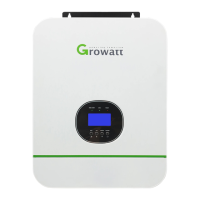
Growatt SPF 3000T HVM-G2
29 pages
Print Icon
To Next Page IconTo Next Page
Loading...
Off Grid Solar Inverter
SPF 3000T HVM-G2
Version: 1.0
User Manual

Questions and Answers

  • T
    Todd BakerAug 7, 2025
    Why my Growatt SPF 3000T HVM-G2 Inverter has no response after power on?
    • A
      Andrew CarlsonAug 7, 2025
      If your Growatt Inverter shows no response after powering on, it might be due to: * The battery voltage being far too low: Check the battery and wiring connections, recharge the battery, or replace the battery. * Reversed battery polarity: Check the battery and wiring connections, recharge the battery, or replace the battery.
  • Z
    Zachary HaneyAug 18, 2025
    How to fix Growatt SPF 3000T HVM-G2 that shuts down during startup?
    • A
      Amanda RodriguezAug 18, 2025
      If your Growatt Inverter unit shuts down automatically during startup, it's likely because the battery voltage is too low (less than 1.91V/Cell). To resolve this, try to recharge the battery or replace it.
  • G
    gabriel35Oct 28, 2025
    What to do if my Growatt Inverter buzzer beeps and the red LED is on?
    • J
      julia50Oct 29, 2025
      If the Growatt Inverter's buzzer beeps continuously and the red LED is on, it could be due to several reasons: * A fan fault: Replace the fan. * The internal temperature of components exceeding 90°C: Ensure the unit's airflow isn't blocked and the ambient temperature isn't too high. * Output short circuit: Check the wiring and remove any abnormal load. * Overload error: Reduce the connected load by switching off some equipment. * BMS communication failure: Check the BMS communication wire connection and transceiver signal. * Over current or surge: Restart the unit. If the issue persists, the unit may need to be returned to a repair center. Other causes may include battery issues like over-charging, voltage too high or low, or abnormal output voltage. Some of these issues may ...

Summary

Information on this Manual

Validity of Manual

Specifies the manual's validity for specific devices.

Manual Scope and Coverage

Defines the manual's coverage: assembly, installation, operation, troubleshooting.

Target User Groups and Skills

Identifies intended users and required skills for installation and operation.

Important Safety Precautions

Provides crucial safety and operating instructions for user reference.

Introduction

Key Product Features

Lists key features of the off-grid solar inverter.

Product Overview

Inverter Component Identification

Identifies key components of the inverter via a labeled diagram.

Installation

Unit Unpacking and Inspection

Details the process of inspecting the unit after unpacking for damage.

Wiring Preparation Steps

Describes how to prepare the unit for wiring by removing the bottom cover.

Unit Mounting Guidelines

Provides guidelines and safety precautions for physically installing the inverter.

Battery Connection

Lead-Acid Battery Connection Procedure

Details the procedure for connecting lead-acid batteries to the inverter.

Lithium Battery Connection Procedure

Details the procedure for connecting lithium batteries to the inverter.

Lithium Battery Communication and Settings

Explains how to set up communication between lithium batteries and the inverter.

LCD Setting

Battery Type and Communication Protocol Configuration

Configures battery type and communication protocols for BMS.

AC Input Voltage Range Settings

Sets acceptable AC input voltage ranges for Appliance and UPS modes.

AC Input;Output Connection

AC Cable Requirements and Connection

Details cable specifications and steps for connecting AC input and output.

PV Connection

PV Module Selection and Connection

Guides on selecting PV modules and connecting them to the inverter.

Final Installation Assembly

Instructions for completing the installation after wiring.

Communication Connection

Inverter to PC Communication Setup

Explains how to connect the inverter to a PC for monitoring software.

Dry Contact Signal

Dry Contact Signal Conditions

Details the conditions under which the dry contact signal is delivered.

Battery Charger

Battery Charger Operation Stages

Explains the three stages of battery charging: Bulk, Absorption, and Float.

Battery Equalization

Applying Battery Equalization Function

Describes methods to enable and apply the battery equalization feature.

Conditions for Battery Equalization

Specifies the conditions and timing for initiating battery equalization.

Equalization Charging Time and Timeout

Details the duration and timeout settings for the equalization charging process.

Operation

Inverter Power ON;OFF

Explains how to turn the inverter on and off using the switch.

Operation Panel and Display Overview

Describes the front panel indicators, buttons, and LCD display functions.

LCD Display Icons

LCD Display Icon Meanings

Explains the meaning of various icons representing AC, PV, Load, Battery, and other information.

LCD Setting

Output Source and Input Voltage Settings

Configures output source priority and AC input voltage ranges.

Battery Type and Operational Parameters

Sets battery type, auto-restart, output voltage/frequency, and charging current.

Voltage Points, Charger Priority, and Alarm Settings

Adjusts voltage points, charger source priority, and alarm controls.

Advanced Battery and Communication Configuration

Configures DC cut-off, RS485 address, and battery equalization parameters.

Display Information

LCD Data Navigation and Interpretation

Explains how to switch between display screens and interpret the information shown.

Operating Mode Description

Inverter Operating Modes Description

Details the Standby, Line, and Battery modes and their LCD representations.

Fault Code

Fault Codes and Events

Lists all fault codes, their descriptions, and associated icons.

Warning Code

Warning Codes and Event Notifications

Details warning codes, their events, audible alarms, and icon behavior.

Troubleshooting

Troubleshooting Common Issues

Provides solutions for common issues like unit shutdown, no response, and buzzer alarms.

Specifications

Line Mode Specifications

Lists input voltage, frequency, efficiency, and transfer time details for line mode.

Inverter Mode Specifications

Details rated power, voltage, frequency, overload protection, and DC input parameters.

Charge Mode and General Specifications

Covers utility and MPPT charging specifications and general operational parameters.

Growatt SPF 3000T HVM-G2 Specifications

General IconGeneral
ModelSPF 3000T HVM-G2
CategoryInverter
Rated Power3000W
Input Voltage230V AC
Output Voltage230V AC
Frequency50Hz/60Hz
Efficiency93%
Max. PV Array Power4000W
Max. Charging Current80A
Max Solar Input Voltage145V
Max Solar Input Power4000W
CommunicationRS232/USB
Operating Temperature-10°C to 50°C
Dimensions330 x 485 x 135 mm
Weight12 kg
ProtectionOverload, Short circuit, Over temperature

Related product manuals