STRUCTURE AND FUNCTION COBOSAFE-CBSF
16
CoboSafe-CBSF325-2810-012US15
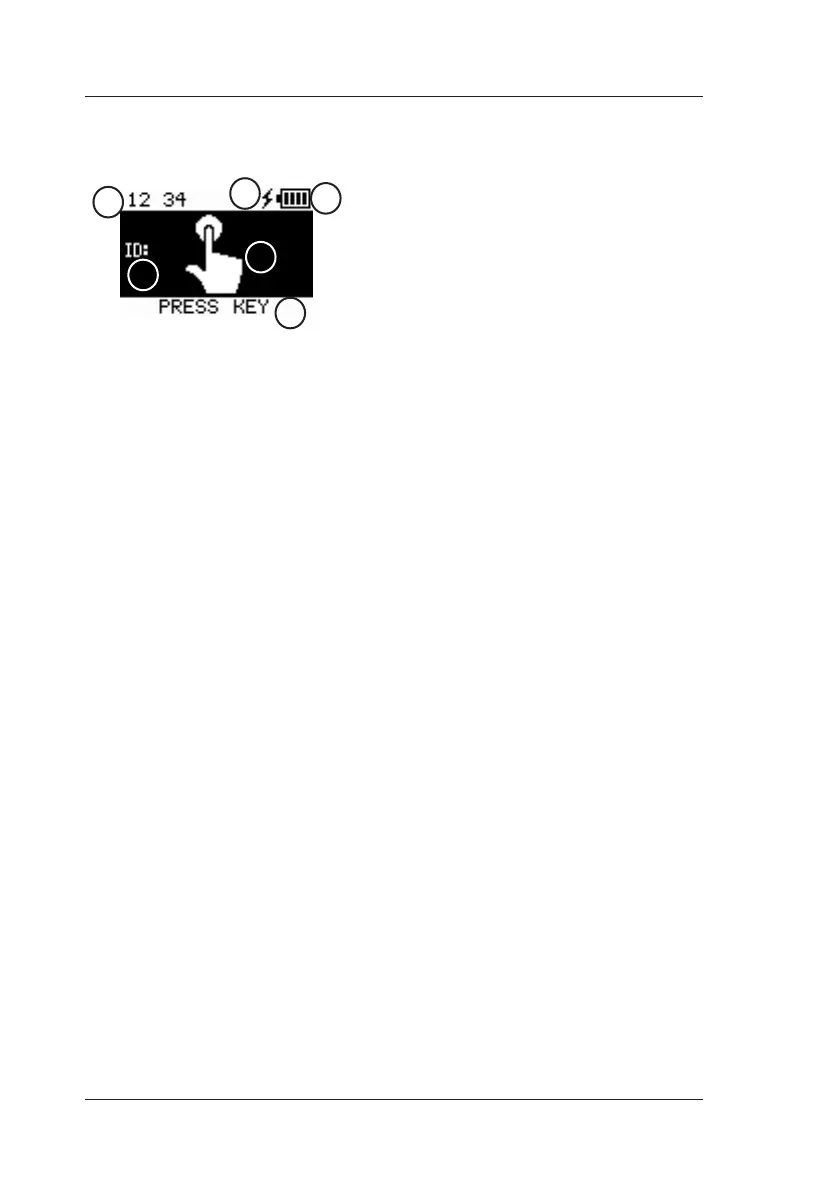
7.2 Display
■ Charge level [1]
■ Charging display [2]
■ Time [3]
■ Measurement number [4]
■ Measured value display [5]
■ Command line [6]
7.3 Menu Navigation
CBSF is operated by pressing the button on the back of the device briefly or for a longer time.
■ Short keypress: Switch between menus and submenus
■ Long keypress: Open menu; confirm selection; exit menu.
Switch on:
■ Long keypress: CoboSafe-CBSF starts up when the pushbutton is released.
Operating mode:
When switched on, the CoboSafe-CBSF is immediately ready for measurement (REC). After the
measurement has been completed, the results are displayed.
■ Short keypress: Activate next measurement (in 'manual' mode).
■ Long keypress: Menu opens in option 'Shutdown'.
■ Long keypress: Switch off CoboSafe-CBSF (Device switches off after 45 minutes auto-
matically)
Open menu:
■ Long keypress: Switch on CoboSafe-CBSF.
■ Long keypress: Menu opens in option 'Shutdown'.
■ Short keypress: Move to the next menu.
■ Long keypress: Switch to the submenu.
■ Short keypress: Switch between the options in the submenu.
■ Long keypress: Select the option and exit the submenu.
1
2
5
6
3
4
Fig. 8: Starting display


 To Next Page