35
CoboSafe-CBSF 325-2810-012US15
PERFORMING MEASUREMENT
2 ►
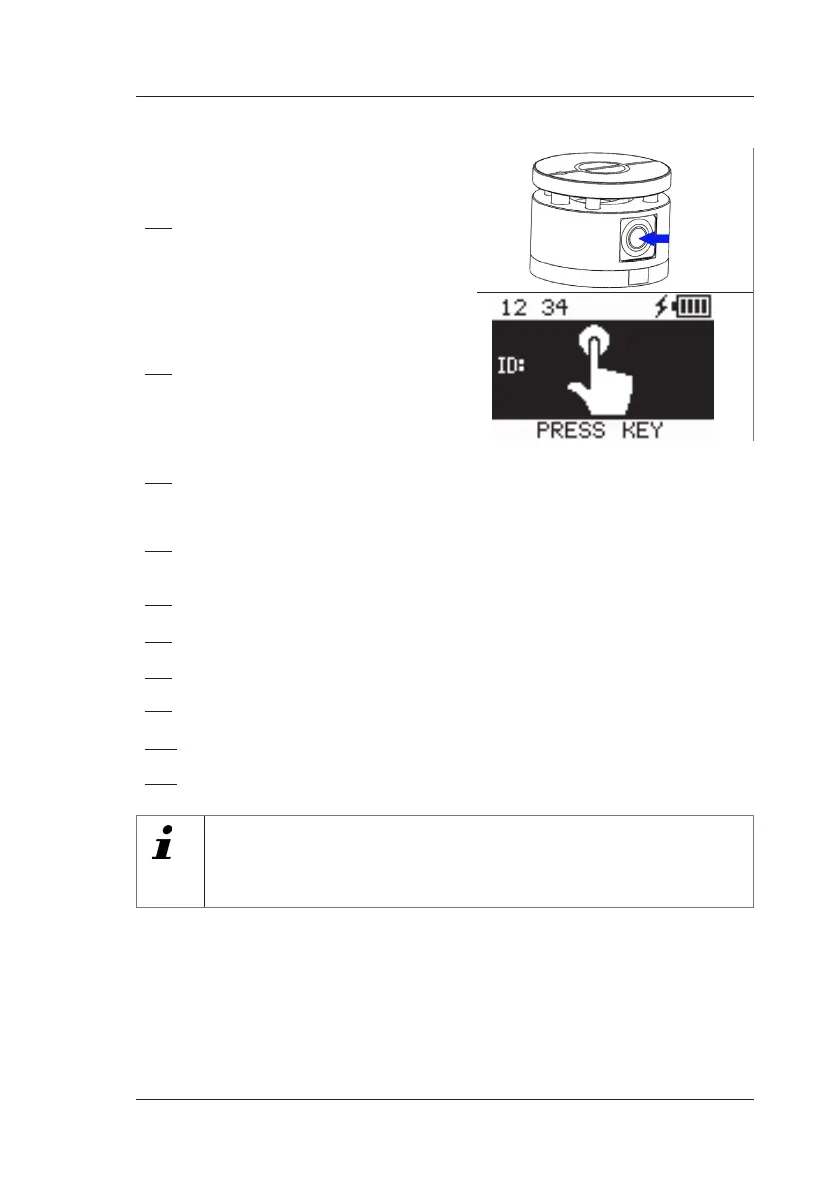
Switch on the force sensor by pressing
the pushbutton
Fig.23: Pushbutton
3 ►
Read and note the displayed measure-
ment number.
Fig.24: Measurement number
4 ►
Start robot movement.
The robot moves in the intended vector and collides centrally with the measuring
unit.
5 ►
Wait until the CoboSafe-CBSF displays a message on the display indicating that
the measurement has been performed.
The measurement data of the force measurement are stored in the internal memory.
6 ►
End the contact situation according to the instructions in the robot's manual.
7 ►
Remove and separate the measuring unit.
8 ►
Carefully remove the microfibre cloth
9 ►
Carefully loosen fixing aids such as adhesive tape
10 ►
Carefully remove the pressure measuring film.
11 ►
Remove the K1 damping element and stow it in the transport case.
When using the measuring system CoboSafe-Scan: Scan lms promptly!
The film “C” of the pressure measuring system CoboSafe-Scan is reddish in the
area of the contact. Film “C” must now be scanned promptly to quantify the mea-
surement data. Please read the operating manual of CoboSafe-Scan.


 To Next Page